
In This Article
Follow BestForAndroid


🔰 TL;DR: Zawa’s AI logo maker turns a text description into multiple logo directions instantly, no design skills needed. The logo stays connected to all other brand assets (cards, posters, video), so nothing drifts visually. Best for early-stage brands that need something real to react to before every decision is made. Free to start, Pro unlocks everything after a 7-day trial.
The process of logo design usually starts with a name and an idea related to what the business is all about. However, at such an initial phase, the look of the logo, including the colors, the shape, and the feeling, is still an absolute mystery.
That gap alone can stall early-stage brands because they need something visual before they’ve made every decision. This often feels stressful as the company has to discover its own unique style.
This is often when people turn to an AI logo maker, not to quickly finish the job, but to create and arrive at a spot to see something tangible. Zawa’s AI logo maker is commonly used at this stage. It helps users to reach some kind of form for early ideas without forcing a final decision.
Why Zawa, you might ask? This AI-powered design tool approaches this from a different angle. Rather than asking you to pick from templates, it generates multiple logo directions from a plain-text description of the brand.
The results you get can then be used as starting points, not finals. And that framing is what matters. It shifts the task from ‘design something’ to ‘react to options,’ which is far more approachable for non-designers. It leaves room for adjustment, which matters more than speed in most cases.
The Logo Now Has to Exist Before the Brand Does

There was a time when logo creation followed a predictable route. Brief, draft, revision, final file. That process still exists, but it does not match how many brands operate now.
Websites launch before everything is settled. Social profiles go live early. Packaging comes later. The logo often needs to exist before the brand fully understands itself.
That is why tools like a free logo maker have become common. Zawa offers the same functionality, which allows people to explore ideas without pressure. The logo becomes something that evolves instead of something locked too early.
What Zawa Really Is

🎨 Zawa (formerly X-Design) is a browser and mobile-based AI design platform that uses logo creation as a starting point for a broader brand identity outcome. We here have a five-step process that covers prompt input, exploring generated directions, adjusting the brief, reviewing format variations, and exporting. What separates Zawa from basic logo generators is that the logo stays connected to other assets, including posters, cards, and video content, through a centralized brand system. Free to start; Zawa Pro unlocks unlimited access after a 7-day trial.
Zawa is often described as a premium logo generator. That summary misses the mark and fails to show how much the site can actually do. The logo works as a first step instead of being the only thing finished for a brand.
Once a logo exists, it stays connected to everything else. Layouts, posters, cards, and even video assets pull from the same visual base. The colors, fonts, and overall visual theme do not need to be reselected for each asset. This stops tiny errors from piling up over weeks or months because the site builds for the long term, not just one file.
Creating a Logo with Zawa: From a Text Description to a Full Logo
The logo process itself is simple; however, it does not have to feel rushed. Each step builds on the one before it, and nothing is locked in until you export.
1. Share the Basics

Type the brand name and a quick note about how the business works well, since the text stays very rough during this early stage. Information like industry, tone, and target audience is useful to include, but the description doesn’t need to be polished. Zawa also accepts a hand-drawn sketch as input if you have a rough visual idea rather than a text one.
The most common mistake here is overthinking the prompt. It is important to keep in mind that plain language works better here. Overworking this part usually leads to generic results.
2. Look at the First Set of Logos
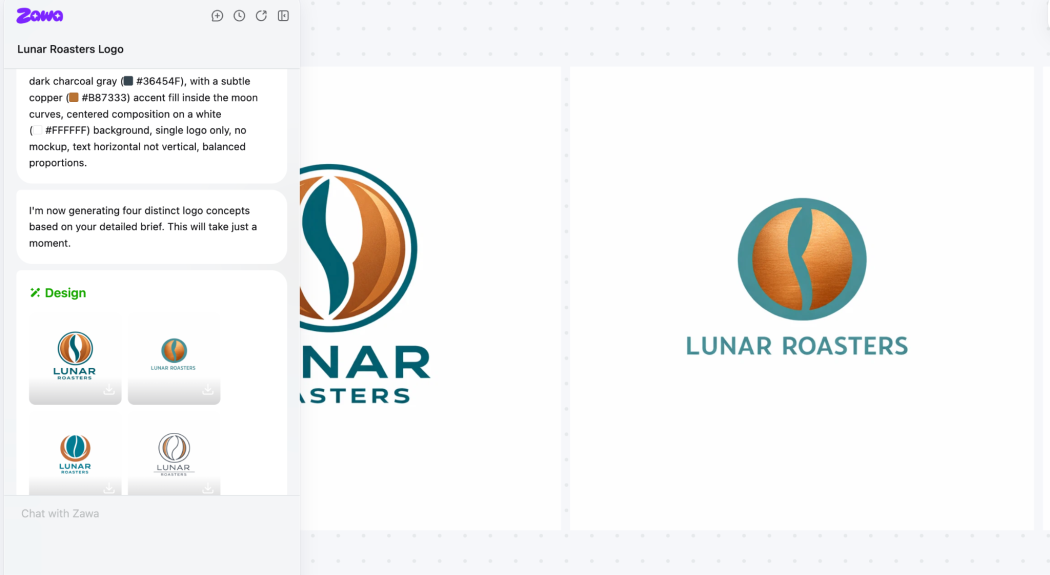
At this point, Zawa generates several logo options at once. They are intentionally different. Some focus on type, some follow specific typography, while others bring in different shapes or symbols. The platform offers you several industry-specific templates across tech, fashion, food, gaming, and retail.
The task here is not to choose a winner. It is about noticing patterns and reactions and finding what works for you and what doesn’t. You might want to narrow down the results by eliminating the visual elements that don’t match your brand’s personality.
3. Adjust Direction, Not Details

If something feels close but not right, we will recommend that you adjust the description, as small changes go a long way. For instance, editing the description slightly often shifts the entire look. You might want to switch “bold” for “clean”, or you might try adding “geometric” to the description.
Similarly, fonts and shapes can also be adjusted directly, without restarting from scratch. Elements like color, icon choices, and even layouts are freely editable at this stage. This is why the aim at this step is to reach a level where you have confirmation that the overall feeling is right.
When to adjust the prompt vs. the editor
If looking at the logo makes you think ‘wrong feel entirely’, then adjust the prompt. If it makes you think ‘almost right, just fix the font’, then use the editor. The difference is what saves time.
4. Review Logo Variations
Once a direction starts to make sense, Zawa prepares different versions automatically. Horizontal layouts, stacked formats, and simplified marks appear together. Reviewing these together will help make it easier to judge how the logo will behave outside a mockup and across various contexts.
This is the step where you can easily test and analyze how the logo reads at small sizes. A mark that looks strong at full size can become unreadable when resized to fit the dimensions of an icon. You will notice that the logo with simplified variations will perform better in these situations.
5. Use or Export the Logo

At this stage, the logo can be downloaded in multiple formats, including JPG and PNG, with a transparent background option. Or, alternatively, this logo can be even used directly inside other Zawa tools, including social templates, business cards, and posters. Nothing needs to be rebuilt.
Zawa also provides a wide range of image editing tools. If you want to enhance logo quality, you can use the Zawa image enhancer tool to increase the quality further, as well as to upscale the exported file.
Key Things to Know About Zawa

Here are a few things to know about Zawa before deciding if it fits your needs:
What the Logo Generator Does Well
Zawa does not overwhelm the process with features. Its strengths are practical.
- Multiple directions at once: It shows multiple directions instead of one answer
- Reversible changes: It keeps changing reversibly
- Format variations generated automatically: It prepares logo variations automatically, including stacked, horizontal, and simplified, without extra steps
- Browser and mobile: It works entirely in the web browser and across devices
These details matter more in practice than advanced controls.
Where It Has Limits
The final shot looks only as good as the prompt you write because thin details always result in flat art. Complex drawings or very dense styles often need extra work in separate apps to reach the right finish for a client later on.
This is not a replacement for custom illustration or a deep brand strategy. It works best as an early and middle-stage tool.
One Logo, Every Asset, No Drift
The real value of Zawa appears after the logo has been created and finalized. Posters, cards, and layouts pull directly from the same brand setup. Fonts and colors stay aligned across assets without extra effort.
This reduces the need to double-check every new asset. Designs feel related even when created weeks apart.
Zawa Creates Branded Video Without a Production Team
Zawa also includes basic video generation and editing. These tools are not meant for complex production. They are meant for short branded clips.
Logos can be placed into motion layouts easily. Posters can become the base for simple videos. The same colors and typography remain in use. For many small teams, this level of functionality is sufficient.
The Brands That Get the Most Out of This Tool
| Situation | How the Tool Helps |
| New brand setup | Turns early ideas into visible logo options quickly |
| Small business marketing | Keeps repeated designs consistent |
| Startup launches | Allows branding to evolve without restarting |
| Social media setup | Provides logo formats that scale cleanly |
| Print materials | Maintains spacing and clarity |
| Short promo videos | Keeps motion content aligned with brand visuals |
Built for Founders Who Can’t Afford to Stall

Zawa makes the most sense in situations where design work happens in between other tasks. A brand might be getting off the ground, running promotions, or updating visuals as things change.
Startups that need something to exist before the brand is fully settled, solo founders managing their own branding, and small teams that need consistent assets without a dedicated designer are the natural fit.
Wasting weeks on one logo never makes sense in these cases. You just need a strong base that is very easy to change much later on.
It also fits teams that expect their visuals to evolve. Early logos and layouts can be created quickly in one iteration. In the next phase, the design is reviewed once again to bring more clarity to the overall brand. This flexibility often matters more, since locking every detail in from the start is rarely practical.
Zawa is less suitable for businesses with highly specific visual requirements and looking for custom design work. Brands built around detailed illustration, tightly controlled systems, or long-established visual rules will likely want tools that offer deeper manual control.
For everything else, especially early or growing brands, the balance feels practical rather than restrictive.
Final Thoughts: A Working Space, Not a Final Answer

The Zawa AI logo generator works best when treated as a working space rather than a final answer. It helps ideas surface faster, then keeps those ideas connected as the brand grows. The tool does not decide for the user. It supports momentum. For many brands, that is exactly what is needed at the initial phase.


![Bring Your Spiciest Imagination to Life with SpicyGen Image to AI Video Generator [NSFW]](https://bestforandroid.com/wp-content/uploads/2026/01/SpicyGen-AI-Video-Generator-featured-image_selected.jpeg.webp)


