
In This Article
Follow BestForAndroid


Your product roadmap looks promising, and your team feels ready to take on new challenges. Your CTO decides to build a custom text editor because “how hard can it be?”
Six months later, two senior engineers are still fixing cursor bugs in Safari, your main product is delayed, and investors are starting to worry.
When they look at your progress, they can clearly see that a big part of your team’s time is going into maintaining an editor instead of building essential features.

This situation is more common than you’d think.
When it comes to building a custom HTML editor with a JavaScript setup, the overall development and design may seem simple at first. Still, it often turns into a long project that distracts you from the real work and efforts that should have been put into making real progress.
This article explains why building your own editor usually backfires and what innovative startups should do instead.
Key Takeaways
- Building a custom HTML editor usually takes 300 to 500 engineering hours, not including the additional time spent on ongoing maintenance and upkeep.
- There are hidden costs as well, including cross-browser compatibility, accessibility compliance, mobile support, and security vulnerabilities.
- Many startups that opt to build their own editors later switch to existing, ready-made solutions.
- Your engineering time should be spent building features that make your product unique, not on rebuilding basic tools that already exist.
- Modern editor libraries offer production-ready solutions that make everything affordable, costing less than one month’s salary for a developer.
The True Cost of Building Your Own HTML Editor
A custom editor looks simple at first, but the hidden work and long-term issues add up quickly.
Where the Real Complexity Begins
When you start building an HTML editor JavaScript solution from scratch, the basic functionality seems straightforward.
Here’s what a simple editor might look like:
| // A very simple custom editor – Day 1 setup const editor = document.getElementById(‘myEditor’); editor.contentEditable = true; // Make the bold button work document.getElementById(‘boldBtn’).addEventListener(‘click’, () => { document.execCommand(‘bold’); }); |
Looks simple, right? But this is where the real problems start. The code works fine…until it doesn’t.
Try it on an iPhone.
Try pasting something from Microsoft Word.
Try undoing an action after making multiple changes.
Very quickly, your “simple” editor now needs things like:
- Correct cursor positioning
- Handling text selection
- Cleaning copy/paste content
- Undo and redo history
- Fixes for different browsers
- Mobile touch support
- Accessibility features (ARIA labels, keyboard navigation)
- Security checks to block harmful code
And once you’ve handled these, another layer of problems shows up.
The Hidden Maintenance Problems
The problems don’t stop after you launch your editor. Every browser update can break something in your editor. And because each browser behaves differently, fixing one issue can easily create another.
Here’s what maintaining a custom editor often looks like:
| // What starts simple becomes complicated very quickly class CustomEditor { constructor(element) { this.element = element; this.history = []; this.historyStep = -1; // Fixes for different browsers this.isFirefox = navigator.userAgent.includes(‘Firefox’); this.isSafari = /^((?!chrome|android).)*safari/i.test(navigator.userAgent); this.isIE = navigator.userAgent.includes(‘Trident’); // Set up the editor with lots of browser-specific code this.initializeEditor(); } initializeEditor() { // Hundreds of lines to handle edge cases… // Each browser behaves differently… // Extra rules needed for mobile devices… } handlePaste(event) { // Sanitize content from different sources // Remove unsafe scripts // Keep the right formatting // Handle images, tables, and lists properly… // This part alone can be 200+ lines } } |
Multiple surveys from Retool show that engineering teams spend about 30-40% of their time building and maintaining internal tools (Retool State of Internal Tools, 2021 and 2022 reports).
When it comes to building a custom editor, its development quickly becomes a part of this workload because it requires constant fixes, updates, and even testing across different browsers and devices to ensure compatibility.
At some point, you will end up asking yourself: Is this really the best use of your team’s time?
What You Should Actually Be Building
Your team should focus on building or adding features that make your product special, rather than spending time and energy rebuilding tools that already exist.
Focus on What Makes Your Product Special
Your startup exists to solve a specific problem, and that’s what sets you apart. A text editor isn’t the thing that makes your product unique. Whether you’re building:
- A project management tool
- A CRM platform
- A content management system
- A documentation platform
Your real value comes from how you organise, analyse, or present information, not from creating text formatting features from scratch.
Use an Existing Editor Instead of Building One
When it comes to making smart decisions, the vast majority of teams choose to integrate a ready-made editor like Froala, TinyMCE, or CKEditor rather than build their own. This not only saves time but also reduces the effort required for maintenance, letting you focus on building or enhancing the features that actually matter.
I’m showing Froala here as it’s very easy to learn and set up. The documentation is simple, and the CDN setup lets you get a working editor in just a few minutes.
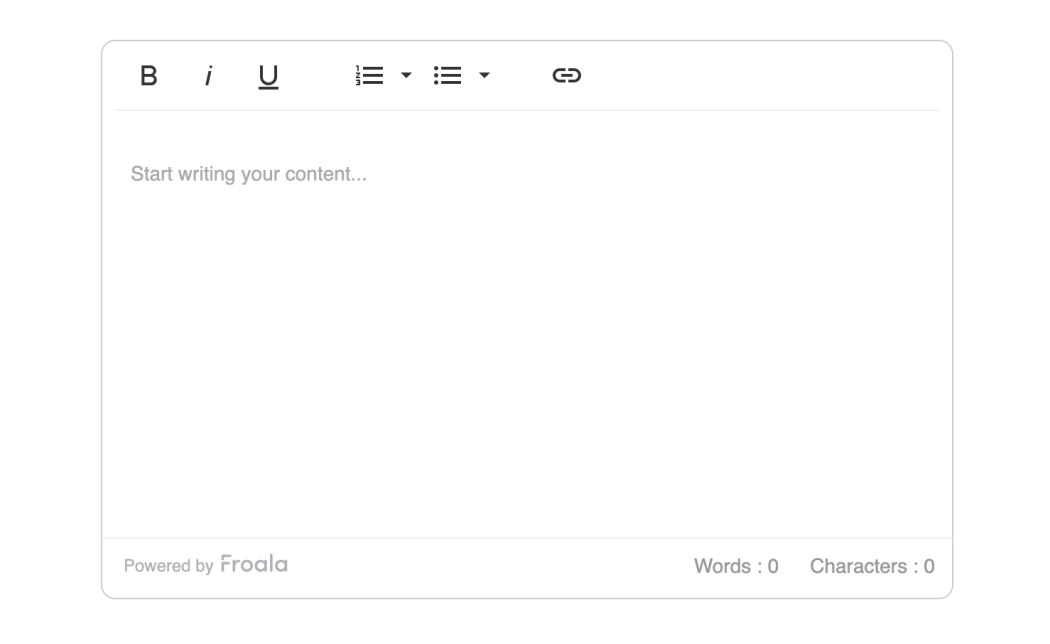
The code below shows how quick the integration can be:
| <!DOCTYPE html> <html> <head> <meta charset=”utf-8″ /> <title>Froala Editor</title> <!– Include Froala CSS –> <link href=”<https://cdn.jsdelivr.net/npm/froala-editor@latest/css/froala_editor.pkgd.min.css>” rel=”stylesheet” /> </head> <body> <!– Your editor container –> <div id=”editor”></div> <!– Include Froala JavaScript –> <script src=”<https://cdn.jsdelivr.net/npm/froala-editor@latest/js/froala_editor.pkgd.min.js>”></script> <!– Initialise Froala –> <script> // Simple initialisation new FroalaEditor(“#editor”, { // Basic toolbar options toolbarButtons: [ “bold”, “italic”, “underline”, “|”, “formatOL”, “formatUL”, “|”, “insertLink”, ], // Set height heightMin: 300, width: 600, // Placeholder text placeholderText: “Start writing your content…”, }); </script> </body> </html> |
And that is precisely all you need. With this, you instantly get:
- Reliable performance on all major browsers
- Full mobile support
- Built-in accessibility
- Strong security features
- Regular updates and bug fixes
- Professional support if something goes wrong
What to Do Before You Decide
Here are a few simple tips that can help you choose the right approach and avoid future headaches:
- Evaluate build vs. buy honestly: Compare the real cost of building your own editor from scratch with using an existing, ready-made text editor.
- Start with essential features only: Keep the build simple initially. Begin with the basic features your users actually need.
- Plan for content migration: If you’re switching from another editor, ensure you have a clear plan to migrate existing content safely.
These best practices will give you a strong start, but it’s just as important to understand what could go wrong. When it comes to building a customer editor, many teams face the same issues, and avoiding them can save you months of work.
Where Most Editor Projects Go Wrong
Here are some common mistakes teams often make when building their own editor:
- Underestimating mobile complexity: Mobile editing is significantly more complex than desktop editing, as there are different aspects involved, like touch events, selection, and keyboard behaviour, all of which work differently on every device. Check out MDN Web Docs’ explanation on why this is so challenging.
- Ignoring accessibility needs:
A fully accessible editor must support:- Keyboard navigation
- Screen reader support
- ARIA labels
- Focus management
- Good color contrast
These aren’t optional; they’re required under WCAG and ADA guidelines.
- Overlooking security risks: A poorly built JavaScript setup for an HTML editor can expose your users to XSS attacks. Established editors like Froala have security teams handling this; most startups can’t match that level of protection.
- Falling into the “Almost Done” trap: Custom editors are never “done.” Every new feature leads to new bugs. Even simple things like bullet lists can take days to fix.
Concluding Thoughts
Building your own JavaScript-based HTML editor might look fun and manageable. Developers often enjoy solving these kinds of challenges.
But the reality is this: unless you’re building something as big as Google Docs, making your own editor will only waste time and pull your team away from real work.
Investors want quick progress, a clear path to product-market fit, and innovative use of time and money. They don’t want to hear that your engineers spent weeks fixing tiny cursor bugs in Safari while your competitors released features your customers actually needed.
The best technical choice isn’t always the most exciting one; it’s the one that lets your team focus on what makes your product unique. Use proven tools like Froala for standard editor features, and let your engineers focus on the parts of the product that truly matter to users and investors.
Remember, the editor is just a tool. The real value is in what people create with your product. Choose the more straightforward solution, always aim to ship faster, and save your team’s energy to develop the features that really matter.
About the Author
Shefali Jangid is a web developer, technical writer, and content creator with a love for building intuitive tools and resources for developers.
She writes about web development, shares practical coding tips on her blog shefali.dev, and creates projects that make developers’ lives easier.


