
In This Article
Follow BestForAndroid


- Gemini now lets you import chat history and memories from ChatGPT and Claude via ZIP file uploads
- Supports uploading of up to five 5GB ZIP files per day, with imported chats searchable and deletable from Gemini’s side panel
- Not available in EEA, the United Kingdom, and Switzerland due to data regulations, also blocked for business, enterprise, and under-18 accounts
Google has added a chat and memory import feature to Gemini, making it easier for you to switch from any other AI chatbot service/app by importing memories, context, and entire chat history. This enables you to share key preferences, past conversations, relationships, and even personal context, so you won’t have to spend time retraining Gemini from scratch.
You can pick up right where you left off on Claude or ChatGPT without starting over.
Gemini will understand the same key facts you had shared with existing AI chat assistant apps. Researched hotels on ChatGPT? Trained Claude on your writing style? Months of custom preferences? Gemini imports all the context in one click. Migration has become easier.
I personally think this is less about making AI better and more about eliminating the switching cost and time that keeps users locked into a single AI chatbot. This also gives everyone the ultimate freedom to explore multiple AIs without spending time on personalization.
How The Import Process Works
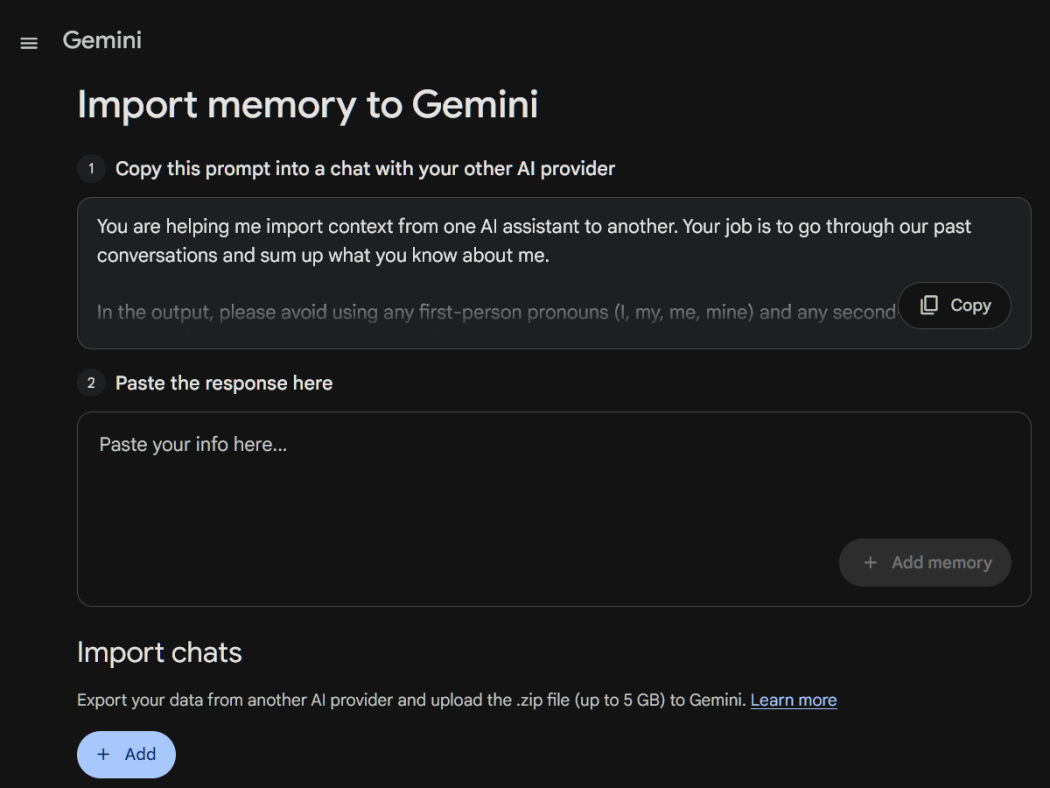
Within the import page gemini.google.com/import, you will find two options, i.e., import memory and import chats.
The memory import option is designed to import details from a single conversation. It provides a suggested readymade prompt that you copy and paste into your old AI chatbot app, which then generates a summary of your key facts and context (including information related to demographics, interests and preferences, relationships, dated events, and instructions) that you paste back into Gemini.
Copy the prompt provided by Gemini Apps, visit the AI platform from where memory needs to be exported, paste the copied prompt into a chat or input field, copy the response that contains memories about that specific conversation, return to Gemini, paste the copied response into the designated text field, and click Add memory.
The other option is the import chats, which handles full conversation history by letting users export data from ChatGPT or Claude as a ZIP file and upload it to the Gemini import page. The imported conversations then appear in the Gemini side panel with a specific icon to distinguish them from native chats, along with options to search through them or delete entire batches.
This option supports up to five ZIP files per day, with a size limit of 5GB each. That’s large and sufficient enough for years of conversation history across multiple platforms.
Moreover, the process of both options is straightforward and removes the friction of switching from one chatbot platform to another.
What This Means For Users
ChatGPT remains the leader in the consumer chatbot market, with OpenAI announcing last month that it reached 900 million weekly active users. Gemini, despite Google’s distribution advantages, including default placement across Android devices and Chrome browser, has lagged in consumer adoption.
Google has been making switching effortless by letting chatbot and AI assistant users import their history, clone memories, and transfer preferences without friction and zero lost context.
This is how platform competition escalates. First, build better products. And when that doesn’t work fast enough, eliminate the switching costs.
The AI you’ve been training for months can move with you to another platform. Google is now betting on the fact that once you see Gemini with your full context plus access to your entire Google ecosystem, you won’t want to leave.
Only time will tell if they are right about that calculation.
Gemini memory and chat import are available now for consumer accounts globally except EEA, UK, and Switzerland. Access via Settings in the Gemini web interface or gemini.google.com/import.


