
In This Article
Follow BestForAndroid


The short version: for most people the best free crypto tracker on Android is CoinGecko, because its data is broad and the company behind it is independent. If you want to watch a whole portfolio rather than just prices, use CoinStats in read-only mode, and if you hold your own keys, Zerion ties a wallet and a tracker together. Crypto is no longer niche; about 741 million people owned some, up from 659 million a year earlier, according to Crypto.com’s market sizing report. The other seven apps below cover charts, DeFi, and quick price checks.

Prices move while you sleep, and a tracker is the cheapest way to keep up without staring at an exchange all day. The catch is that the app you pick sees what you own, so it is worth choosing one you trust. It also pays to choose one that will still be here next year. The old Blockfolio app, once the default, became the FTX app and disappeared when FTX collapsed, taking its users’ convenience with it. The ten apps below are all current, all on the Play Store, and all worth a place on a new phone.
Pick the tracker that fits how you use crypto
The 10 crypto trackers at a glance
| App | What it does | Price | Best for |
|---|---|---|---|
| CoinGecko | Broad, independent price and market data | Free | Following the whole market |
| CoinMarketCap | The largest coin listing, watchlists, alerts | Free | Looking up any token |
| CoinStats | Syncs a portfolio across wallets and exchanges | Free; paid Premium | All-in-one portfolio tracking |
| Delta | A polished portfolio tracker | Free up to 10 assets; paid tiers | A clean portfolio view |
| CoinCodex | Prices, charts, and market news | Free | A light all-round tracker |
| Live Coin Watch | Fast, real-time price tables | Free with ads | Quick price checks |
| TradingView | Advanced charts and technical analysis | Free; paid plans for advanced data | Chart watchers and traders |
| Zerion | A self-custody wallet plus tracking | Free | Self-custody and DeFi |
| DeBank | On-chain DeFi portfolio tracking | Free | DeFi power users |
| Coinpaprika COINS | All-in-one prices and portfolio | Free | One free app for everything |
How we picked these apps

We set up each app, connected a small test portfolio where it made sense, and lived with it rather than reading a feature list. We leaned toward apps that are free or have an honest free tier, keep your data to themselves, and have the staying power that means you will not have to migrate again soon. Security mattered too: a tracker that reads your balances should not be a place you park your coins. We hold every roundup to the same bar, from the essential apps for a new phone to this one. What we weighed:
- Trust and ownership: who runs the app, and whether that affects how neutral its data is.
- Honest pricing: a genuinely useful free tier, with any paid plan adding real extras rather than unlocking the basics.
- Coverage: the coins, exchanges, and chains it tracks, and how current the data feels.
- Safety: read-only tracking by default, and a clean record, or an honest response when something went wrong.
A quick note on scale: CoinMarketCap’s own counter lists tens of millions of tokens, while only roughly 15,000 to 17,000 are actively ranked. No app tracks everything, so coverage is really about whether the coins you care about are there.
1. CoinGecko

CoinGecko is our default crypto tracker, mostly because of who runs it. It was founded by TM Lee and Bobby Ong and grew without outside investors, so its rankings do not answer to an exchange. The free app covers a huge range of coins with prices, charts, market cap, trading volume, and watchlists, plus a community-driven trust score that flags shady tokens.
Independence is worth keeping an eye on, though. CoinGecko has reportedly been exploring a sale, according to CoinDesk, so its standing could change. For now it is the one we would install first. If you prefer something even lighter, Live Coin Watch further down the list does prices and little else.
Highlights
⭐️ Best for: anyone who wants broad, independent market data in a free app
👎🏼 The catch: the sheer amount of data can feel busy if you only want a price
💰 Pricing: Free; paid API tiers exist for developers
Key Features
- Wide coverage: prices and charts for one of the largest sets of tracked coins anywhere.
- Independent data: rankings not owned by an exchange, with a community trust score on tokens.
- Watchlists and alerts: follow the coins you hold and get notified on big moves.
- Portfolio view: log holdings to see your total at a glance, no account required to browse.
2. CoinMarketCap

CoinMarketCap is the other giant of price data, and for looking up almost any token it is hard to beat. The app gives you prices, charts, watchlists, alerts, and a portfolio, with the deepest listing in the business. The one thing to know is ownership: CoinMarketCap was bought by Binance, which is fine for raw prices but worth remembering when you read any of its rankings or featured lists.
In day-to-day use it is fast and familiar, and its data feeds half the crypto sites you already visit. We rank it just behind CoinGecko only because of that exchange ownership; on features alone the two are neck and neck.
Highlights
⭐️ Best for: looking up any coin and setting price alerts on the ones you hold
👎🏼 The catch: it is owned by an exchange, so treat its rankings with that in mind
💰 Pricing: Free
Key Features
- Deepest listing: almost every token you can name has a page here.
- Alerts: price and percentage alerts on your watchlist coins.
- Portfolio tracker: log holdings and see your balance and allocation.
- Market context: volume, supply, and trending sections to gauge sentiment.
3. CoinStats
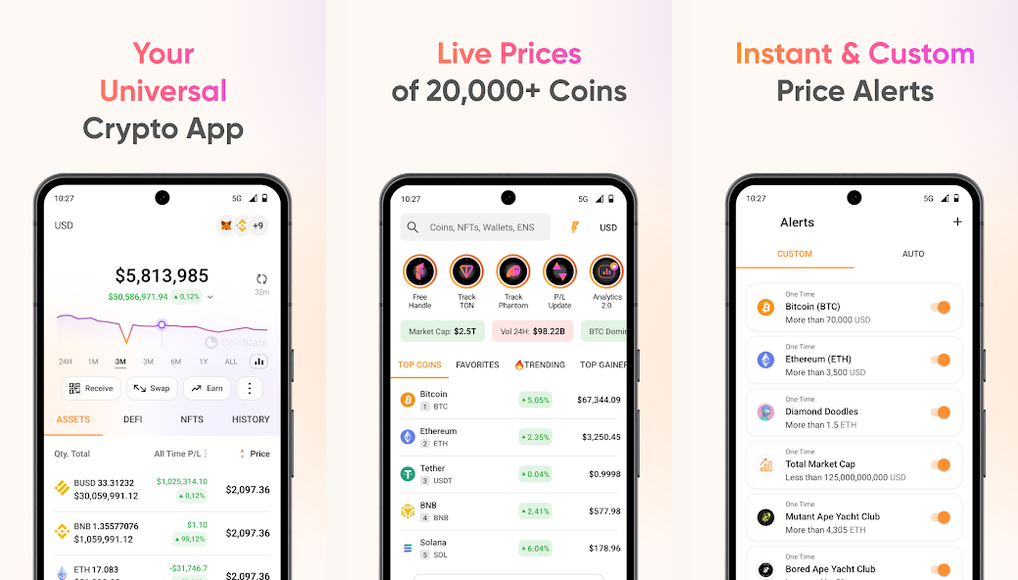
CoinStats is the pick when you want to see everything you own in one place. It connects to your wallets and exchanges and pulls balances into a single dashboard, so you are not hopping between apps to add up a portfolio. Connections for tracking are read-only, which is exactly how you want it.
There is an important caveat. CoinStats disclosed a security breach in which attackers drained 1,590 of its in-app wallets for around 2.2 million dollars, according to the company’s own incident report; it said wallets and exchanges connected only for read-only tracking were not affected. The lesson is simple: use CoinStats to track, keep your coins in your own wallet, and read our guide to securing your crypto wallet before you connect anything.
Highlights
⭐️ Best for: people who hold coins across several wallets and exchanges and want one dashboard
👎🏼 The catch: a past breach hit its in-app wallets; use read-only tracking, not its wallet, for funds
💰 Pricing: Free; optional paid Premium
Key Features
- One dashboard: read-only sync from many wallets and exchanges into a single view.
- Alerts and news: price alerts plus a news feed tuned to your holdings.
- DeFi and NFT tracking: follows on-chain positions, not just exchange balances.
- Wide support: hundreds of integrations across the major chains and platforms.
4. Delta

Delta, now branded Delta by eToro after the broker acquired it, is the most polished portfolio tracker here. The layout is clean, the charts are clear, and connecting exchanges to follow your balances is straightforward. It has been adding smarter features lately, including portfolio insights and an assistant that explains what is moving your holdings.
The trade-off is the free tier, which caps you at tracking 10 assets; going beyond that means a paid plan. It is also owned by a trading platform, the same kind of consideration as CoinMarketCap. If your portfolio is small and you value a tidy interface, Delta is lovely to use.
Highlights
⭐️ Best for: people with a focused portfolio who want the cleanest possible view
👎🏼 The catch: the free tier tracks only 10 assets, and it is owned by a broker
💰 Pricing: Free up to 10 assets; paid PRO tiers above that
Key Features
- Polished design: one of the clearest portfolio layouts on Android.
- Insights: breakdowns and an assistant that explain your performance.
- Broad connections: sync exchanges and wallets to track balances automatically.
- Alerts: custom price alerts on the assets you follow.
5. CoinCodex

CoinCodex is an easy app to overlook and a genuinely handy one. It covers prices, charts, and market news across a wide list of coins, wraps in a simple portfolio, and stays light and quick. It is well established and actively maintained, with well over a million downloads, so it is not a here-today project.
It also shows algorithmic price forecasts, which are a fun extra rather than anything to trade on; treat them as entertainment, not advice. As an all-round free tracker that does not bury you in features, CoinCodex earns its spot.
Highlights
⭐️ Best for: people who want prices, charts, and news in one light, free app
👎🏼 The catch: the built-in price forecasts are algorithmic guesses, not advice
💰 Pricing: Free
Key Features
- All-round coverage: prices, charts, and market news for a wide list of coins.
- Simple portfolio: log holdings without a heavy setup.
- Light and fast: quick to open and easy to read.
- Market tools: conversions and overviews for a fast read on the market.
6. Live Coin Watch

When all you want is to glance at prices, Live Coin Watch is the cleanest way to do it. It shows fast, real-time price tables in a no-nonsense layout, with a simple portfolio and watchlist on top. There is no learning curve; you open it, you see the market, you close it.
The free app is ad-supported, which is the price of that simplicity, and it is lighter on the deep features that CoinGecko and CoinStats offer. As a quick-check companion to a heavier tracker, though, it is a keeper.
Highlights
⭐️ Best for: anyone who just wants a fast, clean look at live prices
👎🏼 The catch: it shows ads, and it is thinner on deep portfolio features
💰 Pricing: Free with ads
Key Features
- Real-time tables: fast price updates in a clean list.
- Watchlist: pin the coins you care about up top.
- Simple portfolio: log holdings for a quick total.
- Lightweight: minimal, quick, and easy to read at a glance.
7. TradingView

TradingView is a different animal from the rest of this list. It is a serious charting and technical-analysis platform that happens to cover crypto alongside stocks, forex, and more. If you read candlesticks, draw trendlines, and lean on indicators, nothing else here comes close to its tools.
There is a free tier, and the more advanced data and ad-free use come with a paid subscription; pricing and exactly what each plan unlocks change often, so check the current plans in the app rather than trusting a number you read somewhere. For casual price watching it is overkill, but for chart-focused traders it is essential.
Highlights
⭐️ Best for: chart watchers and technical traders who want professional tools
👎🏼 The catch: it is a charting platform, so it is heavier than a simple tracker, and advanced data needs a paid plan
💰 Pricing: Free tier; paid plans for advanced data and an ad-free view
Key Features
- Pro charts: deep charting with a huge library of indicators and drawing tools.
- Cross-market: crypto next to stocks, forex, and indices in one app.
- Alerts: flexible price and indicator alerts.
- Community ideas: published analysis and scripts from other traders.
8. Zerion

Zerion is for people who hold their own keys. It is a non-custodial wallet, meaning the company never has access to your assets, with portfolio tracking built right in. Connect it to your addresses and it shows your tokens, DeFi positions, and NFTs across chains in one place, with profit and loss broken out. It supports hardware wallets like Ledger and Trezor too.
Because it is a wallet first, tracking wallets you do not control means adding them as read-only addresses, which is fine for watching. If you live in DeFi and want self-custody and tracking in a single app, Zerion is the natural choice. For more on staying safe, see our take on whether your crypto is safe on Android.
Highlights
⭐️ Best for: self-custody users who want a wallet and a DeFi tracker in one app
👎🏼 The catch: it is a wallet first, so tracking outside wallets is read-only by address
💰 Pricing: Free
Key Features
- Non-custodial: you hold the keys; Zerion never controls your funds.
- DeFi and NFTs: tracks on-chain positions and collectibles, not just tokens.
- Profit and loss: realized and unrealized gains across supported chains.
- Hardware support: works with Ledger and Trezor for cold storage.
9. DeBank
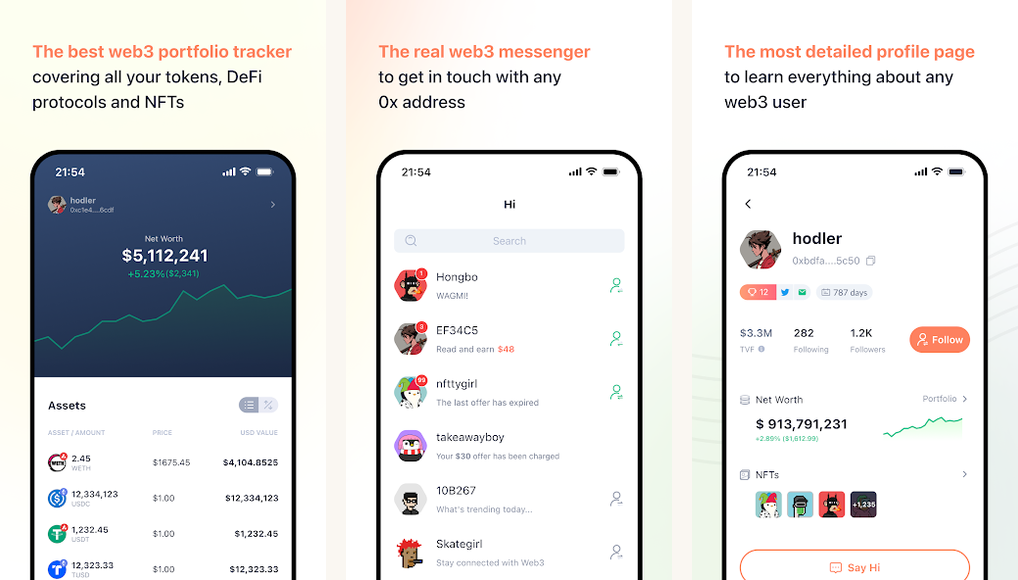
DeBank is the specialist’s tool for on-chain DeFi. Paste in a wallet address and it maps out everything that address is doing across chains: tokens, lending and borrowing positions, liquidity pools, and more. It comes from OPCODE LABS, the team behind the well-regarded Rabby wallet, which is a good sign for upkeep.
This is not the app for someone who just wants to watch Bitcoin. It is dense and aimed at people who actively use DeFi protocols, and its Play Store rating is more mixed than the mainstream trackers. But for following complex on-chain positions, little else is as thorough.
Highlights
⭐️ Best for: DeFi users who need to see complex on-chain positions across chains
👎🏼 The catch: it is dense and DeFi-focused, with a more mixed rating than the mainstream apps
💰 Pricing: Free
Key Features
- On-chain first: reads positions straight from wallet addresses across many chains.
- Full DeFi picture: lending, liquidity, and protocol positions in one view.
- Trusted team: built by the makers of the Rabby wallet.
- Address tracking: follow any public wallet, yours or one you are watching.
10. Coinpaprika COINS
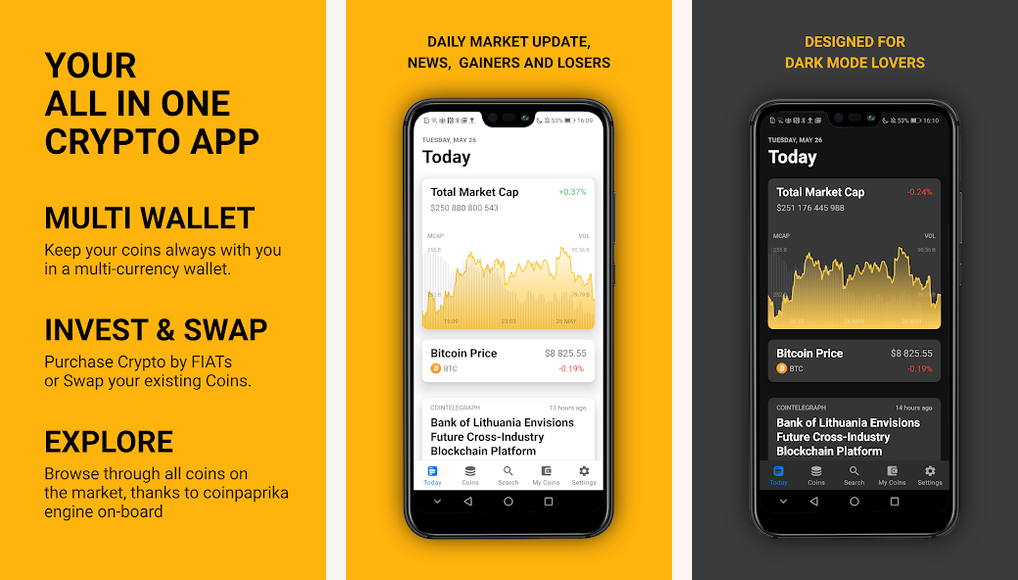
COINS, from the team behind the Coinpaprika data site, tries to be a single home for crypto: prices, charts, news, and a portfolio across thousands of coins, all free. When it works it is a tidy all-in-one, and it carries a strong overall rating on the Play Store.
We list it last because some recent reviews report reliability wobbles, such as the app getting stuck loading, and its last update is a little older than the others here. It is worth a look as a free all-rounder, but try it alongside one of the steadier picks above rather than relying on it alone.
Highlights
⭐️ Best for: people who want one free app for prices, news, and a portfolio
👎🏼 The catch: recent reviews flag reliability issues, and updates have slowed
💰 Pricing: Free
Key Features
- All-in-one: prices, charts, news, and a portfolio in a single app.
- Wide coverage: data on thousands of coins from the Coinpaprika dataset.
- Watchlists: track the coins you care about.
- Free: no paywall on the core tracking features.
The verdict

If you install only one, make it CoinGecko: it is free, broad, and independent. Add CoinStats in read-only mode when you want a single view of a portfolio spread across wallets, and Zerion if you hold your own keys. Whichever you choose, let the app watch your coins and keep the coins themselves in a wallet you control. Pair any of them with a trustworthy Android VPN on public Wi-Fi and your setup is in good shape.
What people usually ask
- What is the best free crypto tracker for Android?
CoinGecko, for most people. The data is broad, the app is free, and the company behind it is independent of any exchange. CoinMarketCap is a close second. - Is it safe to connect my wallet to a tracker?
Connecting for read-only tracking is generally safe, because the app can see balances but not move funds. Never share a seed phrase, and keep your coins in a wallet you control rather than in a tracker’s in-app wallet. - What happened to Blockfolio?
It was acquired and rebranded as the FTX app, then shut down after FTX collapsed. If you still have it, move to one of the apps on this list and export any data you can. - Do I need to pay for a crypto tracker?
No. Most picks here are fully free. CoinStats and Delta have optional paid tiers, and TradingView reserves advanced data for paid plans, but you can track a portfolio well without spending anything. - Which app is best for DeFi?
Zerion if you want a self-custody wallet with tracking built in, or DeBank if you only need to read complex on-chain positions by wallet address.
How we tested
We installed each app on Android, connected a small test portfolio where it made sense, and used them over time rather than spot-checking a feature. We weighed data coverage, ownership and privacy, pricing, and security record. Some links here may earn BFA a small commission, which never changes which apps we recommend.


