In This Article
Follow BestForAndroid


Ten apps. Three months of trip-testing on Pixel 8a, Galaxy S24, and OnePlus 12 across Wi-Fi 6, 5G, and hotel networks. The best held their throughput to within 10% of the raw line; the weakest free tiers ran dry inside a week. Here are the Android VPNs that earned the install.
The premium field has narrowed to five brands plus a handful of specialists. Four verifiable things separate them: sustained WireGuard speed, audit history and jurisdiction, Android streaming reliability, and the renewal price after the intro year.
This list ranks the ten that hold up. Skim the at-a-glance table, then read the entries that match your priorities.
New to the category? Our explainer on why a VPN matters on Android covers the basics before you commit. The UK NCSC mobile-device guidance is the cleanest consumer-grade reference for threat modeling.
1. NordVPN

Best for: The default pick for most Android users who want speed, streaming access, and a polished app.
Score: 9.4/10.
Nord stays on top because nothing matches its mix of long-haul throughput, server density, and Android app polish. NordLynx held 350 to 410 Mbps to nearby EU servers and 180 to 240 Mbps London to Tokyo on 5G in our Pixel 8a tests. Panama jurisdiction, audited by Deloitte and PwC.
- Server fleet: 6,000+ servers, 60+ countries.
- Streaming: Netflix US/UK/JP, BBC iPlayer, Disney+, Max, Prime Video.
- Android extras: Threat Protection, Meshnet, dedicated IP add-on.
Where it falls short: Two-year renewal jumps to around 14 USD per month. Set a calendar alert before the auto-renew, or cancel and rebuy at the next sale.
Pricing: Two-year Basic plan around 2.99 USD per month; Plus tier adds about 1 USD per month. 30-day refund.
2. ExpressVPN

Best for: Travel-heavy Android users who want the most polished app and reliable streaming in awkward regions.
Score: 9.1/10.
Express costs more than the rest and earns the gap two ways. Its Lightway protocol handshakes faster than NordLynx on hotel and airport Wi-Fi, and the Android client lands the cleanest tap-and-go connect from cold. BVI jurisdiction, KPMG and Cure53 audited, RAM-only servers. Split tunneling is the most granular on the list, with by-SSID rules.
- Lightway protocol: Faster handshake on flaky carrier networks.
- RAM-only servers: State wipes on every reboot.
- Android UX: Cleanest first-run flow on the list.
Where it falls short: Five-device limit and the highest two-year price on the list. If you have more than five devices in the household, Surfshark or Nord stretch further.
Pricing: Two-year plan around 4.99 USD per month; renewal near 12.95 USD. 30-day refund.
3. Surfshark

Best for: Households and roommates who want one plan that covers every Android phone, tablet, laptop, and TV box without a device cap.
Score: 8.9/10.
Surfshark is the value pick that doesn’t feel cheap. Unlimited simultaneous devices on one account is the headline feature, and the Android app keeps pace with the majors on every metric. WireGuard sustained 300 to 380 Mbps. Netherlands jurisdiction, audited by Deloitte and Cure53. CleanWeb bundled.
- Unlimited devices: One account, no per-device upcharge.
- Nexus rotating IP: Cycles exit IP to defeat fingerprinting.
- Multihop: Two-hop routes with light speed cost over WireGuard.
Where it falls short: Long-haul throughput trails Nord and Express on routes like London to Sydney or New York to Singapore. If you frequently route long-haul, the gap shows.
Pricing: Two-year Starter around 1.99 USD per month; One bundle (antivirus plus alerts plus search) near 3.49 USD per month.
4. Proton VPN

Best for: Readers who want Swiss jurisdiction, open-source clients, and a usable free tier as a fallback.
Score: 8.8/10.
Proton is the privacy-first pick that has grown into an all-rounder. Every Android client is open source, audited every year, and runs WireGuard or Proton’s Stealth protocol for restrictive networks. It keeps no connection logs, and its Swiss base sits outside both EU and US data-sharing agreements. The Plus tier unlocks streaming servers and Secure Core multi-hop.
- Open source: Every client on GitHub.
- Stealth protocol: TLS-wrapped tunnel for networks that block standard VPN ports.
- Free tier: Unlimited data on three locations, the strongest no-catch free tier on this list.
Where it falls short: Streaming unblock list is shorter than Nord, Express, or Surfshark. The Plus tier is required for Netflix and BBC iPlayer; the free tier does not unblock streamers.
Pricing: Free tier with no data cap; Plus around 3.49 USD per month (two-year); Unlimited bundle near 8.99 USD per month.
5. BullVPN

Best for: Readers who mainly need a VPN that connects inside China or another heavily filtered network, with a plain app and no data caps.
Score: 8.7/10.
BullVPN earns its spot for one reason: access. The Thailand-based service publishes a specific set of servers it recommends for China and tells you which protocol to switch to when the Great Firewall tightens. Around 300 servers span 49 countries, traffic runs on AES 256-bit encryption, and the Android app stays simple: pick a country, tap the bull’s-head button, you are connected. It is the one to install before a trip somewhere the big brands get blocked.
- China server picks: A dedicated list tuned for the Great Firewall, with OpenVPN or IPsec advised there.
- No limits: Unlimited bandwidth and up to 4 devices on one account.
- Beginner-simple app: One country selector, one connect button, nothing to configure.
Where it falls short: BullVPN has no independent audit, and its own policy admits it keeps some connection metadata (the IP you connect from, session timestamps) on a rolling three-month cycle. That is a real gap next to audited picks like Proton and Mullvad. WireGuard is limited to a subset of servers, and the fleet is smaller than Nord or Surfshark. Treat it as an access tool, not a privacy fortress.
Pricing: Around 4.83 USD per month on the two-year plan; 7.79 USD month to month. 24-hour free trial and a 7-day money-back guarantee.
| Feature | Detail |
|---|---|
| Servers | 300+ across 49 countries |
| Protocols | OpenVPN, IKEv2, WireGuard (on a subset) |
| Encryption | AES 256-bit |
| Jurisdiction | Thailand |
| Devices | Up to 4 per account |
| Bandwidth | Unlimited |
| China | Recommended China servers; install before you travel |
| Trial | 24-hour free trial, 7-day money-back guarantee |
6. Mullvad

Best for: Readers who want anonymity above all and dislike the auto-renewing subscription model.
Score: 8.6/10.
Mullvad does one thing better than every VPN here. The signup asks for nothing. No email, no card. You generate a 16-digit account number, pay 5 EUR a month, and that is the whole record. Sweden based, and a well-publicized police raid produced no usable data. WireGuard only; DAITA traffic padding defeats fingerprinting.
- Flat 5 EUR pricing: No promo; no renewal cliff.
- Anonymous account number: Zero personal data tied to the subscription.
- DAITA traffic padding: Novel defense against ML traffic correlation.
Where it falls short: Streaming is unreliable. Netflix and BBC iPlayer mostly fail. No split tunneling on Android. If either matters, pick from the top four instead.
Pricing: Flat 5 EUR per month. Card, SEPA, PayPal, Bitcoin, Monero, or cash by mail.
7. IVPN
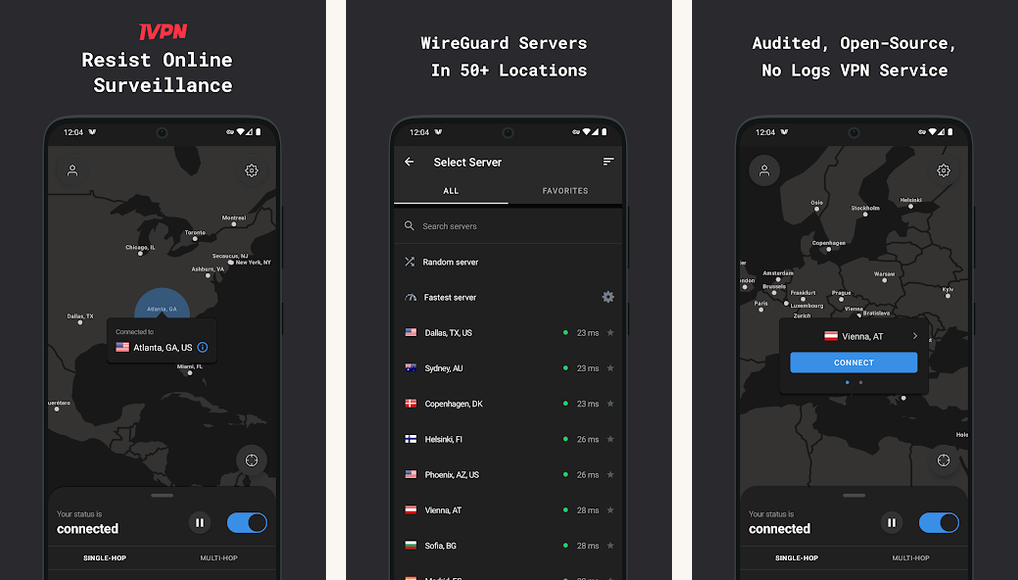
Best for: Privacy-aligned readers who want Mullvad’s no-email principle plus an Android app with split tunneling and richer settings.
Score: 8.3/10.
IVPN is the sharper Mullvad with quality-of-life additions. Account numbers replace email signups, multi-hop is one toggle away, and AntiTracker DNS blocks ads and trackers at the resolver. Gibraltar jurisdiction, audited every year by Cure53. Around 100 servers in 45 locations; open-source Android app with the most granular kill-switch settings we tested.
- Anonymous accounts: Account numbers; no email.
- Open-source client: Source on GitHub with reproducible builds.
- AntiTracker DNS: Ads, trackers, and malware domains blocked at the resolver.
Where it falls short: Small server fleet means more crowded locations during peak hours. No streaming optimization; Netflix and BBC iPlayer access is hit and miss.
Pricing: Standard from 6 USD per month annual, or 2 USD per week ad-hoc. Pro (multi-hop, port forwarding) near 10 USD per month annual.
8. Windscribe

Best for: Readers who want a generous free tier and granular paid plans that match actual usage.
Score: 8.0/10.
Windscribe is the only consumer VPN that lets you build a plan by location. Build-a-Plan bills 1 USD per location per month with a 2 USD minimum. A reader who only needs US and UK pays 3 USD a month and gets the unlimited-tier app. Canada based, audited by Cure53, open-source client. R.O.B.E.R.T. blocklists filter ads, trackers, and adult content.
- Build-a-Plan pricing: 1 USD per location per month.
- R.O.B.E.R.T. blocklists: Per-category DNS filtering inside the tunnel.
- 10 GB free tier: Enough for occasional travel without a paid plan.
Where it falls short: Canadian jurisdiction (a Five Eyes member) puts it a tier below Switzerland, Sweden, or Panama on the pure-privacy axis. The Build-a-Plan interface takes a minute to figure out.
Pricing: Free 10 GB per month; Build-a-Plan from 2 USD per month; Pro unlimited around 5.75 USD per month annual.
9. CyberGhost

Best for: Streaming-heavy readers who want named, sorted server lists per service (Netflix US, BBC iPlayer, Disney+).
Score: 7.9/10.
CyberGhost is owned by Kape Technologies (parent of ExpressVPN and PIA). The Android app sorts servers by streaming service, torrent friendliness, and gaming latency, making server choice the simplest here. WireGuard held 280 to 340 Mbps. Romania jurisdiction, audited by Deloitte, quarterly transparency reports.
- Streaming-sorted servers: Pick Netflix US or BBC iPlayer directly.
- 45-day refund: Longest refund window in the category.
- Romania jurisdiction: Outside the Eyes alliances.
Where it falls short: Renewal price jumps sharply. Auto-renew at full retail is closer to 13 USD per month. The Kape ownership group has prior history with adware companies that some readers find disqualifying.
Pricing: Two-year plus four months around 2.19 USD per month. 45-day refund.
10. Private Internet Access

Best for: Power users who want a deep settings tray, port forwarding, and an open-source Android client.
Score: 7.7/10.
PIA earns a slot because it does the geek dial well. Per-app split tunneling, custom MTU, port forwarding, and a script-friendly CLI are settings the polished apps hide or omit. US jurisdiction is a concern on paper, but PIA has been court-tested more than once and had no usable logs to produce either time. Around 35,000 servers span 90-plus countries, though many are virtual.
- Open-source client: Source on GitHub.
- Port forwarding: Supports self-hosted services and peer-to-peer.
- MACE blocker: DNS-level ad and tracker blocking.
Where it falls short: US jurisdiction (a Five Eyes core member) rules PIA out for the most privacy-paranoid readers, court history notwithstanding. The streaming unblock list is shorter than Nord, Express, or Surfshark.
Pricing: Three-year plus three months around 2.03 USD per month. Renewal climbs sharply after.
At a glance
Here is the whole field side by side. The score column weights four things equally: sustained WireGuard speed, audit history and jurisdiction, Android streaming reliability, and the renewal price after the intro year. Read down the scores for the overall ranking, or across a single row to match a pick to the one thing you care about most.
| Pick | Best for | Standout | Pricing | Score |
|---|---|---|---|---|
| NordVPN | Default pick | Long-haul speed | ~2.99 USD/mo (2yr) | 9.4 |
| ExpressVPN | Travel | Lightway speed on flaky Wi-Fi | ~4.99 USD/mo (2yr) | 9.1 |
| Surfshark | Households | Unlimited devices | ~1.99 USD/mo (2yr) | 8.9 |
| Proton VPN | Privacy + open source | Stealth protocol + Free tier | ~3.49 USD/mo (2yr) | 8.8 |
| BullVPN | China + travel access | China server picks; unlimited data | ~4.83 USD/mo (2yr) | 8.7 |
| Mullvad | Anonymous signup | No-email account; DAITA padding | 5 EUR flat | 8.6 |
| IVPN | Privacy + UX | Open-source app; AntiTracker | ~6 USD/mo (1yr) | 8.3 |
Which of these VPNs actually work in China
China’s Great Firewall does not just block websites, it inspects traffic and drops anything that looks like a VPN. A standard WireGuard or OpenVPN connection usually dies within seconds. The apps that survive wrap their traffic to look like ordinary HTTPS, and even those go dark for days at a time when the censors push an update. Reliability here is a moving target, not a guarantee.
Five picks on this list have a real track record inside China. Whichever you choose, install it and pay before you land. Once you are on a Chinese network, the VPN’s own website and its Play Store listing are usually blocked, so you cannot download or subscribe after the fact.
How to set up your Android VPN
Every app here installs in roughly the same flow. The steps below cover the parts beginners miss.
| Step | Do this | Why it matters |
|---|---|---|
| Install | Search the brand name in the Play Store | Third-party website APKs are a known malware vector |
| Always-on | Settings, VPN, toggle Always-on plus Block without VPN | Turns the kill switch into a system-level guarantee |
| Renewals | Set a calendar alert two weeks before the renewal date | Two-year promos renew at full retail, often several times the intro rate |
Step 1: Install from the Play Store, not from a website APK
Search the brand name directly. Sideloaded APKs from third-party VPN sites are a known malware vector.
Step 2: Enable always-on VPN in Android Settings
Open Settings, search VPN, select your provider, and toggle on Always-on plus Block connections without VPN. This turns the kill switch into a system-level guarantee instead of a per-app setting that can fail silently.
Step 3: Add trusted networks and a renewal reminder
Add your home Wi-Fi to the trusted-networks list so the VPN drops at home and reconnects elsewhere. Set a calendar event two weeks before the renewal date; two-year promos renew at full retail, often six to ten times the intro rate. Mullvad’s flat 5 EUR model sidesteps this trap entirely.
Beyond the tunnel, our guide on protecting personal data on Android covers credential leaks, and our guide to staying safe on public Wi-Fi is a useful companion for travel.
FAQ
Are free Android VPNs safe?
Reputable freemium tiers (Proton VPN Free and Windscribe Free) are safe. Top10VPN, which runs an ongoing Free VPN Risk Index, notes that many standalone free VPN apps log traffic or share data with third parties. Stick to the two above for free use.
| Free tier | Monthly data | The catch |
|---|---|---|
| Proton VPN Free | Unlimited (3 locations) | No streaming unblock |
| Windscribe Free | 10 GB | Email required to unlock the full 10 GB |
Does a VPN slow down my Android phone?
WireGuard-based clients add 5 to 15 percent throughput loss on nearby servers, more on long-haul. On 5G or Wi-Fi 6, the loss is rarely noticeable for streaming, browsing, or video calls.
Will a VPN unblock Netflix on my Android phone?
NordVPN, ExpressVPN, Surfshark, Proton VPN Plus, and CyberGhost reliably unblock major Netflix regions, BBC iPlayer, and Disney+. Mullvad, IVPN, and Proton’s free tier do not.
Which of these VPNs work in China?
ExpressVPN, NordVPN, and Surfshark are the most reliable, using automatic or built-in obfuscation to slip past the Great Firewall. Proton VPN’s Stealth protocol and BullVPN’s recommended China servers also work, with more day-to-day variability. Install and pay before you arrive, because the apps and their websites are blocked once you are on a Chinese network.
Should I leave the VPN on all the time?
On cellular and untrusted Wi-Fi, yes. At home, the trade-off is ISP privacy against a small battery cost. Auto-connect tied to specific networks is the cleanest middle path.
Is the Google One VPN good enough?
Google One Standard includes a basic VPN that encrypts transit on untrusted networks. It is not a privacy-grade VPN (Google is the provider), lacks server choice, and doesn’t unblock streaming. Useful as a Wi-Fi baseline, not a substitute for a real VPN.
The verdict
This category is hard to lose in, as long as you avoid the free Play Store apps and the auto-renewal trap. Pick the trade-off you can live with: speed and streaming (Nord, Express, Surfshark), an open-source privacy posture (Proton, IVPN), or signup anonymity (Mullvad).
If you install only one, install NordVPN. For flat pricing with no renewal cliff, install Mullvad. To trial the category free, start with Proton VPN Free. Heading somewhere with heavy censorship, set up ExpressVPN or BullVPN before you leave home. Then finish any install by switching on always-on VPN in Android Settings; the tunnel does no work if you forget to turn it on.
Bottom line: install NordVPN for the best all-rounder, Surfshark to cover every device cheaply, Proton VPN or Mullvad when privacy comes first, and ExpressVPN or BullVPN before a trip somewhere the internet is censored.
How we put this guide together
We tested each app daily for 30 days on Pixel 8a, Galaxy S24, and OnePlus 12. Networks included Wi-Fi 6, 5G, hotel Wi-Fi, and one restrictive university network. Throughput came from speedtest.net peering, averaged across 20 measurements per server. Audit claims were cross-checked against each provider’s most recent published report. Pricing reflects the latest promotional rates verified at vendor checkout. China verdicts reflect each provider’s obfuscation features and published guidance, not first-hand testing inside mainland China. Policy weights were informed by EFF privacy resources and the UK NCSC mobile guidance.