In This Article
Follow BestForAndroid


The short version: set up a password manager before anything else. A Cybernews study of 19 billion leaked passwords found that 94 percent were reused or duplicated, so Bitwarden paired with the Aegis authenticator is the combination that pays off fastest on a new phone. After that, in rough order: Vivaldi for browsing, Gboard for typing, Obsidian for notes, Files by Google for storage, Spike for email, VLC for media, Forest for focus, and Google Photos for backup. Already built out your setup? You can skip the list; this is a starter kit for day one.

You unbox the phone, sign in, and the home screen looks ready. It is not, quite. Stock Android handles the basics and leaves a dozen small gaps: no real password vault, a file manager that nags, a photo library with no safety net. The ten apps below fill those gaps. Most are free, a couple cost a few dollars, and you can have all of them running before your first coffee goes cold.
Pick the gap you want to close first
The 10 apps at a glance
| App | What it fixes | Price | Best for |
|---|---|---|---|
| Bitwarden | Reused, forgotten passwords | Free; from $1.65/mo | Everyone |
| Aegis | Two factor codes scattered in texts | Free | Privacy-minded Android users |
| Vivaldi | A browser that tracks you | Free | Power browsers |
| Gboard | A weak stock keyboard | Free | Anyone who types a lot |
| Obsidian | Notes locked in someone’s cloud | Free; Sync $4/mo | Note-takers and planners |
| Files by Google | An ad-filled file manager | Free | Storage that fills up fast |
| Spike | An inbox that buries you | Free; Pro $6/mo | High-volume email |
| VLC | A player that refuses your files | Free | Anyone with downloaded media |
| Forest | A phone that breaks your focus | Free; Pro $1.99 | Chronic phone-checkers |
| Google Photos | Photos with no backup | Free 15 GB; paid above | Everyone with a camera |
How we picked these apps

Every app here is one we set up and lived with on more than one phone, not just a name pulled off a top-ten list. We leaned toward apps with an honest free tier or a one-time price, a clean privacy record, and the kind of staying power that means you will not have to switch again in a year. Where a category had a strong runner-up, we name it inside the pick. The short list of what mattered:
- Honest pricing: a usable free tier with no ads in the core flow, or a modest one-time unlock.
- Privacy: no selling your data, and as little tracking as the category allows.
- Quality that lasts: active development and a track record, so the pick still holds up next year.
- Easy day-one setup: useful within minutes, not after an afternoon of configuration.
We hold every roundup to the same bar, from our best productivity apps guide to this one.
1. Bitwarden
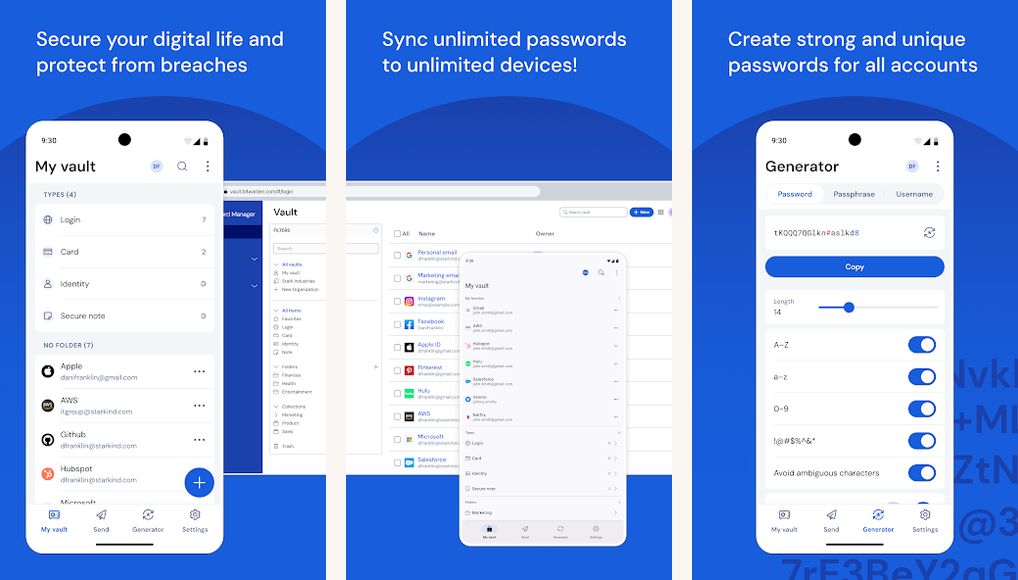
Bitwarden is the password manager we install first on any phone. It is open source and end to end encrypted, and its free tier is the rare one that does not throttle you toward a paid plan: unlimited passwords, synced across every device you own. That matters more than it sounds. Password reuse is close to universal, and only about 36 percent of US adults use a password manager at all, according to security.org. Bitwarden’s own survey put it at just 46 percent even among Gen Z, the group you would expect to be furthest ahead.
On trust, Bitwarden publishes independent security audits each year (firms including Cure53), and a recent ETH Zurich review of its cryptography found a set of issues that Bitwarden says it has since fixed, which is roughly how a healthy audit cycle should read. If you install one app from this list, make it this one.
Highlights
⭐️ Best for: everyone, especially anyone still reusing passwords across accounts
👎🏼 The catch: the first-time import and browser-extension setup takes a few minutes of fiddling
💰 Pricing: Free with unlimited passwords and sync; Premium from $1.65 per month; Families from $3.99 per month
Key Features
- Real free tier: unlimited passwords and unlimited device sync at no cost.
- End to end encryption: your vault is encrypted before it ever leaves the phone.
- Audited and open source: annual third-party audits and a public codebase.
- Everywhere you are: Android, iOS, and browser extensions on every desktop platform.
2. Aegis Authenticator
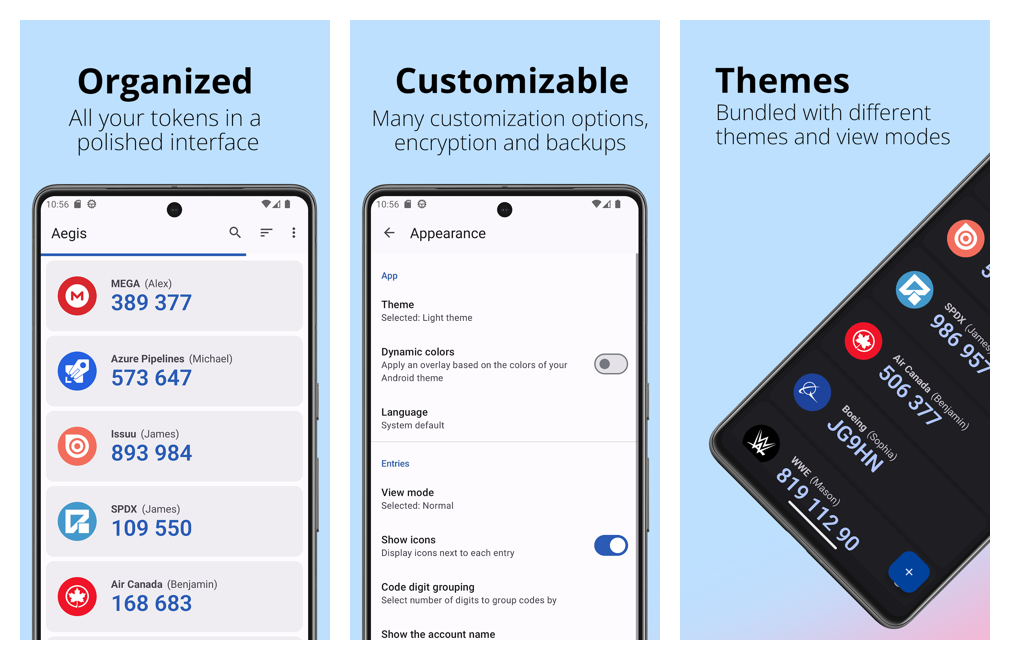
A password manager guards your passwords; an authenticator guards the second step. Aegis is our open-source pick for two factor codes on Android. It keeps every code in a vault on the phone, encrypted with AES-256, with no account to sign up for and backups you control yourself. It imports straight from Google Authenticator, Microsoft, Authy, and others, so moving over is painless.
The trade-off is the flip side of that independence: Aegis is Android only, and recovery leans on the backup file you export, so set one up the day you start. If you would rather have codes sync to an iPhone or a laptop, the open-source Ente Auth is the natural alternative.
Highlights
⭐️ Best for: privacy-minded users who want their two factor codes stored locally, not in a vendor’s cloud
👎🏼 The catch: it is Android only, and you are responsible for your own backups
💰 Pricing: Free and open source, with no ads or in-app purchases
Key Features
- Encrypted local vault: codes stored on-device with AES-256 and an optional biometric unlock.
- Backups you own: exportable, password-protected vault files, no cloud account required.
- Easy migration: imports from Google Authenticator, Microsoft, Authy, and more.
- Open and offline: a public codebase that works fully offline with minimal permissions.
3. Vivaldi

Vivaldi brings a desktop-class browser to the phone: tab stacks, a customizable toolbar, and a tracker and ad blocker built straight into the app, no extensions needed. On privacy, Vivaldi says plainly that it does not profile your behavior or sell your data. It still pings its own servers to count active users, so it is fairer to call it tracker-blocking and non-profiling than to claim it collects nothing at all.
All of that polish makes it heavier than a stripped-down browser, which is the main reason to look elsewhere. If you want something leaner, Brave and Firefox are the usual alternatives, but neither matches Vivaldi’s level of control. If privacy is the main draw, it pairs well with a trustworthy Android VPN.
Highlights
⭐️ Best for: people who want real control over how their browser looks and works
👎🏼 The catch: the feature depth makes it feel heavier than a minimalist browser
💰 Pricing: Free, with no ads
Key Features
- Built-in blocking: a tracker and ad blocker with three levels, no add-ons required.
- Tab stacks: group related tabs the way you would on a desktop.
- Deep customization: rearrange the toolbar, gestures, and start page to taste.
- No data sale: Vivaldi states it does not profile or sell user behavior.
4. Gboard

Most stock keyboards are fine; the best free upgrade is Gboard. It has fast, accurate glide typing, strong multilingual support that lets you mix languages in one message, voice typing, and a clipboard manager. It is a Google app, so the usual account considerations apply, but it is the lowest-friction way to a better keyboard on a new phone. If you want to weigh the alternatives, we go deeper in our roundup of the best Android keyboard apps.
SwiftKey, from Microsoft, is the strong alternative, and it is still actively maintained on the Play Store. One heads-up: Android Authority reports that from late May, syncing and backing up SwiftKey needs a Microsoft account, with that data moving to OneDrive. The keyboard itself still works without signing in; you just lose cross-device sync. Both are excellent, so the choice comes down to which ecosystem you prefer rather than a typing-accuracy contest.
Highlights
⭐️ Best for: anyone who wants a better keyboard without thinking about it
👎🏼 The catch: it is a Google app, tied to your Google account for its synced features
💰 Pricing: Free
Key Features
- Glide typing: swipe across letters to type whole words at speed.
- Multilingual: type in several languages at once without switching keyboards.
- Voice typing: fast dictation with automatic punctuation.
- Clipboard manager: keep recent copied items handy, and pin the ones you reuse.
5. Obsidian
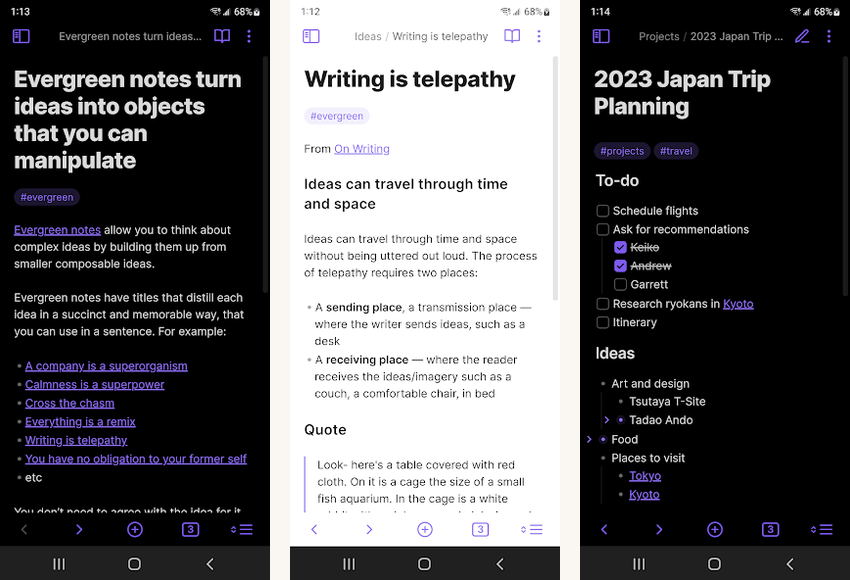
Obsidian stores your notes as plain Markdown files in a folder you own, which means no lock-in and nothing to lose if you ever walk away. It is a favorite among power users, as Android Authority found after a long stretch of using it, thanks to bidirectional links, a graph view, and a deep plugin ecosystem that lets it grow with you over years.
The blank canvas is also the catch: newcomers who just want a quick notes app can find it overwhelming at first. If you want the same local-first idea with everything free, Logseq is the close open-source alternative.
Highlights
⭐️ Best for: students, researchers, and anyone who wants a private notes vault they fully own
👎🏼 The catch: the plugin-heavy, blank-canvas approach has a real learning curve
💰 Pricing: Free for personal use; optional Sync from $4 per month; Publish from $8 per month
Key Features
- Local plain text: notes are standard Markdown files on your device, with no lock-in.
- Linked thinking: wikilinks and a graph view connect notes into a personal web.
- Plugins and themes: thousands of community add-ons reshape the app to fit you.
- Same vault everywhere: Android, iOS, and desktop, with optional encrypted sync.
6. Files by Google

If your phone shipped with an ad-filled file manager, swap in Files by Google. It is free and carries no ads, and it stays light while doing a lot: storage cleanup, fast search, offline sharing, a document scanner, and a PIN-locked Safe Folder, all in one official app. People clearly trust it, since it passed 5 billion downloads, according to 9to5Google.
It is deliberately simple, which becomes a limit the moment you need more. As Android Authority points out, there is no network access over SMB or FTP and no built-in encryption, so power users will want Solid Explorer instead. For most people on a new phone, Files is the safe default.
Highlights
⭐️ Best for: mainstream users who mostly want to clear space and find a download fast
👎🏼 The catch: it is shallow on purpose: no network protocols, no built-in file encryption
💰 Pricing: Free, with no ads and no in-app purchases
Key Features
- Free up space: cleanup cards flag junk, duplicates, and large files to reclaim storage.
- Offline sharing: fast, encrypted transfers to nearby devices with no connection needed.
- Document scanner: capture pages and save them as searchable PDFs.
- Safe Folder: a PIN or pattern-locked space for sensitive files.
7. Spike

Spike is the pick for anyone drowning in email. It turns the inbox into a chat-style view, threading messages by person instead of by subject line, and layers AI summaries on top so you can triage without opening every message. Spike says its AI Feed condenses unread mail and attachments into a single stream you can act on at a glance.
It is a genuine rethink of email rather than a drop-in replacement, so there is a learning curve, and some reviewers find the interface and search take adjustment. If that sounds like more than you want, the Gmail app most phones already ship is the obvious fallback.
Highlights
⭐️ Best for: high-volume email users who want their inbox to read like a chat
👎🏼 The catch: the conversation-first layout takes time to get used to
💰 Pricing: Free for one address; Pro from $6 per month, billed annually
Key Features
- Conversational inbox: mail threads render like a chat, grouped by contact.
- AI summaries: long threads and attachments get condensed so you can act fast.
- Built-in writing help: draft replies and summarize messages inside the inbox.
- Works with your accounts: Gmail, Outlook, iCloud, and other IMAP providers, plus calendars.
8. VLC

VLC plays virtually any video or audio file you throw at it, with no ads, no in-app purchases, and no tracking, which makes it the safest default media player for a fresh phone. It falls back to software decoding to open the odd files a stock player refuses, handles subtitles better than almost anything else, and streams from network shares over SMB and FTP. It is also fully open source.
The one honest knock, as Android Police puts it, is that the interface looks dated next to sleeker modern players. If a cleaner look matters more to you than raw compatibility, Next Player is a tidy, ad-free alternative.
Highlights
⭐️ Best for: anyone who keeps downloaded movies, music, or unusual file formats on their phone
👎🏼 The catch: the interface looks dated and does not follow Material You
💰 Pricing: Free and open source, with no ads or in-app purchases
Key Features
- Plays everything: handles nearly any video or audio format, plus DVDs and network streams.
- Software decoding: opens files and codecs the stock player gives up on.
- Strong subtitles: built-in and external subtitle support, with multiple audio tracks.
- Gesture controls: swipe for volume, brightness, and seeking, with a built-in equalizer.
9. Forest

Forest turns focus into a small game: start a session and a tree grows on screen; leave the app to scroll and the tree withers. That simple stake is surprisingly effective against compulsive phone checking, and Android Police still lists it among the best focus timers on Android. Stick with it and the in-app coins fund real trees; Forest says the program has paid for more than two million.
The honest barrier is the paywall: the free tier carries ads, and the full experience is behind a small unlock, with a few extras gated behind a separate subscription. If you want the same idea entirely free, Focus Friend is the alternative XDA recommends.
Highlights
⭐️ Best for: people who lose hours to compulsive phone-checking and like a visible reward
👎🏼 The catch: the free tier shows ads, and the full feature set sits behind a paid unlock
💰 Pricing: Free with ads; one-time Pro unlock around $1.99 (some stores still list it as paid up front)
Key Features
- Grow-a-tree timer: a focus session plants a tree that dies if you leave the app.
- App blocking: allowlist what you can open while the timer runs.
- Focus stats: session history and tags show where your attention actually goes.
- Real trees: in-app coins fund actual tree planting through a long-running partnership.
10. Google Photos

Set up Google Photos on day one and your camera roll backs itself up automatically, with search and cross-device sync that simply work. The catch is space. Google ended free unlimited backup a few years ago, and new photos now count against the 15 GB that comes with your account, which is shared with Gmail and Drive. On a phone that shoots a lot of video, that fills up faster than you expect.
It is still the easiest backup to live with, and the free 15 GB is fine for casual shooters; heavy ones will end up paying for a Google One plan. If you would rather self-host and skip the cloud rent, open-source options like Immich and Ente Photos are worth a look.
Highlights
⭐️ Best for: anyone who would be gutted to lose their photos to a dropped or lost phone
👎🏼 The catch: the free 15 GB is shared with Gmail and Drive, so it fills up quickly
💰 Pricing: Free up to 15 GB shared; paid Google One plans above that
Key Features
- Automatic backup: photos and video upload in the background once it is set up.
- Smart search: find photos by people, places, or things without tagging them.
- Cross-device sync: your library follows you to any phone, tablet, or browser.
- Editing built in: solid editing tools and automatic organization.
The verdict

If you install only one, make it Bitwarden; nothing else on this list closes a bigger gap in a stock setup. Add Aegis right after it, and the security side of a new phone is sorted. The other eight fill in browsing, typing, notes, files, email, media, focus, and backup. Spend an afternoon setting them up and you will not have to think about any of these choices again for years.
What people usually ask
- Which app should I install first on a new phone?
A password manager. Bitwarden is free, works everywhere, and fixes the riskiest habit most people have, reusing passwords. Add the Aegis authenticator straight after. - Are all of these apps free?
Most are fully free. Bitwarden, Obsidian, Spike, and Forest have optional paid tiers, and Forest charges a small one-time unlock, but every pick is useful without paying. - Do I really need both a password manager and an authenticator?
Yes. The password manager stores your passwords; the authenticator holds the second-step codes that protect an account even if a password leaks. They cover different risks. - Is Google Photos still free?
There is a free tier of 15 GB shared across Gmail, Drive, and Photos. Google ended its free unlimited backup a while back, so heavy shooters will eventually need a paid plan. - Is SwiftKey still available?
Yes, it is still on the Play Store and maintained. Android Authority reports that syncing now needs a Microsoft account, but the keyboard works fine without signing in.
How we tested
We set these apps up and used them across Pixel, Samsung, and OnePlus hardware, living with each one rather than spot-checking a feature list. Some links here may earn BFA a small commission, which never changes which apps we recommend.