
Get more from BestForAndroid on Google


I open YouTube to find and watch a 12-minute thesis. I closed it 45 minutes late,r having watched nothing but Shorts. Filled with regret about the lost time. Every single time. Though thanks to the recent YouTube update, that era is seemingly over.
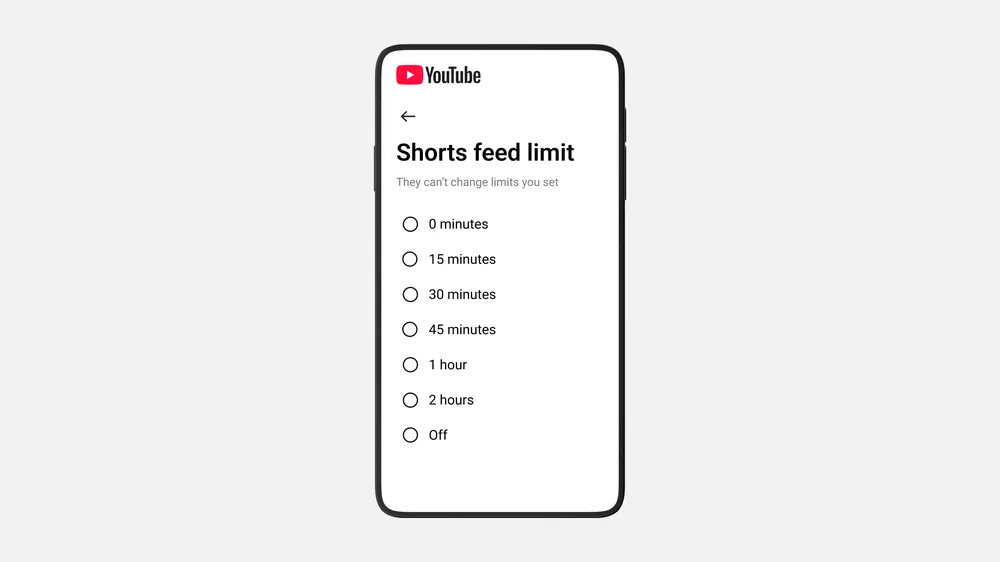
YouTube has expanded its Shorts timer feature to include a zero-minute option, which effectively lets you turn off YouTube Shorts entirely, removing the Shorts tab from your homepage feed. YouTube confirmed the option is live for all parents and is currently rolling out in phases to everyone.
This is genuinely one of the most user-friendly moves a social platform has made in years, and I say that without sarcasm.
Here is how you can find the Shorts feed limit feature and enable it right away.
Go to Settings > Time Management > under the Daily limits section, toggle the Shorts feed limit > set it to zero minutes.
Just like that, the Shorts tab disappears from your feeds. No more being sucked into the algorithmic rabbit hole the second you open YouTube.
Previously, the lowest limit was 15 minutes; now they have introduced 0 minutes as a new low, which effectively turns off the Shorts feed immediately.
I do want to be honest about what this actually does and doesn’t do, though.
Shorts will still appear in your Subscriptions feed, and you can still open them via direct links. This setting mainly affects the Shorts tab and the Home feed. So, it is not a permanent way to turn off Shorts entirely, but for most people, that’s where the damage was happening anyway. The home feed is where the scroll trap lives.
For parents, on the other hand, the limit notification is not dismissible. This means kids cannot just tap past it and continue scrolling. That is a meaningful and helpful distinction. Adult users can, however, override the time limit if they choose, which I respect, but the friction alone will stop a lot of mindless scrolling.
I think what makes this feel significant to me is what it signals culturally. At a time when platforms like TikTok, Instagram, and Snapchat are doubling down on short-form video to drive quick engagement, YouTube is quietly acknowledging the other side of the equation: fatigue.
Ultimately, users don’t just want more content; they want more control. And that is indeed a mature acknowledgement coming from one of the biggest content platforms.
I have already set mine to zero. My screen time reports are soon going to look very different, and honestly, I’m looking forward to being more mindful of where and how I am spending my time.


