In This Article
Follow BestForAndroid


Short answer: For most people, Fax by Municorn is the easiest pick, with a dedicated number and unlimited send and receive on a paid plan. Genius Fax wins if you only fax now and then, since it charges per page with no subscription. Fax.Plus suits regulated work, iFax adds e-signing, and Simple Fax and Tiny Fax cover light, occasional use.

Fax refuses to die. Healthcare, law, and finance still lean on it because a faxed document leaves a clean paper trail that holds up later, and plenty of clinics and courthouses will not accept anything else. Faxing has been around for well over a century, yet it keeps outliving every prediction of its demise.
The good news is that you no longer need the machine. A fax app turns your phone into a sending station, scans a page through the camera, adds an e-signature, and drops a copy in cloud storage. Tom’s Guide has tested the major online fax services for years and lands on the same short list of names you will see below, which is a fair sign the category has settled.
We installed and worked through six of the most popular Android fax apps to see which ones earn the install. Below is a quick comparison, then a section on each pick with current pricing, the standout feature, and a download link for Android and iOS.
| App | Free tier? | Best for |
|---|---|---|
| Fax by Municorn | Trial only | An easy all-rounder with a dedicated number |
| Fax.Plus | Yes, 10 pages | Regulated work that needs certifications |
| iFax | Trial only | E-signing and reusable templates |
| Simple Fax | 15 starter credits | Light, occasional faxing |
| Tiny Fax | Credit packs | A clean, budget interface |
| Genius Fax | Pay as you go | Rare faxes with no subscription |
1. Fax by Municorn (Best Choice)

Best for: anyone who wants one tidy app that just works, with a real fax number attached.
Fax by Municorn is the pick we hand to most people because it hides none of the basics behind setup. Each paid plan comes with an included dedicated US fax number, so you can both send and receive, and the app tracks delivery in real time instead of leaving you guessing. The built-in scanner uses your camera to capture a clean page, and you can pull files straight from Google Drive, iCloud, or Dropbox.
On the trust side it is HIPAA-compliant and uses AES 256-bit encryption, with 24/7 live support if a fax stalls. It runs on Android, iPhone, and Mac, handles international numbers, and reads like a polished consumer app rather than a dusty office tool. This is also the Android fax app the team reached for first when we needed to fire off a signed contract in a hurry.
Pricing is subscription-based and runs from a weekly Pro plan up to a yearly Pro plan that covers unlimited send and receive; the yearly option is the obvious value if you fax often. There is no permanent free tier, only a trial, so treat it as a paid tool from the start.
- Included dedicated US fax number on every paid plan
- Real-time delivery tracking so you know a fax landed
- HIPAA-compliant with AES 256-bit encryption
- Built-in camera scanner plus Drive, iCloud, and Dropbox links
- Works across Android, iOS, and Mac with 24/7 support
Get it here: Download for Android or Download for iOS.
2. Fax.Plus

Best for: regulated teams that have to prove a document was sent securely.
Fax.Plus is the grown-up of the group. It is built for businesses that answer to auditors, with ISO 27001, SOC 2 Type II, GDPR, CCPA, and PCI DSS coverage, plus TLS 1.3 in transit. You can port an existing fax number, run multiple numbers and users, choose the region your data lives in, and wire it into a workflow through its API. It reaches across Android, iOS, a Chrome extension, desktop, web, email, and Google Workspace, so a team rarely outgrows it.
One thing worth flagging: the headline plan prices, from a Basic tier up to Enterprise, are the rates you pay when you commit to annual billing. Month-to-month costs more, so compare like with like before you sign up. HIPAA and a signed BAA sit on the Enterprise tier rather than the cheaper plans, which matters if compliance is the whole reason you are here. The free plan covers 10 pages, and failed faxes resend for free. The verdict is consistent across independent testers too: reliable, business-first, and priced for teams rather than the odd page.
- ISO 27001, SOC 2 Type II, GDPR, CCPA, and PCI DSS coverage
- Number porting plus multiple numbers and users
- Choose the region where your faxes are stored
- Free plan of 10 pages and free resends of failed faxes
- HIPAA and a signed BAA on the Enterprise tier
Get it here: Download for Android or Download for iOS.
3. iFax

Best for: people who sign and send paperwork in volume and want templates ready to go.
iFax leans hard into the document side of faxing rather than treating it as a one-way pipe. You can e-sign right inside the app, track each document in real time, and reuse ready-made templates so a repeat fax takes seconds. Sync carries your history across devices, fax broadcast sends an encrypted batch to many recipients at once, and email confirmations tell you a fax actually arrived. It is HIPAA-compliant and runs on Android, iOS, Windows, macOS, and the web.
Pricing has crept up since this app first launched, so go in expecting a mid-range tool rather than a bargain. Plans start around the low teens per month on annual billing for the entry tier, climb to roughly the mid-twenties for the plan that adds receiving and the HIPAA features, and reach the low thirties for the top tier with the highest page allowance and the full compliance stack. Check the live store listing before you commit, since promotions move the numbers around.
- Built-in e-signing with real-time document tracking
- Reusable templates for faxes you send again and again
- Encrypted fax broadcast to many recipients at once
- Email delivery confirmations and cross-device sync
- HIPAA-compliant across Android, iOS, Windows, Mac, and web
Get it here: Download for Android or Download for iOS.
4. Simple Fax

Best for: a quick, no-commitment fax when you do not want a subscription.
Simple Fax lives up to its name. It sends documents, photos in JPG or PNG, receipts, PDFs, and plain text to destinations across more than a hundred countries, and it greets new users with 15 free starter credits, enough to send a single-page fax without paying a cent. The interface is stripped back, with a clear fax history, push notifications when something arrives, and a built-in scanner for paper originals.
The model mixes credits with subscriptions: you buy credit packs to send pages, and a subscription adds a dedicated US or Canada number so people can fax you back. Support is email-only, with no live chat, which is the trade-off for keeping things this light. Pricing on the credit packs and the subscription tiers shifts now and then, so glance at the live Play listing for the current figures before you commit.
- 15 free starter credits, enough for a single-page fax
- Sends documents, photos, receipts, PDFs, and text
- Reaches destinations across more than a hundred countries
- Built-in scanner with push notifications and a clear history
- Email-only support and a credit-plus-subscription model
Get it here: Download for Android or Download for iOS.
5. Tiny Fax

Best for: a clean, budget-minded interface for the odd fax.
Tiny Fax, from Appxy’s TinyWorks team, is the tidiest interface of the budget picks and sits around a 4.2-star rating on Google Play. It handles images and PDFs through a built-in scanner, sends single pages or batches, and uploads to Google Drive, iCloud, Dropbox, or Box. You also get timely send notifications and tools to group, organize, and archive what you have sent. Coverage runs to around 50 countries, so confirm your destination is on the list before you rely on it.
Pricing leans on a credit model, with packs you buy and spend per page, alongside subscription tiers if you fax regularly. The exact rates drift, and the older flat weekly-and-monthly figures floating around the web are not always current, so check the live Play listing for what you will actually pay today. For a phone that only faxes once in a while, the pay-per-page approach keeps the cost honest.
- Clean, beginner-friendly interface with a 4.2-star rating
- Single-page and batch sending through a built-in scanner
- Cloud upload to Google Drive, iCloud, Dropbox, and Box
- Grouping, organizing, and archiving for your fax history
- Credit packs plus subscription tiers across around 50 countries
Get it here: Download for Android or Download for iOS.
6. Genius Fax
Best for: faxing a handful of times a year without paying for a plan you barely touch.
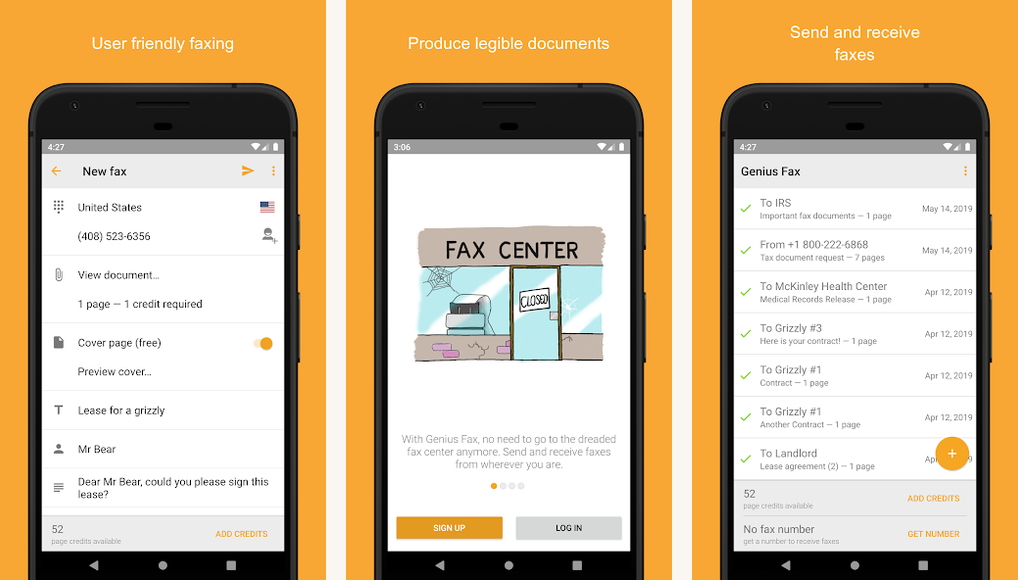
Genius Fax, from The Grizzly Labs, is the one to install if a subscription feels like overkill. It is pay-as-you-go: you load credits, send or receive across more than 40 countries, and the cost works out to roughly 19 cents a page when you buy in bulk, with a free cover page on every fax and credits that do not expire. Documents up to 50 MB go through, there is a built-in scanner, a web interface, and you can pull files from cloud or phone storage.
If you do want a permanent number for inbound faxes, a personal fax line starts at a few dollars a month, but you can skip it entirely and just pay for the pages you send. That makes it the cheapest way to fax once in a blue moon, and the no-expiry credits mean the money you load is never wasted.
- Pay-as-you-go pricing, around 19 cents a page in bulk
- Free cover page on every fax and credits that never expire
- Sends and receives across more than 40 countries
- Handles documents up to 50 MB with a built-in scanner
- Web interface plus cloud and phone-storage file picking
Get it here: Download for Android or Download for iOS.
How to Pick the Right One
The right fax app comes down to how often you fax and how much you care about compliance. If you want one app that handles everything and you do not mind paying for it, Fax by Municorn is the safe first install, with a dedicated number and unlimited send and receive on a paid plan. If you fax a handful of times a year, Genius Fax is the smarter buy, since paying roughly 19 cents a page beats a monthly plan you would forget you owned.
For regulated work in healthcare, law, or finance, Fax.Plus earns the premium with its stack of certifications and number porting; Tom’s Guide’s hands-on Fax.Plus review reaches the same call, and you can sanity-check the app against its live Google Play listing before you commit. iFax is the pick if e-signing and reusable templates save you real time, while Simple Fax and Tiny Fax cover light, occasional faxing without locking you into much. For the wider buyer’s view, Tom’s Guide has tested the major online fax services and lands on a similar shortlist.
A couple of practical notes before you install. Sending is usually cheap, but receiving almost always needs a dedicated number, so factor that in if people fax you back. Prices move with promotions, so treat the figures here as a guide and confirm the current rate on the store listing. Beyond that, any of these six will retire your old fax machine without much fuss.