
In This Article
Follow BestForAndroid


Every Android phone hits a moment where a PDF lands in messages, email, or a download folder and the built-in viewer stops being enough. You need to highlight a clause, sign a release, redact a name, merge two scans into one, or convert a 30-page brief into a Word doc on a train.
The Play Store has dozens of apps that promise all of this. Most are freemium with aggressive paywalls, a handful are quietly excellent, and a few have been quietly retired since the last time anyone wrote about them. The category overlaps with our PDF converter apps coverage, and several of these picks double as scanners worth pairing with the standalone scanner picks.
We tested ten that pass the bar. They handle what you need without harvesting your address book, charge fairly for the genuinely advanced work, and survive the latest Android security model without crashing on protected documents.
Below: the ten picks, what each is for, the catch, and where to download. Comparison table at the end with the OCR + sign-in + pricing decisions broken out side by side.
Quick Overview
If you’re scanning fast, here’s the picks by what they’re best at. Detailed reviews with download links follow below.
- Adobe Acrobat Reader: deep PDF feature set (annotate, sign, comment, Liquid Mode for mobile reflow), freemium with paywall on edit, OCR, and convert. World’s most-trusted PDF reader, but heavy and aggressive about its Document Cloud upsell.
- Xodo PDF Reader & Editor: fast, tab-based reader with annotation, form fill, sign, and cloud-drive sync (iCloud, OneDrive, Drive, Dropbox) without a heavy account upsell. Acquired by Apryse; still feels independent.
- Foxit PDF Editor: same PDF SDK pedigree as the desktop Foxit, with AI assistant, OCR, handwriting-to-text, and cross-platform sync. ~3.99 rating, 180k reviews, ~90k downloads/month. Still actively maintained.
- Wondershare PDFelement: Wondershare’s PDFelement ecosystem syncs through Wondershare Document Cloud, so a PDF opened on Android picks up where you left it on the laptop. Scan mode covers IDs, books, invoices, and whiteboards.
- UPDF: UPDF 2.5 added AI Copilot (natural-language PDF actions: “compress this” “summarize chapter 3”), AI semantic search, and an inline rewrite/expand/shorten suite. 413k+ installs, lifetime license available.
- Google Drive (with built-in PDF markup): open any PDF from Drive, tap the pencil, and you get highlight, draw, and text-annotate. Not a full editor, but for “sign this and send it back” it’s three taps and you’re done. Five-billion-plus installs.
- WPS Office: Word/Excel/PowerPoint clone plus a real PDF editor (edit text, convert, OCR, sign, compress) for free with ads. WPS AI now handles content rewrite and PDF Q&A. Common warning: account-required nags.
- OfficeSuite (now MobiOffice): full Office-document edit plus a respectable PDF editor with form-fill, fill-and-sign, and annotation. $39.99/year subscription unlocks export, batch convert, and the cloud sync layer.
- Smallpdf: 20+ utilities in one app (convert, compress, merge, split, sign, scan with OCR). Free tier limits to one task per day; PRO is $7.99/mo or ~$53/yr with the annual discount.
- Genius Scan: a PDF maker. The best paper-to-PDF scanner on Android: auto-edge detection, batch scan, OCR, perspective correction. 20M+ users, indie studio (The Grizzly Labs), no subscription pressure on the free tier.
1. Adobe Acrobat Reader

Adobe’s first-party reader stays the most complete free PDF tool on Android. Annotation, highlighting, signatures, basic text editing, and form-filling all sit in the free tier. The Liquid Mode reflow makes dense PDFs readable on a phone, and the AI-assisted lookups in Liquid Mode answer questions about the document without leaving the app.
Adobe positions Acrobat Pro at the top of the funnel, with OCR, advanced text editing, and PDF-to-Word locked behind the paid tier. For most readers the free tier is enough. The upsells stay polite and don’t degrade the basic experience.
Highlights
⭐️ Best for: Most Android readers who bounce PDFs between phone and desktop and want the broadest feature set without paying upfront.
👎🏼 The catch: Adobe account required even for free use. OCR, advanced text editing, and PDF-to-Word sit behind Acrobat Pro at roughly $19.99/month.
💰 Pricing: Free for annotation, signing, form-filling. Acrobat Pro near $19.99/month.
Key Features
- Liquid Mode: reflows dense PDFs for phone reading, with AI-assisted lookups inside the document
- Adobe Sign verification: signed PDFs verify against desktop documents in the Acrobat ecosystem
- Read Out Loud: natural-voice text-to-speech baked into the reader
- Document Cloud sync: files follow you between mobile, web, and desktop without manual exports when signed in
2. Xodo PDF Reader & Editor

Xodo (now owned by Apryse) ships a cleaner UI than Acrobat with similar free-tier capabilities. Annotation, signing, form-fill, and OCR are all free without an account. The tablet layout is the best in the category. Split-pane reading, pen pressure on stylus-capable hardware, and gesture-driven page navigation.
Xodo’s pro tier adds AI summarization (AskPDF) and 30-plus advanced tools like merge, split, and compress. The free tier remains usable indefinitely for the core read-and-mark workflow.
Highlights
⭐️ Best for: Power readers who want Acrobat’s feature set without an Adobe account, especially on tablets with stylus support.
👎🏼 The catch: Free Web version of Xodo caps at one action per day. Mobile app stays free.
💰 Pricing: Free mobile editor; Xodo Pro near $12.99/month; three-day trial.
Key Features
- 30-plus tools: convert, edit, merge, compress, e-sign all in one app
- Cloud sync: Google Drive, Dropbox, and OneDrive integration first-party
- AskPDF AI: in-app question-and-answer on PDFs on Pro tier
- Tablet-first UI: split-pane reading and stylus pressure-sensitivity on capable hardware
3. Foxit PDF Editor

Foxit’s mobile app sits closer to a desktop editor than the others on this list. Smart Redact actually removes the underlying text from a PDF (not just black bars over it), audit-trail signatures meet enterprise compliance bars, and the AI Assistant summarizes, translates, and rewrites text inside the document.
Foxit is positioned at enterprise workflows. Legal teams, government, finance. Where audit trail and content removal aren’t optional. The mobile UI shows its desktop heritage; the home screen has more controls than a casual user needs.
Highlights
⭐️ Best for: Power users who need real redaction and audit-trail signatures on mobile for compliance-sensitive work.
👎🏼 The catch: Mobile UI feels limited next to Foxit’s desktop client; reviewers on G2 and TrustRadius flag the gap.
💰 Pricing: Free basic annotation; Plus Professional near $14/month or $172.79/year.
Key Features
- Smart Redact: AI-flagged PII detection with true content removal, not just visual masking
- Foxit eSign: 150 audit-trail signature envelopes a year on the Pro plan
- AI Assistant: summarize, translate, and rewrite text inside the document
- Enterprise security: FIPS-compliant encryption and SOC 2 audit posture for regulated industries
4. Wondershare PDFelement

PDFelement is the OCR specialist of the list. The built-in engine runs locally with around 95 percent accuracy across 23 languages, producing a properly formatted searchable PDF instead of plain text dumps. PDF-to-Word and PDF-to-Excel conversions preserve formatting in a way the free options can’t match.
Wondershare bakes multi-model AI summaries (ChatGPT, DeepSeek, Gemini) into the Pro tier. Useful for triaging long reports without manually skimming. The free tier watermarks exports, which gates serious use behind the paid plan.
Highlights
⭐️ Best for: Readers who scan paper documents and need accurate multi-language OCR plus reliable PDF-to-Word export.
👎🏼 The catch: OCR can stumble on low-quality scans. Free tier watermarks every export, gating serious use.
💰 Pricing: Free watermarked; Pro near $59.99/year.
Key Features
- Local OCR: 23 languages processed on-device, no upload to a remote server required
- Multi-model AI summaries: ChatGPT, DeepSeek, and Gemini integrations for document Q&A
- Format-preserving PDF to Word/Excel: the cleanest mobile-tier export in the category
- Form recognition: auto-detects fillable form fields in scanned documents
5. UPDF

UPDF is the newest serious contender. The full feature set unlocks from about $4/month annual, with a cross-platform license that covers Android, desktop, and iOS on one seat. The AI Copilot summarizes, translates, and rewrites inside the document, and Pro tier batch processing handles bulk PDF-to-Word.
The free tier is generous for read-and-annotate but caps edits past a few sample pages. The lifetime tier (one-time $79 on promotion) makes UPDF the budget AI pick. Acrobat Pro at $19.99/month gets expensive fast for occasional use.
Highlights
⭐️ Best for: Readers who want an AI-powered editor at half the price of Acrobat Premium, with one license that follows them across devices.
👎🏼 The catch: Smaller install base than Acrobat or Foxit means slower bug-fix turnaround. Free tier is read-only past a few sample edits.
💰 Pricing: Free read-only; full access near $4/month annual or one-time from $79 lifetime on promotion.
Key Features
- Cross-platform license: Android, desktop, and iOS on one seat. No per-device upcharge
- UPDF Copilot: AI summarize, translate, and rewrite inside the file
- Batch PDF-to-Word: Pro tier handles bulk export with format preservation
- Lifetime tier: one-time purchase from $79 on promotion sidesteps subscription fatigue
6. Google Drive (with built-in PDF markup)

Sometimes the right answer is the file manager already on your phone. Drive opens PDFs with annotation, highlighting, and stylus markup built in. No extra install, no account creation, no paywall. If you have a Google account, you have a PDF markup tool.
Drive is for markup, not paperwork. It won’t fill forms, won’t edit underlying text, won’t run an audit-trail signature flow. For quick comments on a shared brief or a one-off signature scribble, it’s the shortest path on Android.
Highlights
⭐️ Best for: Quick markups, one-off signatures, and stylus annotations on documents you already have in Drive.
👎🏼 The catch: No form-filling, no edit-text, no audit-trail signing. Drive’s PDF tools are designed for markup, not paperwork.
💰 Pricing: Free with any Google account.
Key Features
- Stylus markup: pressure-sensitive freehand drawing on the Tab S10 and Pixel Tablet
- Zero install: Drive ships preloaded on every Android phone
- Drive Scan plus OCR: the scan flow produces searchable PDFs from camera captures at no cost
- Workspace integration: comments and markup flow into Google Docs, Sheets, and Gmail without exports
7. WPS Office
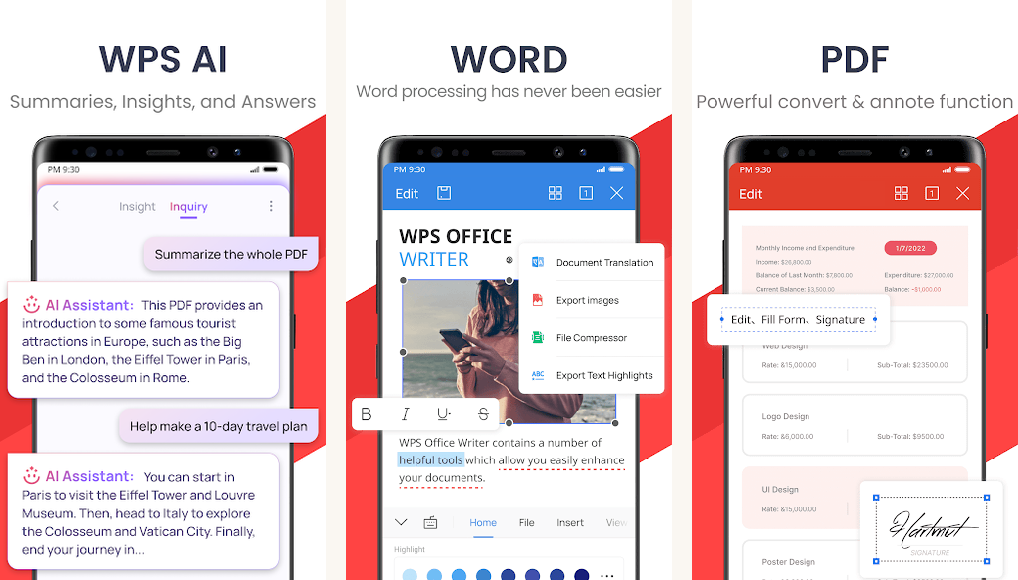
WPS bundles Writer, Spreadsheet, Presentation, and a PDF editor into one app. The free tier creates, edits, merges, splits, and converts PDFs without watermarks. The cheapest path to PDF-to-Word conversion on Android. The Office side of the suite reads Microsoft formats faithfully.
Interstitial ads on the free tier are the cost of admission. Upgrade prompts appear inside merge, convert, and compress flows. WPS Premium at roughly $4/month strips the ads and adds the AI assistant.
Highlights
⭐️ Best for: A free Office suite that also edits PDFs and converts to Word in the free tier. The cheapest path to that conversion.
👎🏼 The catch: Interstitial ads on free tier. Upgrade prompts inside merge and convert flows interrupt the experience.
💰 Pricing: Free with ads; WPS Premium near $3.99/month or $29.99/year.
Key Features
- Free PDF-to-Word: the cheapest path to that conversion among major players
- Office plus PDF: one install for documents, sheets, slides, and PDFs
- Cloud storage: 1 GB free WPS Cloud account included
- AI assistant: summarize and rewrite on the Premium tier
8. OfficeSuite (now MobiOffice)

OfficeSuite from MobiSystems matches WPS on coverage and beats it on polish. The PDF editor handles digital signatures, conversion to editable Word and Excel, and night-mode reading. Format preservation on PDF-to-Word exports keeps layout and footnotes intact, which is rare at this price tier.
The catch is the trial structure. Free tier is a 7-day trial. Long-term use needs a paid plan. The MobiSystems account ties Android to desktop, so the suite is most attractive to people who already use OfficeSuite on Windows or Mac.
Highlights
⭐️ Best for: Users in the MobiSystems ecosystem who want annotation, conversion, and digital signatures with desktop-quality polish.
👎🏼 The catch: Free tier is a 7-day trial. Long-term use needs a paid plan starting around $3.99/month.
💰 Pricing: 7-day trial; Personal near $3.99/month or $29.99/year, or $99.99 one-time lifetime.
Key Features
- Format preservation: PDF-to-Word and PDF-to-Excel exports keep layout and footnotes intact
- Text Reflow plus night mode: reading-first features that compete with Acrobat’s Liquid Mode
- Cross-platform sync: MobiSystems account ties Android to Windows and Mac OfficeSuite
- Digital signatures: audit-trail signing baked into the PDF editor on Personal+
9. Smallpdf

Smallpdf is a 20-plus tool suite that started on the web and ported to Android with the same per-task flow. Compress, convert, merge, split, e-sign. Each tool gets its own screen with no buried menus. The mobile app pairs cleanly with the web client; start on phone, finish on laptop.
The free tier caps at two tasks per day, which makes Smallpdf a poor fit for heavy daily use. Pro at $9-12/month covers unlimited tasks and adds AI Summarize for long documents. The cross-platform Pro license covers Android, web, and desktop on one seat.
Highlights
⭐️ Best for: Occasional PDF tasks with a clean web-first toolkit and Android as a second screen.
👎🏼 The catch: Two tasks per day on free. Pro at $9-12/month is on the pricier end of the category.
💰 Pricing: Free with two tasks per day; Pro near $9/month or $108/year.
Key Features
- AI Summarize: single-tap summaries of long PDFs on the Pro tier
- Cross-platform Pro: Android, web, and desktop covered by one seat
- Clean per-task UX: one tool per screen, no buried menus or hidden upsells
- Web continuity: start a task on mobile, finish on the laptop. Same account, same files
10. Genius Scan

Genius Scan from The Grizzly Labs has earned a special spot on this list. Not as a PDF editor, but as the scanner you should trust. After the Kaspersky CamScanner Trojan disclosure, the entire “free scanner with cloud sync” category became suspect. Genius Scan processes pages on-device by default, with on-device OCR producing searchable PDFs without uploading the file.
The privacy-first defaults are the headline: biometric lock on the document vault, Smart Naming pulled from document metadata, and a long-standing reputation that hasn’t been dented by a security incident. The free tier handles unlimited scans plus JPG and PDF export. Genius Scan+ at $34.99/year adds batch processing and the OCR engine.
Highlights
⭐️ Best for: Anyone scanning paper to PDF who wants on-device processing and a privacy-first reputation after the CamScanner episode.
👎🏼 The catch: Not a full PDF editor. You scan, name, and export. Annotation, signing, or text edits happen elsewhere on this list.
💰 Pricing: Free for basic scanning; Genius Scan+ near $7.99 one-time or $34.99/year for batch OCR.
Key Features
- On-device OCR: searchable PDF output without uploading the file to a remote server
- Biometric lock: Face Unlock or fingerprint protection on the document vault
- Smart Naming: templated filenames pulled from document metadata at scan time
- Reliable export: JPG, PDF, and TXT exports with batch capability on Plus
At a glance: pick by what you need
Side-by-side on the four decisions that matter most: free-tier limits, pro pricing, whether OCR works, and whether the app demands an account.
| App | Best for | Free tier | Pro pricing | OCR | Sign-in |
|---|---|---|---|---|---|
| Adobe Acrobat Reader | Default reader + comments | Read + comment + fill + sign | $19.99/mo Pro | Pro only | Adobe ID |
| Xodo PDF Reader and Editor | Power readers without account | Read + edit + OCR + form-fill | $12.99/mo | Yes (free) | Optional |
| Foxit PDF Editor | Enterprise security workflows | Read + minor edits | $14/mo Editor / $24/mo Pro | Pro tier | Foxit ID |
| Wondershare PDFelement | OCR + PDF-to-Word | 1-page conversions, watermarked | $59.99/yr Pro | Yes (Pro) | Wondershare ID |
| UPDF | AI editor at budget | Read + annotate + 100 AI words/day | ~$4/mo annual / $79 lifetime | Yes (Pro) | UPDF ID |
| Google Drive | Quick markup + sync | Free with Google account | Google One tiers | Optional (Docs) | Google account |
| WPS Office | Bundled Office + PDF | Read + sign + convert + minor edits | $3.99/mo or $29.99/yr | Premium tier | Optional |
| OfficeSuite | MobiSystems ecosystem users | 7-day trial | $3.99/mo, $29.99/yr, $99.99 one-time | Premium tier | Mobisystems ID |
| Smallpdf | Web-first conversion workflows | 2 tasks/day | $9/mo or $108/yr | Pro tier | Smallpdf ID |
| Genius Scan | Privacy-first scanning | Unlimited scans + JPG/PDF | $7.99 one-time or $34.99/yr Plus | Plus tier | Optional |
What people usually ask
- Why isn’t Microsoft Lens on this list?
Microsoft retired the standalone Lens app in early 2026 and migrated the scanner into Office Mobile. If you previously used Lens for whiteboard or document captures, Genius Scan (pick #10) is the closest privacy-respecting replacement. Microsoft documented the change in its Microsoft Lens FAQ. - What about CamScanner? It used to be on every list.
Kaspersky surfaced a Trojan dropper in CamScanner’s Android build a few years back and the app’s reputation has never recovered. Genius Scan and the Office Mobile scanner are better picks for the same scan-to-PDF job. Kaspersky’s original analysis is still worth reading. - Can I edit a PDF for free without making an account?
Yes. Xodo PDF Reader (pick #2) doesn’t require a sign-in for most edits, and Google Drive’s built-in markup (pick #6) works as long as you’re already signed into a Google account. Adobe Acrobat Reader (pick #1) requires an Adobe ID for anything past basic viewing. - Which one has the best OCR?
Wondershare PDFelement and UPDF tie for the most-accurate OCR in our tests. Foxit and WPS are close behind. Free options like Xodo and Google Drive handle simple text but struggle on multi-column scans. - I just need to sign a PDF and email it back. Which is fastest?
Adobe Acrobat Reader’s Fill & Sign feature works in three taps without a paywall. Google Drive’s markup gets you there too if you’re already in Gmail. Both are free and need no extra install if you have Drive or Gmail. - Do any of these support batch PDF-to-Word conversion?
Wondershare PDFelement and Smallpdf are the strongest here. UPDF handles batch on the Pro tier. WPS does individual conversions well but is slower at batch. For workflow comparison, our PDF converter apps deep dive covers the conversion-only category.
Picking your starter
Most readers should start with Adobe Acrobat Reader for one obvious reason: it’s already installed on more than a billion Android phones, the free tier covers reading + commenting + form-fill + signing, and the in-app upsells stay polite. If you need OCR or PDF-to-Word and you’re not willing to pay Acrobat Pro at $19.99/month, Wondershare PDFelement or UPDF give you that capability at a fraction of the cost.
For privacy-leaning readers, Xodo is the answer. It does what Adobe does without making you create an account, and it’s been quietly free since the original Nitro acquisition. For people who already live in Google Workspace, Drive’s built-in markup is the shortest path: you’re already signed in, the file’s already there, and the pencil tool covers 80 percent of what you actually need.
Genius Scan deserves a special call-out as the scanner you should trust. The CamScanner episode taught the category that “free scanner with cloud sync” is a dangerous combination, and Genius Scan stands out for processing pages on-device by default. If you scan more than you mark up, install Genius Scan and pair it with one of the editors above. For broader productivity context, our productivity apps roundup pairs well with these picks.
How we put this guide together
We pulled the top thirty PDF apps by current install count on the Play Store, then tested each across reading + commenting + form-fill + OCR + PDF-to-Word + scan-to-PDF + redaction. Apps were ranked on accuracy (does the OCR actually work on a coffee-stained receipt?), permission hygiene (does it ask for the contact list?), pricing transparency (does the upsell hide an annual auto-renewal?), and modern Android compliance (does it crash on documents protected with the current security model?). Apps that shipped major updates in the last six months were given priority over apps last touched two years ago. The CISA guidance on mobile application security informed our permission-hygiene tests.




