In This Article
💡 AI detection on Android in a nutshell
- What it is Lynote.ai, a browser based AI detector that runs on an Android phone with no app install and no account for a basic check.
- Why bother Semrush looked at 42,000 blog pages and found human written ones taking Google’s number one spot about 80% of the time, against roughly 9% for purely AI generated pages.
- What it measures Statistical predictability, not authorship. A high score marks flat writing. It does not prove a machine wrote it.
- Known blind spot Seven public detectors flagged 61.3% of writing by non native English speakers as AI generated, against 5.1% for native speakers.
- Use it for Finding your own weakest sections before you publish. Not for judging anyone else’s work.
There is a version of this article that opens with a dramatic claim about how AI has changed everything. You have read that article. We are going to skip it and get to the part that actually matters for Android users who produce content, whether that is blog posts, social media, academic assignments, or professional work.
The practical question is this. If you use AI to help you write, how do you know the output is good enough to publish? And if someone hands you a piece of writing and you are not sure how much of it came from a machine, what do you do?
The answer, increasingly, is to run it through a detection tool. Working from Android, you want something that loads fast, does not demand a complicated sign up, and returns a clear result rather than a wall of caveats.
One thing is worth settling before any of that. A detector does not identify authorship. It scores how statistically predictable your text is, and predictable text gets flagged whether a model produced it or a tired human did. That distinction runs underneath everything below.
Why Detection Matters for Content Creators
This is not only an academic integrity issue, though it certainly is that. Platforms, publications and employers screen content for AI generation now. Google’s own guidance rewards writing that demonstrates genuine experience and expertise, and deprioritises the statistically flat text that models produce by default. If you are creating content for any audience that takes quality seriously, knowing how your output reads to a detection system is practical information.
The numbers are worth knowing. Semrush classified 42,000 blog pages pulled from 20,000 keyword searches and found that the number one result was human written about 80% of the time, against roughly 9% for purely AI generated pages. That is an eight to one gap at the top of page one, and it narrows further down: AI content shows up far more often at positions two through four than at position one. Whatever else that says, it says the top spot is still being won by people.
It helps to know what a detector is actually reading. Most of them work on predictability and variation: how confidently a language model can guess your next word, and how much your sentence lengths move around. Human drafts wander. They run a nine word sentence into a thirty word one, drop in an oddly specific number, then double back to fix something. Model output is smoother than that, and smoothness is what the meter reads.
Running an AI detector app before you publish tells you where the problems are. A high AI probability on one section is not a judgment on your writing. It is a diagnostic, and it is usually pointing at the paragraph where your own thinking went missing.
What Makes Lynote Worth Using
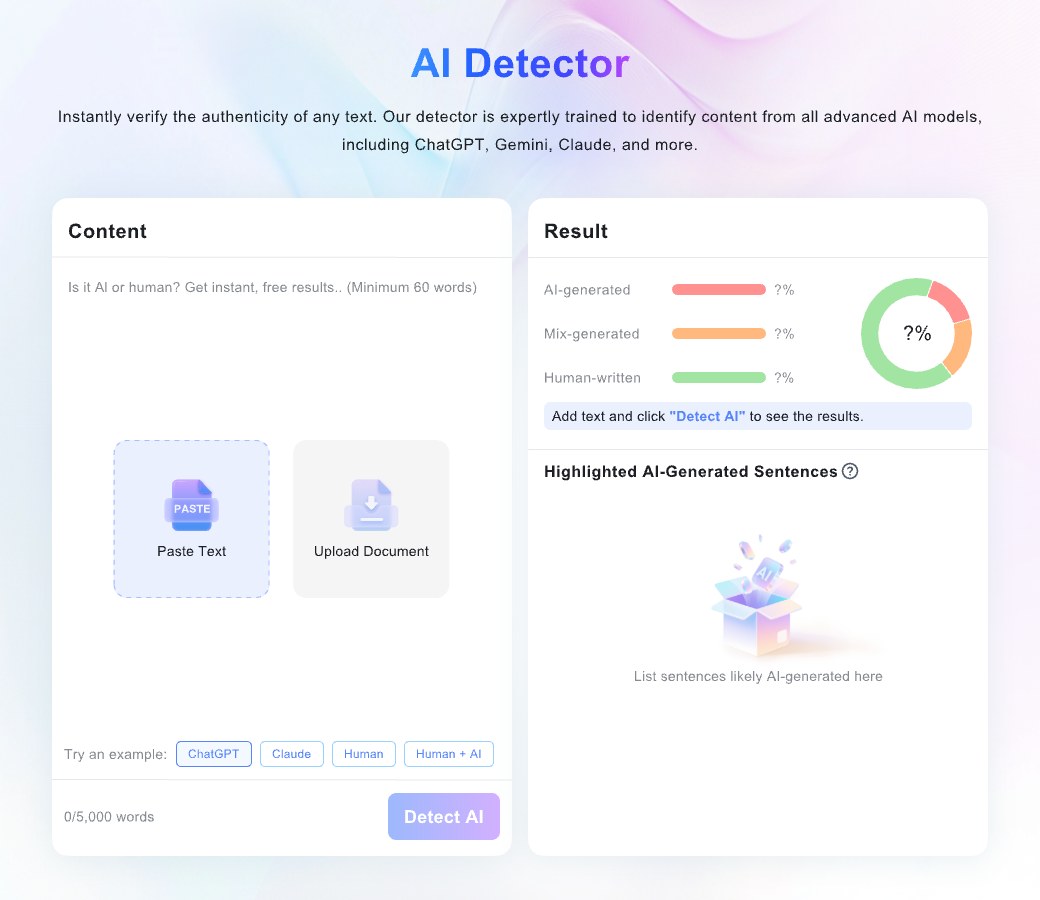
Lynote.ai is a web based tool that works cleanly from Android browsers without an app install. The interface is built for a phone screen, which matters when you are checking something you drafted on that phone ten minutes ago.
By the company’s account, the detection engine is calibrated against output from the major models, GPT-4, Claude, Gemini and DeepSeek, and cross referenced with the systems used in academic settings, including GPTZero, Turnitin and Copyleaks. What you get back is a section by section breakdown rather than one overall verdict, so you can see which parts are flagging and go straight to them.
Beyond detection, Lynote runs an AI humanizer that works at the structural level, varying sentence rhythm and formality rather than swapping synonyms, plus AI image detection and YouTube transcription. All of it runs in the browser, so there is no storage cost on the device and no app permissions to hand over.
Basic detection needs no account. You paste your text, you get your result, you decide what to do with it. That is roughly the whole difference between a tool you actually open and one you keep meaning to get around to.
| Feature | What it actually buys you |
|---|---|
| Runs in the browser | No install, no storage cost, no permissions. It works on a cheap phone and on a borrowed one. |
| No account for basic checks | You can test it on a single paragraph before deciding whether to trust it with anything. |
| Section by section scores | An edit list. This is the part worth reading; the overall percentage is the part worth ignoring. |
| A 5,000 word paste limit | Long pieces go through in chunks, which is fine for a post and tedious for a manuscript. |
| Built in humanizer | Genuinely useful on rhythm. Still no substitute for adding something only you know. |
Read the score, then discount it. Detection is probabilistic, and the errors are not spread evenly. A study published in Patterns ran essays through seven publicly available GPT detectors and found they flagged 61.3% of writing by non native English speakers as AI generated, against 5.1% for native speakers. The reason is mechanical rather than sinister: these tools reward linguistic variety, and a smaller working vocabulary looks like predictability to a model measuring how surprised it is by your next word.
That sets a hard ceiling on what any score can prove. It is a good instrument for finding your own flat paragraphs. It is a poor one for judging somebody else’s writing, and a dangerous one for accusing them.
The Practical Workflow
If you are producing AI assisted content on Android with any regularity, the loop is short enough to actually keep to.
- Draft wherever you already draft. Google Docs, Notion, Keep, whatever is already open on the phone.
- Copy the text and open Lynote.ai in Chrome or your browser of choice. Nothing to install.
- Paste and run detection. Read the section breakdown first; the headline number is the least useful thing on the screen.
- Take the two or three highest scoring passages and rewrite them with something only you could have written: a number you measured, a thing that went wrong, a preference you can defend.
- Re run it if you want the confirmation, then publish.
That adds maybe five minutes to a workflow that might otherwise ship content reading exactly like every other AI assisted piece competing for the same attention. Given how good that audience is getting at spotting it, consciously or not, five minutes is cheap.
One habit is worth building into step four. Do not rewrite to beat the meter. Editing for the score alone produces prose that is strange rather than human, all broken rhythm and no substance, and the next model update moves the target anyway. Rewrite to add information a reader cannot get somewhere else, and the score tends to follow on its own.
The Broader Point
Android users who create content are in the same position as everyone else producing work right now. AI tools are available, useful, and increasingly assumed to be part of the process. The differentiator is not whether you use them. It is whether what comes out the other side reflects your thinking, meets your standards, and holds up when somebody reads it closely.
How ordinary this has become is now measurable. Nature reported on an analysis finding signs of LLM assistance in at least 13.5% of a recent year’s biomedical abstracts, rising past 40% in some subfields. When that much published research carries the fingerprint, the interesting question stops being whether a machine helped and starts being whether anybody checked the result afterwards.
Lynote.ai gives you a way to know where you stand, and to fix it when the answer is not where you wanted it. For Android users who take their content seriously, that is worth keeping a tab open for.
✅ What to take away
- What it is A browser based detector that works on Android with no install, and no account for basic checks.
- Read it as A map of your flattest paragraphs, not a verdict on who wrote them.
- The blind spot Non native English gets flagged far more often. A score is never grounds for an accusation.
- The actual fix Add the specifics only you have. Rewriting to beat the meter produces odd text and chases a target that moves with every model update.