In This Article

Android development doesn’t have to come with an expensive setup, but only the right one. Several tools, including Android Studio, emulators and test environments, just make the system slower and weaker. This is why choosing the right budget laptops for Android development is important from the beginning.
Most developers look for a few basics while choosing a laptop; however, everyone should check the processor, RAM and SSD storage. Checking these features can get you smoother performance on Android app development laptops, especially when running builds or switching between tasks.
Keeping that in mind, here are 5 budget-friendly options that you can consider if you want to be an Android developer.
1. HP 15s (Ryzen 5)
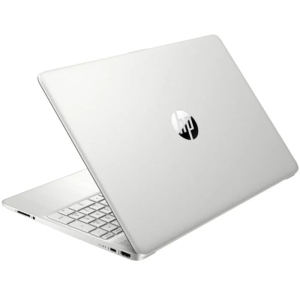
The HP 15s is one of the best choices for beginners who are interested in Android development. This laptop provides steady performance for coding, supports multitasking and comes with an affordable price tag.
Specifications:
| Processor | AMD Ryzen 5 5500U |
| RAM | 8GB |
| Storage | 512 GB SSD |
| Display | 15.6 inches FHD |
| Price | $420 – ₹40k |
Apart from offering an amazing processor, the laptop also offers multitasking without lag. This is a great option for beginners and it is one of the best laptops for app development.
2. ASUS VivoBook 15
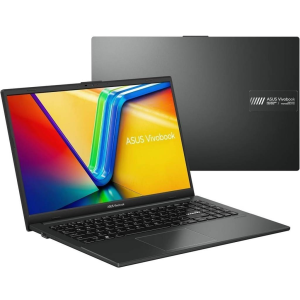
The Asus VivoBook 15 combines performance with portability and makes it one of the best laptops in the market right now. It is reliable and helps you to multitask without any lag.
Specifications-
| Processor | Intel Core i5 11th Gen |
| RAM | 8GB |
| Storage | 512GB SSD |
| Display | 15.6-inch Full HD |
| Price | $545 – ₹52k |
Looking for a faster and portable laptop? This is one of the best choices for you. The laptop offers everything that one needs and the bonus point is that it doesn’t come with a very heavy price tag. Go to the website, check the specifications and make an informed decision.
3. Lenovo IdeaPad Slim 3
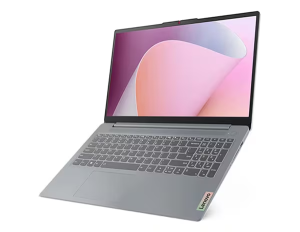
Lenovo has always been a reliable brand option in the budget range, which makes it a popular choice for students and developers. The devices of this company are known for offering reliable performance and practical configurations for everyday use.
Specifications
| Processor | Intel Core i5 12th Gen |
| RAM | 8GB (expandable) |
| Storage | 512 GB SSD |
| Display | 15.6-inch Full HD |
| Price | $577 -₹55k |
Lenovo is a great choice for people who want to upgrade their skills without overspending. The laptop is a good choice for multitasking and allows you to upgrade RAM, which makes it last longer. That makes it an excellent choice of cheap laptops for programmers.
While the laptop is an affordable choice, you can still check out CouponzGuru to make it even more economical. The platform offers discount deals and coupon codes that make the overall cost more budget-friendly and affordable.
4. Acer Aspire 5
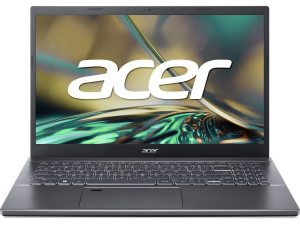
The Acer Aspire 5 is a little more geared toward performance and will do well if you expect to be doing more demanding work in the future.
Specifications:
| Processor | Intel Core i5 12th Gen |
| RAM | 8GB (expandable to 16GB) |
| Storage | 512GB SSD |
| Display | 15.6-inch Full HD IPS |
| Price | $629 – ₹60k |
It performs even better while running emulators and bigger projects, and also allows you to expand later when needed. It is well-suited for the requirements of Android development tools.
5. Dell Inspiron 15
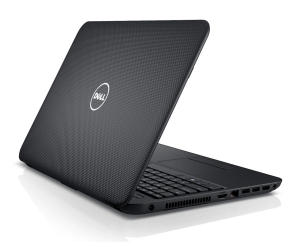
The Dell Inspiron 15 emphasises durability and consistent performance over eye-catching design. It is built for the long haul.
Specifications:
| Processor | Intel Core i5 11th Gen |
| RAM | 8GB |
| Storage | 512GB SSD |
| Display | 15.6-inch Full HD |
| Price | $600 – ₹58k |
It can take long coding sessions without slowing down and is a reliable choice in the best budget laptops for coding.
Features to Prioritize
Choosing a budget laptop is not only about price. Android developers should also focus on features that improve coding speed and daily performance. A laptop with the right hardware can save time, reduce lag, and make development much smoother.
- RAM Capacity: At least 8GB RAM is recommended, but 16GB is better for running emulators, browsers, and coding tools together.
- Processor Power: A modern Intel Core i5 or AMD Ryzen 5 processor helps Android Studio run faster and handles multiple tasks smoothly.
- SSD Storage: SSDs load apps and projects much faster than traditional hard drives and improve overall system speed.
- Battery Backup: Long battery life is useful for students and developers who work in classes, cafes, or while traveling.
- Upgrade Options: Laptops with expandable RAM or storage give better long-term value and can handle future development needs.
- Cooling System: Good cooling prevents overheating during long coding sessions and keeps performance stable.
Final Words

You don’t need to spend a lot to start with Android development. The key is to choose a laptop that can handle your daily tasks and won’t slow you down.
A good combination of processor, RAM and SSD storage can make your laptop smoother and prevent it from lagging. The options described above are practical choices for anyone who wants budget laptops for Android development without breaking the bank.