In This Article
Follow BestForAndroid


Short answer: An OTT box streams everything over your home internet, so think Roku, Amazon Fire TV, Apple TV, or a Google TV Streamer. A set-top box pulls channels from cable, satellite, or IPTV through a provider. OTT wins on apps, choice, and price; a set-top box still wins when you want rock-steady live TV that does not flinch when the internet does.

Walk into any living room and the way people watch has quietly flipped. Streaming now pulls in roughly half of all TV time in the United States, and Nielsen’s monthly measurement shows it passed cable and broadcast combined for the first time not long ago. That shift is exactly why the OTT-box versus set-top-box question keeps coming up: most homes are deciding whether to keep the provider box or hand the TV over to a small streaming puck instead.
The names get blurry fast, which does not help. People say streaming stick, smart-TV box, cable box, and IPTV box as if they mean the same thing. They do not. The cleanest way to tell them apart is to ask one question: where does the picture actually come from? An OTT box reaches out over your home internet for it. A set-top box waits for a managed signal a provider sends down a cable, a dish, or an IPTV line.
If you want the vendor framing, inorain’s primer on what counts as an OTT box walks through the hardware from an operator’s angle. The short version for a viewer at home is below, with the real devices named and the trade-offs spelled out.
What an OTT box and a set-top box actually are
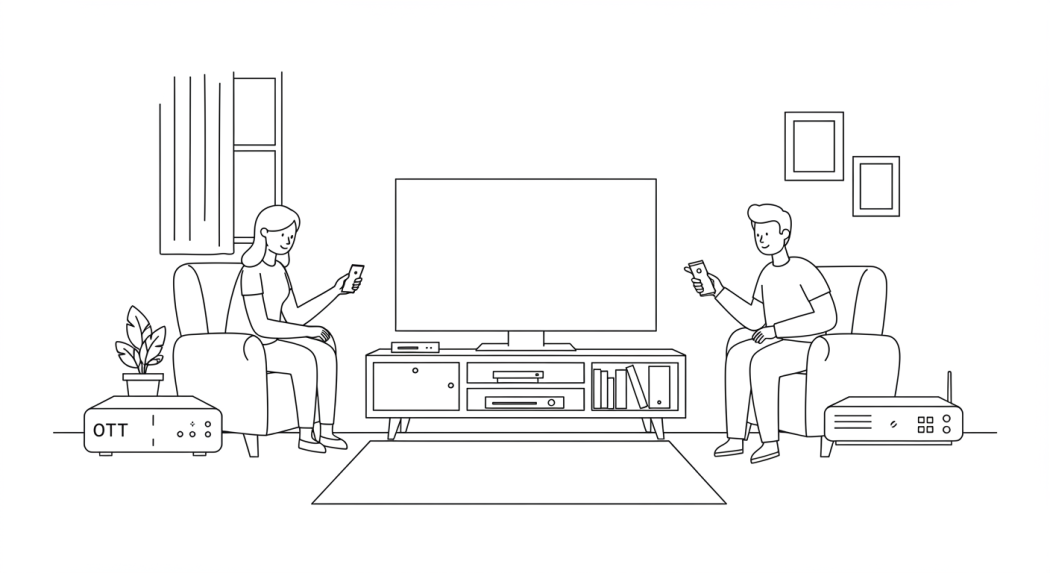
An OTT box, short for over-the-top, sends video straight across the open internet and skips the traditional broadcast chain entirely. That is the same OTT idea behind any streaming app, just in a box that hangs off your TV. You install apps, browse libraries, and watch on demand, all without a provider in the middle deciding what shows up.
The boxes themselves are names you already know. Roku’s Streaming Stick and Ultra, the Amazon Fire TV Stick, Apple TV 4K, the Google TV Streamer, and the enthusiast-grade NVIDIA Shield all do this job. Roku and Amazon dominate the field, holding most of the streaming-player share in US homes between them, which is why those two interfaces feel so familiar even on a TV you have never owned.
A set-top box plays a different role. It sits between your TV and a media or telecom provider, decoding a satellite, cable, or IPTV signal that arrives ready to watch. The operator hands you the box already configured, so it is plug-and-go but locked down. You get the channels in your plan and not much room to change anything, which is the trade you make for a service that simply works the moment it is switched on.
How they deliver content: open internet versus a managed network

Everything else flows from that one difference in plumbing. A set-top box runs on a closed, managed system. The provider controls the channels, the picture quality, and even when a service is available, because the signal travels over infrastructure built for exactly that purpose. The upside is steadiness: bandwidth is effectively reserved, so the feed holds firm even when the household’s Wi-Fi is busy with something else.
An OTT box rides whatever broadband or fiber you already pay for, which is freeing and a little fragile at once. Quality tracks your connection. On a healthy line you get clean 4K; on a slow or crowded one you can hit buffering or a resolution drop, and a house full of people streaming at once makes it more likely. The trade is real but small for most homes, and it shows up most on live sports and other fast motion.
Picture quality is where the gap narrows. Both sides handle HD and 4K comfortably now. Streaming leans on smart compression, usually HEVC, to squeeze a sharp picture down a thinner pipe without an obvious quality hit, which is what keeps 4K watchable on a connection that is good rather than great. A set-top box gets its steadiness from the reserved bandwidth instead, so the picture varies less but the ceiling is similar.
Features, apps, and the way the two are merging

Day to day, the two feel different the moment you pick up the remote. A set-top box gives you linear channels, an electronic program guide laid out as a schedule, and usually some recording plus PIN-locked parental controls. It is the familiar grid-and-channel-number experience. An OTT box opens onto a wall of apps instead, with cross-app search, personalized recommendations, voice control, smart-home tie-ins, and even casual gaming on some models.
Here a common myth needs correcting. OTT boxes are often described as Android devices, but that is only part of the picture. Many do run Android TV or Google TV, yet Roku OS, Amazon’s Fire OS, and Apple’s tvOS are just as common, and each is its own world with its own app store and quirks. The platform you land on shapes the experience more than the spec sheet does, so it is worth knowing which one a box uses before you buy.
The more interesting trend is that the line is blurring. Hybrid devices now fold live TV and streaming into one box, so an IPTV unit might carry a slimmed-down program guide alongside the apps, and a streaming platform might pipe in live channels next to its on-demand catalog. If you want a clear sense of where each platform lands, Engadget keeps a running roundup of the best streaming devices you can buy today, and Tom’s Guide pits Roku, Fire TV, Chromecast, and Apple TV head to head if you have narrowed it down to the big four.
OTT box vs set-top box at a glance
Strip away the marketing and the choice comes down to a handful of trade-offs. The table below lines them up side by side so you can see where each box earns its place.
| What matters | OTT box | Set-top box |
|---|---|---|
| Delivery | Over your home internet, no provider needed | Cable, satellite, or IPTV from a provider |
| Content | Streaming apps, on-demand libraries, some live | Provider channels, an EPG, limited on-demand |
| Examples | Roku, Amazon Fire TV, Apple TV, Google TV Streamer | Cable and satellite operator boxes, IPTV units |
| Quality | Up to 4K, tracks your connection speed | Up to 4K, steady on reserved bandwidth |
| Cost | Cheaper, often ad-supported, no fixed plan | Usually a fixed monthly subscription |
| Flexibility | You install and arrange apps yourself | Provider-controlled, little to customize |
The cost line is where most people feel the difference. Cord-cutters who lean on streaming boxes tend to spend a fraction of what a full cable household pays each month, and the majority of US homes have already moved off traditional pay-TV. That is the gravity pulling toward OTT, even before you weigh up the bigger app selection.
Which one should you pick
For most people setting up a TV today, an OTT streaming box is the sensible default. It costs little up front, asks for no contract, opens onto nearly every app worth having, and keeps getting software updates long after you buy it. A Roku or Fire TV Stick turns an aging television into a modern streamer for the price of a couple of takeout meals, and a Google TV Streamer or Apple TV 4K steps that up for anyone who wants a slicker, faster interface.
A set-top box still earns its keep in specific homes. If you watch a lot of live TV, lean on a provider’s DVR, or sit on an internet connection that wobbles, the reserved bandwidth and managed signal of a cable, satellite, or IPTV box buy you a steadiness streaming cannot always promise. Sports-heavy households and anyone in a patchy-broadband area are the clearest cases for keeping one.