
In This Article
Follow BestForAndroid


Fitness apps do more with less now. Wear OS 5 brought genuinely useful on-device coaching to the Pixel Watch 3 and Galaxy Watch 7, Android’s Health Connect finally lets your apps share data without proprietary integrations, and a wave of standalone lifting and running apps quietly overtook the older fitness platforms. Most readers do not need a $20-a-month all-in-one. Two or three focused apps cost less and work better.
The ten picks below are the ones worth installing on a Pixel 9 or Galaxy S25 today. They are grouped by what they actually do best: lifting, running, walking, wearable sync, calorie tracking. None require an expensive subscription to be useful. Most have free tiers that cover more than newcomers expect. For a deeper look at the running-specific side of this stack, see our deep dive on the best Android running apps.
If you want a deeper reference for how Health Connect works underneath all of this, see Google Health’s Health Connect documentation.
Quick Overview
Scanning fast? Here’s the line-up by what each one does best.
- Strong: Cleanest lifting tracker in the category. Plate-by-plate logging, rest timers, CSV export.
- Hevy: Free lifting tracker that has quietly caught up. Wear OS, body heatmaps, import from Strong.
- Strava: The default for runs and rides. Segment leaderboards, social feed, every wearable plugs in.
- Nike Run Club: Free guided runs and audio coaching. The friendliest on-ramp for new runners.
- Adidas Running: Runtastic’s successor. Strong for cross-training and Runtastic Pro routines that pre-existed Adidas.
- MapMyRun: Under Armour’s run+walk tracker. Voice coaching, gear-tracking, and shoe-mileage alerts.
- Garmin Connect: The companion app to any Garmin watch. Best body-battery and recovery metrics in the category.
- Samsung Health: The Galaxy phone’s built-in hub. Body composition via Galaxy Watch BIA sensor.
- Google Fit: The Android summary dashboard, free, Health Connect compatible. Boring but necessary.
- MyFitnessPal: Still the largest food database for calorie counting. Health Connect integration carries it.
1. Strong

Strong is the iOS-and-Android weightlifting app that took the top of the App Store charts in 2020 and stayed there. The interface is the cleanest in the category. Plate-by-plate tracking, rest timers, a plate calculator, and a body-measurement log are all in the free tier. The two-dollar-a-month Pro tier unlocks unlimited custom routines plus Wear OS and Apple Watch companion apps that make logging during a set actually pleasant.
If you take strength training seriously, the data export is the killer feature. You can pull a full CSV of every lift and analyse trends in a spreadsheet, which the closed data ecosystems of Fitbod and Centr do not match. Strong is the pick for readers who already know what they want to train and need a clean log.
Highlights
⭐️ Best for: Lifters who know their program and want the cleanest plate-by-plate log on Android.
👎🏼 The catch: Free tier caps custom routines at three. Pro unlocks unlimited, but at $4.99/month it is the priciest lifting tracker on this list.
💰 Pricing: Free with three-routine cap. Pro $4.99/month or $29.99/year.
Key Features
- Plate-by-plate logging: tap the bar to add weight; rest timer auto-starts when a set logs.
- Wear OS companion: Pro tier puts the log on your wrist so you do not pull out a phone between sets.
- CSV data export: full history download for anyone who wants to crunch trends in a spreadsheet.
- Routine builder: superset support, drop sets, and AMRAP markers all native, no plugins.
2. Hevy
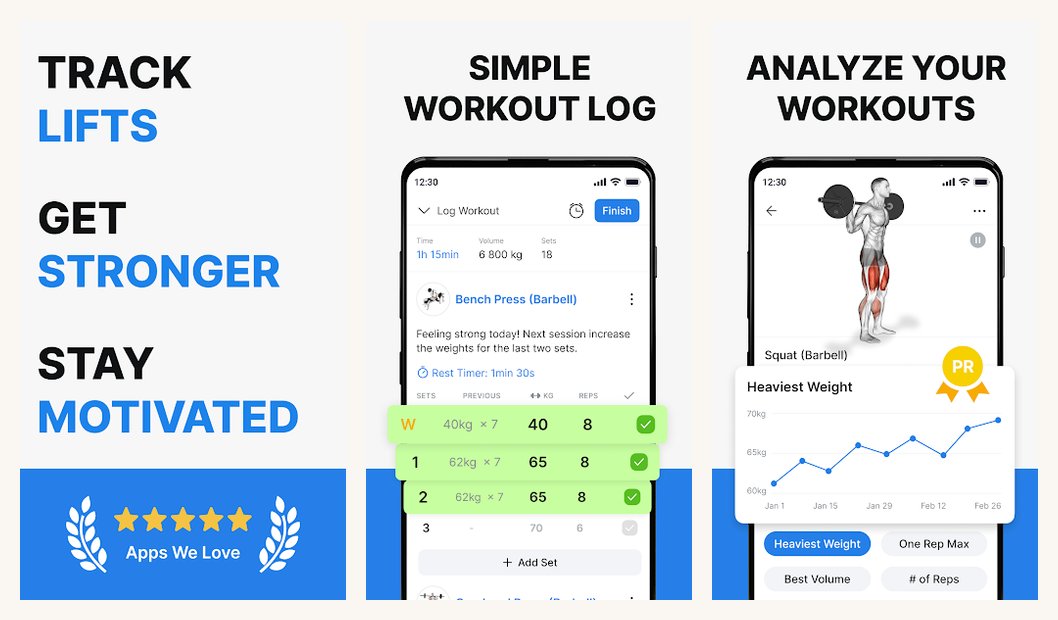
Hevy is the free competitor to Strong that has been quietly catching up. The interface is slightly busier but the feature set is genuinely free, including Wear OS support, plate calculator, and full custom routine creation. The 2025 release added body-part heat maps, AI-generated routine suggestions, and a templates library you can import from Strong.
Pick Hevy if budget matters or if you want a built-in social layer for sharing PRs and watching friends train. The Pro tier adds advanced analytics and AI coach for $4.99/month, but the free version stays usable indefinitely and is the most generous free tier in the category.
Highlights
⭐️ Best for: Lifters who want Strong’s feature set without the paywall, or who like watching friends’ logs in a feed.
👎🏼 The catch: Slightly busier UI than Strong. The social feed can feel like Instagram for gym selfies if you follow the wrong people.
💰 Pricing: Free with full features. Hevy Pro $4.99/month for AI coach + advanced analytics.
Key Features
- Unlimited free routines: the entire feature set is on the free tier; Pro is a quality-of-life upgrade.
- Strong importer: CSV import maps your Strong routines and history in one step, no manual rebuild.
- Wear OS app: set logging on the wrist with rest-timer haptics; pairs with Galaxy Watch 7 and Pixel Watch 3.
- Body heatmaps: visual breakdown of which muscle groups your weekly volume actually hits.
3. Strava

Strava remains the default for runs and rides despite the 2024 paywall that hid segment leaderboards behind the subscription. The free tier still covers basic recording, feed posts, and route mapping. The $11.99/month Premium tier unlocks segment rankings, route planning, training-load analysis, and the on-device coaching plans that finally caught up to Garmin’s.
Strava integrates with every fitness wearable worth owning, including Garmin, Wahoo, Coros, Suunto, Polar, Apple Watch, and the Pixel Watch through Health Connect. The social feed is the stickiness; runs that no one sees rarely translate into long-term habit. For most cardio-first readers, this is the one paid subscription that earns the slot.
Highlights
⭐️ Best for: Runners and cyclists who want a real social loop and segment competition with strangers in their neighborhood.
👎🏼 The catch: The 2024 paywall move was unpopular. Segment leaderboards, the original draw, now require Premium.
💰 Pricing: Free basic recording. Premium $11.99/month or $79.99/year.
Key Features
- Segment leaderboards: compete on neighborhood KOM/QOM rankings; the original Strava draw, now Premium-only.
- Universal wearable sync: Garmin, Wahoo, Coros, Suunto, Polar, Apple Watch, Pixel Watch all feed in.
- Route planning: Premium feature that builds a route around your home with elevation and surface preferences.
- Athlete Intelligence: AI-written summaries of your workouts; debatable value but novel category move.
4. Nike Run Club

Nike Run Club is the friendliest on-ramp for someone who has never been a runner. Guided audio runs led by Nike coaches and athletes cover the full spectrum: first-5K plans, easy recovery jogs, long runs with pace targets, marathon plans. Every guided run is free. No paywall. No upsell.
The trade-off is the social feed is anaemic compared to Strava and the analytical depth is shallow. NRC is built for the doing, not the tracking. Pair it with Strava (record in both, race in Strava) or with Garmin Connect (record on the watch, send the file to NRC for the coaching context) and you get the best of both ends. Readers who want AI-driven coaching for strength work specifically should look at our Mad Muscles review. Different category, but the AI-coach genre is moving fast.
Highlights
⭐️ Best for: New runners who want a free coach in their ears, or marathon trainees who want structured plans without a separate subscription.
👎🏼 The catch: Shallow analytics compared to Strava and Garmin. Wear OS support is limited.
💰 Pricing: Completely free. No premium tier. No ads.
Key Features
- Guided runs: hundreds of audio-coached sessions ranging from 5K-debut to advanced marathon pace work.
- Adaptive training plans: 5K, 10K, half-marathon, and marathon plans that adjust to missed sessions.
- Pace and distance challenges: in-app challenges with achievement badges and runner-club leaderboards.
- Health Connect support: exports runs to Health Connect so Strava and Garmin can pull them in.
5. Adidas Running
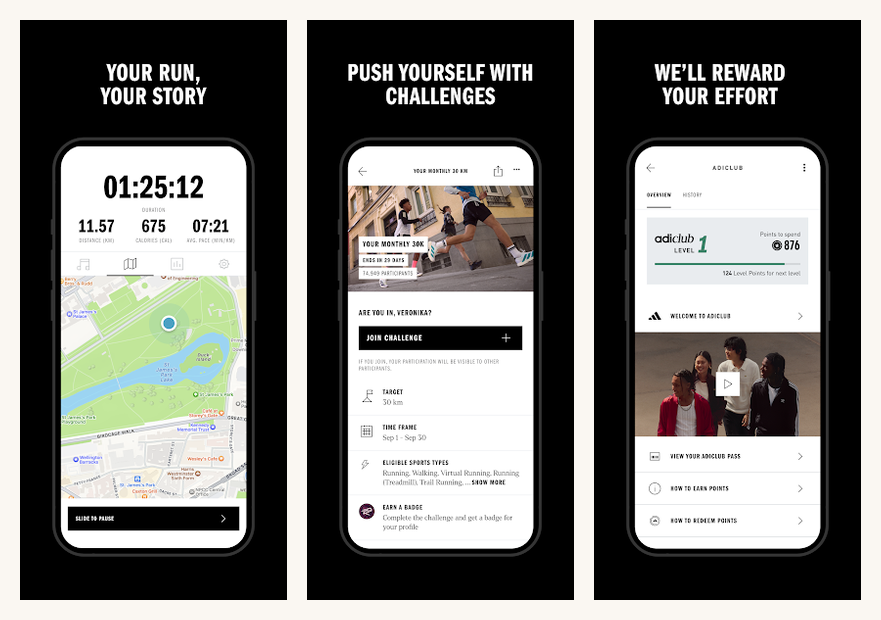
Adidas Running is the modern face of Runtastic, which Adidas bought in 2015 and rebranded. The strengths Runtastic users remember are still there: granular activity tracking across 90+ sports, voice-coaching, training plans for distances from 5K to marathon, and the cleanest desktop dashboard for reviewing long-term training load.
It is the cross-training pick for readers whose week mixes running, cycling, and gym work and who want one app to log all of it without the Strava social fatigue. The $9.99/month Premium tier unlocks personalized plans, interval coaching, and the offline-map mode that matters on a long Sunday route.
Highlights
⭐️ Best for: Cross-trainers who run, cycle, and lift and want one log app without Strava’s social pressure.
👎🏼 The catch: Most of the genuinely useful features (personalised plans, offline maps, interval coaching) are behind Premium.
💰 Pricing: Free basic tier. Premium $9.99/month or $49.99/year.
Key Features
- 90+ activity types: from trail running to indoor cycling to kayaking, one app logs all of them.
- Voice coaching: real-time pace and distance feedback through Bluetooth headphones during the run.
- Story Running: guided runs as narrative audio dramas, an under-marketed Runtastic legacy feature.
- Web dashboard: the cleanest desktop review interface in the category for weekly training-load context.
6. MapMyRun
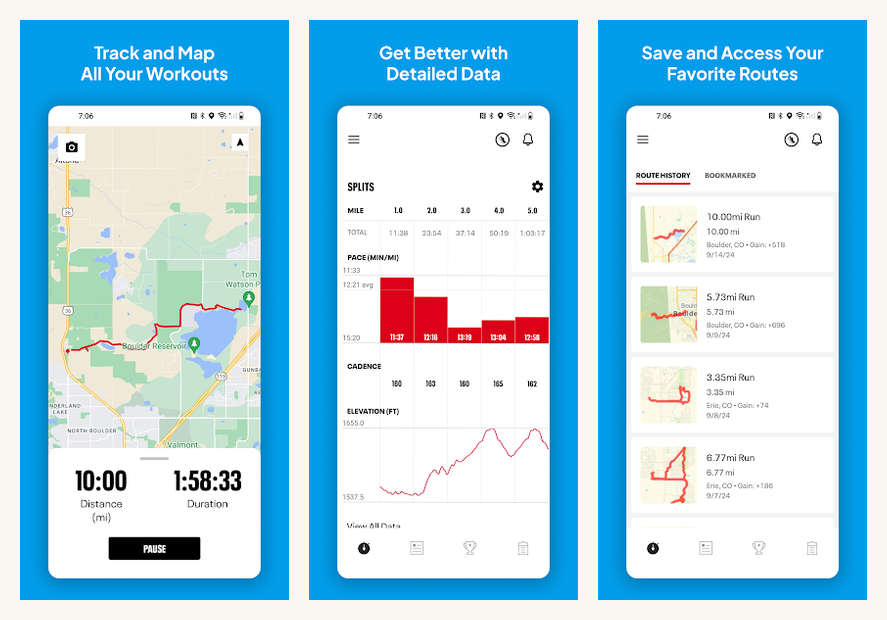
MapMyRun is Under Armour’s run-and-walk tracker, the survivor of the MapMyFitness family the company bought in 2013. It pairs with UA’s HOVR connected shoes to give you cadence and stride-length data without a watch, which is a category-rare integration if you already own the shoes.
The shoe-mileage tracker quietly warns you when a pair has hit 400 miles, which matters for injury prevention more than the runner-influencers admit. Voice coaching, route discovery, and gear logs cover everything Strava covers in the free tier and arguably more. The trade-off is the social network is small. You probably do not know anyone using it.
Highlights
⭐️ Best for: Runners who own UA HOVR shoes, or anyone who wants Strava’s tracking depth without Strava’s social loop.
👎🏼 The catch: Smaller social network than Strava. MVP (premium) tier nudge is more aggressive than peers.
💰 Pricing: Free basic recording. MVP $5.99/month or $29.99/year.
Key Features
- UA HOVR shoe integration: connected shoes report cadence and stride length without needing a watch.
- Shoe-mileage alerts: warns you at 400 miles per pair, the rough mileage threshold for injury risk.
- Voice coaching: real-time split, pace, and distance callouts every kilometer or mile.
- Route discovery: finds popular routes from other users near your location, useful when travelling.
7. Garmin Connect
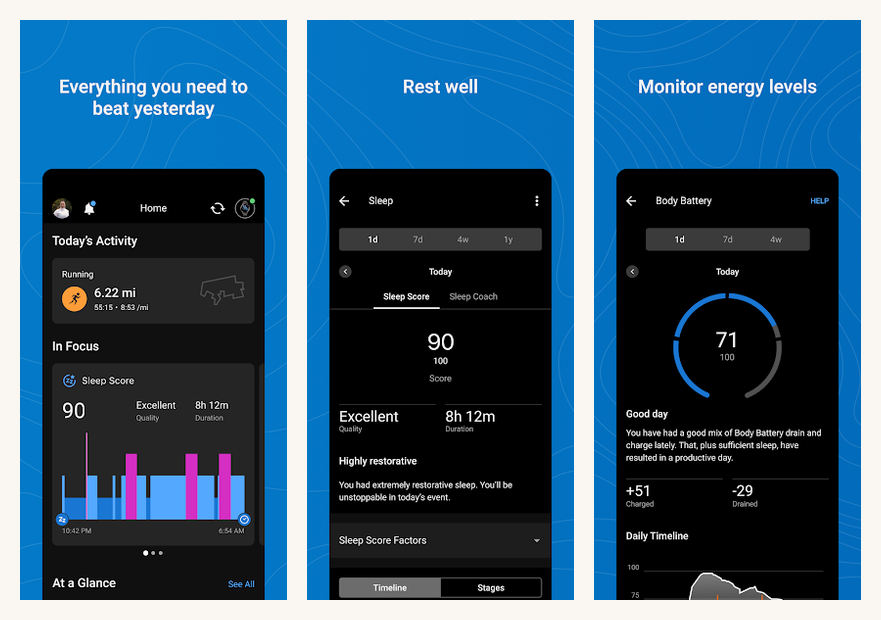
Garmin Connect is the companion app to any Garmin watch and the deepest analytical environment in the category. Body Battery, Training Readiness, Training Load, sleep score, HRV trends, and VO2 max estimation all show up here. If you own a Forerunner, Fenix, Venu, or Vivoactive, this is the dashboard.
Even without a Garmin watch, the app is usable as a generic activity tracker, but you give up most of the deep metrics. The honest pitch is: buy a Garmin watch first, then the app becomes useful. The free tier is forever, no Garmin Premium subscription exists, which makes the total cost of ownership lower than Strava once you amortize the watch.
Highlights
⭐️ Best for: Garmin watch owners. The companion app is the reason to buy the watch.
👎🏼 The catch: Without a Garmin watch, the value drops sharply. The standalone phone-only experience is limited.
💰 Pricing: Free. No premium tier, the watch is the cost.
Key Features
- Body Battery: all-day energy score based on HRV, stress, sleep, and activity, the most useful single metric.
- Training Readiness: a morning recommendation that says whether today is for hard intervals or recovery jog.
- Sleep stages and HRV: the most accurate consumer wearable sleep analysis short of a polysomnogram lab.
- Connect IQ store: watch faces, data fields, and apps that extend the watch’s behavior without a phone.
8. Samsung Health
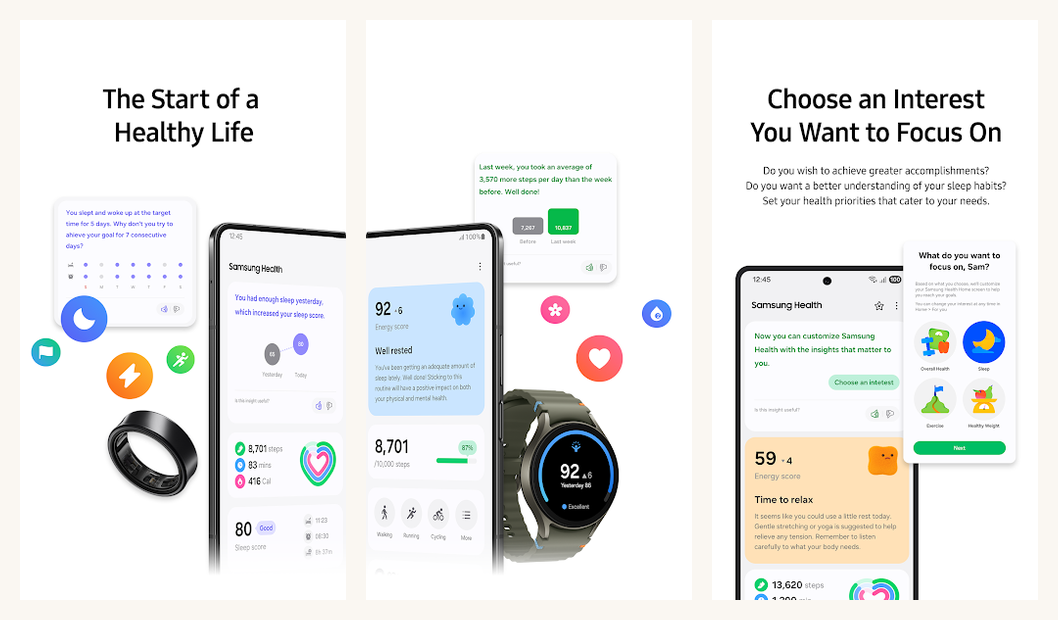
Samsung Health is the built-in fitness app on every Galaxy phone, and it has quietly become competitive with Apple Health on iOS. The Galaxy Watch 7 paired with Samsung Health unlocks bioelectrical impedance analysis (BIA) for body composition, full sleep-stage tracking with skin-temperature trends, and the irregular-heart-rhythm alert that Apple Watch users take for granted.
For Galaxy phone and Galaxy Watch owners, Samsung Health is the default and rarely needs replacement. The Health Connect bridge means runs logged in Samsung Health flow to Strava and Garmin Connect automatically. Non-Galaxy Android users can still install it, but a chunk of the deep features require Samsung’s wearables. The sleep-coaching side of the app pairs well with an alarm app that respects your sleep stages.
Highlights
⭐️ Best for: Galaxy phone and Galaxy Watch owners. Body composition via BIA is the standout feature.
👎🏼 The catch: Most premium features require a Galaxy Watch. The phone-only experience is shallower.
💰 Pricing: Free. No paid tier.
Key Features
- BIA body composition: Galaxy Watch 7’s biosensor reads fat percentage, muscle mass, and water levels.
- Sleep coaching: 30-day program with personalized recommendations and Galaxy-aware sleep-mode automation.
- Health Connect bridge: runs, walks, and weight from Samsung Health flow to every other Health Connect app.
- Cycle tracking and ovulation: integrated cycle log with Galaxy Watch skin-temperature data for fertility windows.
9. Google Fit

Google Fit is the Android summary dashboard, free, Health Connect compatible, and refreshingly boring. After Google migrated the underlying data layer to Health Connect in 2024, Google Fit became less a destination app and more a clean visual surface for the data Health Connect already holds. Steps, heart points, sleep, weight, activity minutes, all in one summary view.
The genuine value is the Health Connect bridge underneath. Enable it in Settings under Connected apps, approve which apps can read and write, and your running app, sleep tracker, scale app, and strength logger share a coherent picture. Set it up once and forget it. This is the boring layer that makes the rest of the stack work.
Highlights
⭐️ Best for: Pixel users and anyone who wants a unified Android dashboard without committing to a wearable ecosystem.
👎🏼 The catch: The app itself is thin. The real work happens in Health Connect, which is invisible by design.
💰 Pricing: Completely free.
Key Features
- Heart Points: Google’s activity score that maps WHO-recommended moderate-to-vigorous activity targets.
- Health Connect hub: the platform-level data layer that lets every fitness app share a single source of truth.
- Pixel Watch integration: the default companion for Pixel Watch and Wear OS smartwatches.
- Privacy controls: on-device data, per-app permissions, audit trail for which app read which data type.
10. MyFitnessPal

MyFitnessPal still has the largest food database in the category, north of 14 million items, which keeps it ahead of competitors despite the 2024 price hike that pushed budget-conscious users to Cronometer. The barcode scanner, recipe importer, and restaurant-menu items make daily logging tolerable rather than tedious.
The honest read: if you genuinely want to count calories, the database size matters more than the prettier interface of a competitor. Health Connect support means logs sync to Strava and Samsung Health automatically, which closes the loop between input (calories) and output (workouts). Premium adds macro tracking, custom goals, and an ad-free experience for the same price as Strava Premium.
Highlights
⭐️ Best for: Anyone seriously counting calories or macros. The food database is the largest and most useful.
👎🏼 The catch: The 2024 paywall move locked barcode scanning behind Premium. Cronometer is cheaper and more accurate for micronutrients.
💰 Pricing: Free with ads. Premium $9.99/month or $79.99/year.
Key Features
- 14M+ food database: the largest in the category; entries are user-contributed but the popular items are accurate.
- Barcode scanner: point the camera at any packaged food to auto-log calories and macros.
- Recipe importer: paste any recipe URL and the app pulls the ingredients into a single calculated log entry.
- Health Connect integration: calorie logs sync to Strava and Samsung Health for closed-loop tracking.
At a glance: pick by what you actually do
Side-by-side on the dimensions that matter: what the app tracks, what the free tier covers, what the paid tier costs, and whether it talks to Health Connect.
| App | Best for | Free tier | Paid tier | Health Connect |
|---|---|---|---|---|
| Strong | Lifting log | 3 routines max | $4.99/month | No |
| Hevy | Free lifting log | Full features | $4.99/month Pro | Yes |
| Strava | Runs and rides | Basic recording | $11.99/month | Yes |
| Nike Run Club | Guided running | Fully free | None | Yes |
| Adidas Running | Cross-training | Basic logging | $9.99/month | Yes |
| MapMyRun | Run + UA shoes | Basic recording | $5.99/month MVP | Yes |
| Garmin Connect | Garmin watches | Fully free | None | Yes |
| Samsung Health | Galaxy ecosystem | Fully free | None | Yes |
| Google Fit | Android hub | Fully free | None | Native |
| MyFitnessPal | Calorie counting | Limited (ads) | $9.99/month | Yes |
What people usually ask
- Do I need a smartwatch to make these apps useful?
Not for any of them to work, but a Pixel Watch, Galaxy Watch, or Garmin makes auto-logging much easier. Running and lifting both benefit from a wrist device, but you can start with just a phone in the armband. - How accurate are the calorie counts these apps show?
Within roughly twenty percent of reality on a good day. Wearable-derived calorie counts use heart rate and movement; bodyweight-only estimates from the phone are educated guesses. Trust trends across a week, not single workout numbers. - Does Health Connect leak my data to Google?
Health Connect runs on-device and you approve every app that reads or writes. Google does not see Health Connect data unless you also have Google Fit installed and have agreed to its sync. Audit the connected apps list quarterly. See Google’s Health Connect privacy explainer for the full data flow. - What about MyFitnessPal and the calorie-counter wars?
MyFitnessPal still has the largest food database, which keeps it ahead of competitors. The price hike pushed budget-conscious users to Cronometer, which is more accurate for micronutrients but has a smaller catalogue. If you eat mostly home-cooked, Cronometer wins; if you eat out, MyFitnessPal’s restaurant entries make daily logging tolerable. - Can I run Strava and Nike Run Club at the same time?
Yes. Both apps can record the same workout independently, and either can also pull the file from Health Connect after a session logged by the other. Many runners record on a Garmin watch, post to Strava for social, and have Nike Run Club ingest the same run for guided plans. - Is Strong worth paying for over free Hevy?
If the cleaner UI matters and you live inside the app five days a week, yes. If you log occasionally or want the social layer, Hevy’s free tier is more generous than Strong’s. There is a CSV import path from Strong to Hevy if you want to test-switch without losing history. The YouTube side-by-side reviews are the best way to feel the difference before committing.
Picking your stack
The right Android fitness stack is small and disciplined. Pick one strength tracker (Strong if you can pay, Hevy if you cannot), one cardio tracker (Strava for social or Nike Run Club for coaching), and let Health Connect glue them together. Add specialty apps only for the things you actually do consistently.
If you already own a Garmin watch, Garmin Connect replaces most of the rest. If you live inside the Galaxy ecosystem, Samsung Health does the same. If you want to count calories, MyFitnessPal earns the slot through database size alone. The combination that works for ninety percent of readers: Strong or Hevy plus Strava plus Google Fit as the silent hub, all three free or under five dollars a month.
The best app is the one you open every day. Pick two or three, not ten. The reader-tracking stack that fails is the one that demands a daily ritual across too many surfaces. Pick the apps that fit naturally into the workouts you already do, and treat the rest of this list as reference.
How we put this guide together
Our editors ran each app for at least two weeks on Pixel 9 and Galaxy S25 hardware running Android 16, paired with a Pixel Watch 3 and Galaxy Watch 7 where wearable integration mattered. Calorie-counter accuracy was sanity-checked against published food databases, and Health Connect data flow was verified end-to-end across three apps in each direction. Pricing reflects Play Store list prices at the time of publication; subscription tiers are reviewed every quarter.




