In This Article
Follow BestForAndroid


💡 Short answer
- Pixel or Galaxy phoneTry the free built-in recorder first: Google Recorder labels speakers in US English, Samsung’s transcribes many languages.
- 10 hours a monthGranola’s free plan publishes no hour limit, though Granola calls it a free taste. Notta Pro is $13.49 billed monthly, with 30 hours.
- 30 hours a monthNotta Pro covers exactly 30 hours; Otter Business is $30 a month billed monthly.
- Privacy firstMeetGeek doesn’t train AI on your meetings unless you opt in.
Three things to check before you pick
- Speakers: six of the seven say they can tell voices apart (Google Meet’s help page doesn’t mention speakers), but only the Pixel and Galaxy recorders have been tested by anyone independent.
- Hours: price by how many hours you record a month; the free plans run from 3 minutes per recording to no published hour limit.
- Audio: Otter trains its AI on de-identified audio recordings and on transcripts, which its policy says may contain personal information. Granola trains on anonymised data unless you opt out.
You put your phone in the middle of the table, five people talk for an hour, and afterwards you want to know who agreed to what. That’s a different job from a bot that joins a Zoom call. The phone’s mic has to pick out voices across a room, and the app has to sort them into speakers, decisions and tasks.
Six of the seven say they can do that on Android; Google Meet’s help page doesn’t mention speakers. None of them has been put through an independent test of speaker labels in a real room that I could find, so every accuracy figure for a third-party app here is the company’s own claim. The only outside tests cover the free recorders on Pixel and Galaxy phones, which is one more reason to try those first.
Start Here
| Your situation | Start with | Why |
|---|---|---|
| Pixel 6 or later, US English | Google Recorder | Free, labels speakers |
| Galaxy phone with Galaxy AI | Samsung Voice Recorder | Free, many languages |
| Up to 10 hours, no budget | Granola | Free plan publishes no hour limit |
| About 30 hours a month | Notta | Most hours for the money |
| Live transcript in the room | Otter | Writes as people talk |
| Audio kept out of AI training | MeetGeek | No training unless you opt in |
| Already on paid Workspace | Google Meet | Notes land in a Google Doc |
Free comes first for a reason. If your phone already records and labels speakers, a week of real meetings will tell you more than any spec sheet. Move to a paid app when you hit a wall: a language Recorder doesn’t label, a summary that skips tasks, or meetings longer than an hour.
What Each App Costs
Hours are what you pay for. Ten hours a month is two or three one-hour meetings a week; 30 hours is about an hour and a half every working day. Prices below are each company’s regular list prices, checked in November.
Free plans and their caps
| App | Free each month | Per recording |
|---|---|---|
| Otter | 300 min a month | 30 min |
| Granola | No hour limit published; 30 days of history | Not stated |
| Notta | 120 min a month | 3 min |
| MeetGeek | 3 hours a month | 2 hours |
| Google Recorder | Free on Pixel | Summaries: 5 min to 1 hour |
| Samsung Voice Recorder | Free on Galaxy AI phones | Not stated |
| Google Meet | No free option; Workspace Business Standard is $14 per user a month on a yearly plan, checked in November | 15 min or more advised |
About 10 hours a month
| App | Plan | Billed monthly | Billed yearly, per month |
|---|---|---|---|
| Granola | Basic (free) | $0 (Basic; Granola calls it ‘a free taste’ and publishes no meeting limit) | $0 |
| Notta | Pro | $13.49 | $8.17 |
| Otter | Pro | $16.99 | $8.33 |
| MeetGeek | Pro | $15.99 | $9.99 |
About 30 hours a month
| App | Plan | Billed monthly | Billed yearly, per month |
|---|---|---|---|
| Notta | Pro (exactly 30 h) | $13.49 | $8.17 |
| MeetGeek | Pro plus 10 extra hours | $20.99 | $14.99 |
| Notta | Business (unlimited) | $27.99 | $16.67 |
| Otter | Business | $30 | $19.99 |
Otter Pro stops at 20 hours, which is why it jumps to Business at 30. The MeetGeek row is my sum of Pro plus 10 extra hours at the listed $0.50 an hour; its page doesn’t say how extra hours are billed on a yearly plan, so check before you count on that figure. The built-in recorders cost nothing at any number of hours.
What the Tests Show
Independent tests, and what’s missing
- Third-party apps: I found no independent test of speaker labels for a room recording on Android for Otter, Granola, Notta, MeetGeek or any other app here. Their accuracy figures are vendor claims.
- Pixel against Galaxy: in a Tom’s Guide test of two people reading a scene, both phones found two speakers but let lines bleed together. Samsung won; the Pixel sometimes put whole lines under the wrong person.
- Bigger rooms: a Tom’s Guide column reports a Pixel 10 Pro inventing a fourth speaker in a three-person interview.
- Google Meet in person: no hands-on test found yet; coverage so far explains how it works.
So expect to fix speaker names by hand, whichever app you use. The more people in the room, the more turns land under the wrong name, and nobody has measured how bad that gets at six voices.

Otter
Live transcript, most reviews
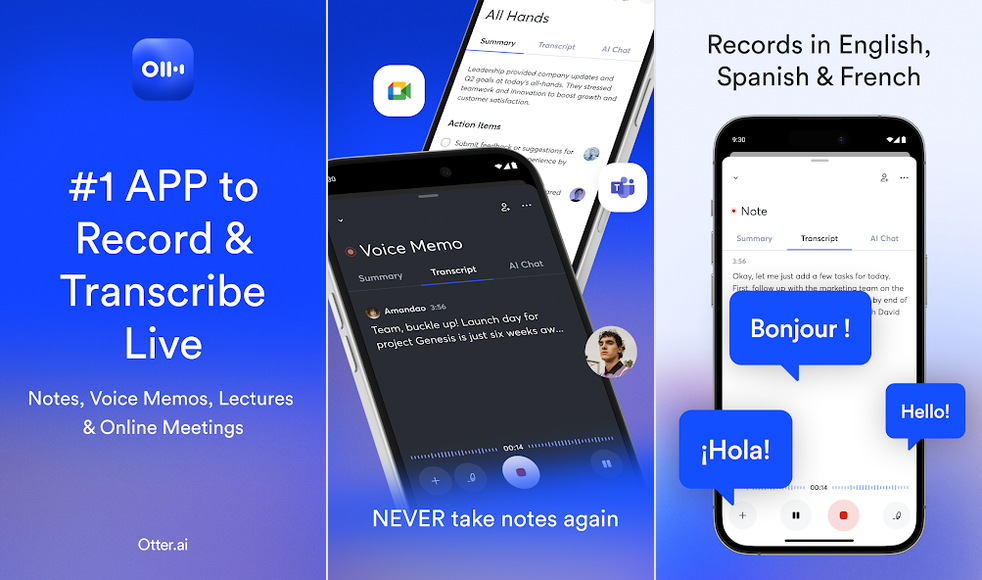
Records the room through your phone’s mic and writes the transcript while people talk, with speaker tags and action items you can assign.
- Best forEnglish meetings where you want to read the transcript as it happens.
- Free300 min a month
- PaidFrom $8.33 a month
- SpeakersYou tag, it learns
- CatchTrains on audio
The good
- Transcribes live, during the meeting
- Largest Play review base of the paid picks
- Action items you can assign to people
The bad
- Free recordings stop at 30 minutes
- Needs internet; no offline mode
Otter is the one to pick if you want to watch the words appear while the meeting is still going. Its Play listing calls it great for in-person recordings, and it takes audio from the phone’s built-in mic or a Bluetooth device. It holds 4.8 stars on about 48,000 Play ratings, the biggest base of any paid app here.
Speaker names take some setup. The listing says Otter identifies speakers after some training: you tag who is talking and it learns their voices. Otter’s own blog claims accuracy above 95 percent, but gives no method, so treat that as a vendor claim.
Pricing and limits
- Basic, free: 300 minutes a month, 30 minutes per conversation, three file imports in total (Otter’s pricing page, checked in November).
- Pro: $16.99 a month billed monthly, or $8.33 a month billed yearly. 1,200 minutes a month, 90 minutes per conversation.
- Business: $30 a month billed monthly, or $19.99 a month billed yearly. No monthly minute cap, up to 4 hours per conversation.
Languages are muddled. The pricing page lists English, Spanish, French, German, Japanese and Chinese; the Play listing says English, Spanish and French only. The sources disagree, so try a short clip in your language on the free plan first.
Where it disappoints
Otter’s privacy policy says it trains its AI on de-identified audio recordings and on transcripts, which its policy says may contain personal information. Its blog says live transcription needs internet and there’s no offline mode, so a basement meeting room with no signal is a problem. The free plan’s 30-minute stop cuts most real meetings short.
Skip it if your recordings must stay out of AI training, or your room has no signal. Verdict: the best live transcript for English meetings, at a fair yearly price. If training is the deal breaker, MeetGeek is the better alternative; if you need more hours for less, look at Notta.

Granola
Clean notes, free taste
Takes AI notes in face-to-face meetings, identifies different speakers, and pulls decisions and action items into a summary.

- Best forFrequent short meetings, if 30 days of history is enough.
- FreeNo hour limit published
- Paid$14 per user a month
- SpeakersVendor claim
- Catch30-day history free
The good
- Free plan publishes no hour limit
- Decisions and action items in the summary
- One flat paid price, $14 a month
The bad
- Free plan keeps only 30 days of notes
- Trains on anonymised data unless you opt out
Granola’s help pages say the mobile app is for AI notes during in-person meetings, and that it can identify different speakers. On a phone it can’t capture other apps’ audio, so the Android app is built for the room, not for calls. The output leans toward notes: highlights, decisions and action items rather than a wall of transcript.
Pricing and limits
Granola’s pricing page, checked in November, lists Basic at $0 with 30 days of meeting history, Business at $14 per user a month and Enterprise at $35. It shows one price per plan, with no separate yearly rate. Granola’s free plan publishes no hour limit, but Granola calls it a free taste; budget for Business at $14 if you rely on it. On Basic, copy out what you need within a month.
Where it disappoints
Training is on by default. Granola’s security page says it trains on your anonymised data and that you can opt out in Settings; data is hosted on AWS in the US. Its mobile announcement says the source audio is deleted after transcription.
Play reviews raise three problems, each from a single reviewer: a login loop, export that is copy and paste one note at a time, and a speaker shown as “Speaker B” instead of a name. The Granola pages I read give no accuracy figure for its speaker labels, so that claim is the vendor’s word.
Skip it if you need to export from the phone or keep notes past 30 days without paying. Verdict: a free taste of clean notes for regular meetings, with Business at $14 if you rely on it. If you want a live transcript and action items you can assign, Otter is the better alternative.

Notta
Most minutes per dollar
A transcription app whose own guide says to leave your phone in the meeting room; it lists 58 languages and, on Pro, exports to Word, PDF and SRT.

- Best forLong or frequent meetings, and rooms that don’t speak English.
- Free120 min a month
- Paid$13.49 for 30 hours
- SpeakersVendor claim only
- Catch3-minute free clips
The good
- Pro covers 30 hours a month
- 58 languages listed
- Exports to txt, docx, PDF and SRT on Pro
The bad
- Free recordings stop at 3 minutes
- No detail behind the speaker claim
Notta is the cheapest way to cover a lot of hours. Its in-person page tells you to place your phone in the meeting room and says it will capture the conversation with the microphone, then write action items and key points. Notta and its Play listing both list 58 languages.
The speaker claim is thin. The same page promises speaker identification, but its FAQ answer to whether Notta can tell speakers apart talks about editing podcast summaries instead. Notta claims about 98.8 percent speaker accuracy, with no method published; our Notta Memo review covers that claim.
Pricing and limits
- Free: 120 minutes a month, up to 3 minutes per recording, 10 AI summaries (Notta’s pricing page, checked in November).
- Pro: $13.49 billed monthly, or $97.99 a year ($8.17 a month). 1,800 minutes a month, up to 5 hours per recording.
- Business: $27.99 billed monthly, or $199.99 a year ($16.67 a month), with unlimited transcription.
Pro’s 1,800 minutes are exactly 30 hours. If your busy months run over that, budget for Business.
Where it disappoints
The free plan’s 3-minute limit makes it a demo, not a meeting tool. Notta’s offline Privacy Mode is described for computers, not the Android app. On Play, one reviewer says choosing the monthly plan got them charged for a full year; that’s a single report, but check the billing period before you pay. Its privacy policy says data is used to improve the service, and I found no sentence about training AI on recordings either way. It is hosted on AWS and encrypted.
Skip it if you need proof that it separates six voices well. Verdict: the best value for 30 hours a month. If you’d rather your recordings never train an AI, MeetGeek is the better alternative.

Google Recorder
Free on Pixel, US English labels
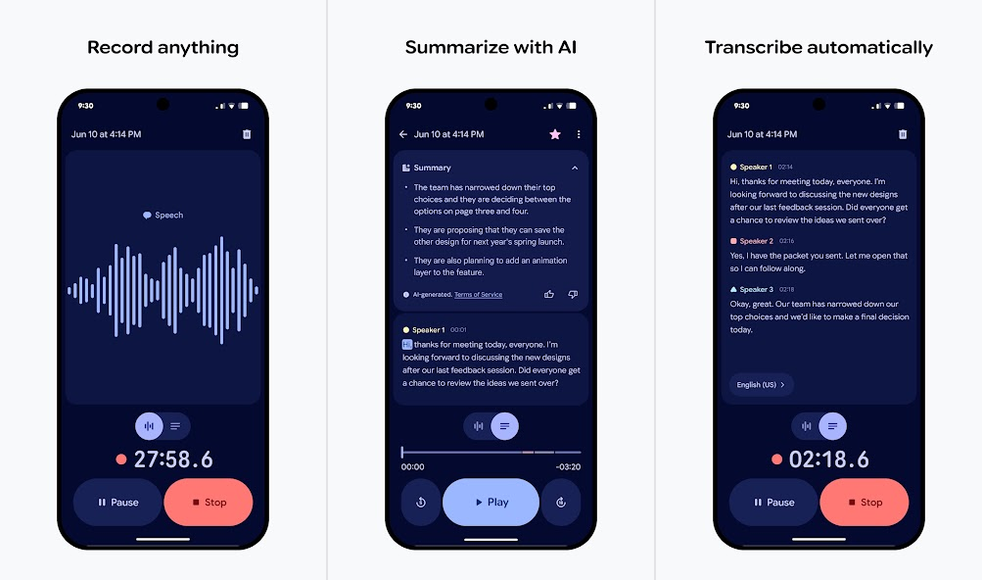
The Pixel’s own recorder: it transcribes as you record, labels speakers on Pixel 6 and later, and summarises on Pixel 8 and later.
- Best forPixel owners whose meetings are in US English.
- CostFree on Pixel
- SpeakersPixel 6 and later
- SummaryPixel 8, up to 1 h
- CatchNo action items
The good
- Free and already on your Pixel
- Speakers labelled and renameable
- Live transcript as you record
The bad
- Speaker labels only in US English
- No action items on the help pages
If you own a Pixel, try this before you pay for anything. Google’s help page says speaker labels work on the Pixel 6 and later, only in US English. Speakers show up as Speaker 1, 2, 3, and you can rename them.
Summaries need a Pixel 8 or later and a recording of 5 minutes to 1 hour, per a second help page. They run on an AI model in Google’s secure cloud, so you may need a connection, and re-transcribing a file may send the audio to Google’s servers.
What testers found
Tom’s Guide ran a test with two people reading a scene on a Pixel 9. Recorder spotted two speakers, but lines bled into each other and it sometimes filed whole lines under the wrong person; Samsung won that round. In a later opinion column, a Pixel 10 Pro invented a fourth speaker in a three-person interview. That’s an anecdote, not a controlled test.
Pricing and limits
Recorder is free and comes on Pixel phones. It sits at 3.3 stars on about 16,000 Play ratings; the reviews I could see were old complaints about Bluetooth mics and missing passages.
Where it disappoints
Outside US English you get a transcript with no speaker labels. Summaries stop at an hour, and the help pages list no action items, so you’ll pull tasks out yourself.
Skip it if you don’t have a Pixel or your meetings aren’t in US English. Verdict: the right free first try for Pixel owners. For other languages or a list of tasks, Notta or Otter are the better alternatives.

Samsung Voice Recorder
Free on Galaxy AI phones
Galaxy’s built-in recorder. With Galaxy AI, Transcript Assist turns a recording into a transcript and a summary, in many languages.

- Best forGalaxy owners who want a free first try in their own language.
- CostFree basic Galaxy AI
- NeedsOne UI 6.1 or later
- SpeakersBarely documented
- CatchSelect devices only
The good
- Free on supported Galaxy phones
- Transcribes many languages
- Won a two-person test by Tom’s Guide
The bad
- Only on select Galaxy AI devices
- Samsung barely explains speaker labels
On a recent Galaxy, this is the free option to try first. Samsung’s US support page says Galaxy AI features run on select phones and tablets with Android 14 and One UI 6.1 or later. You open a recording, tap Transcript Assist, then Transcribe, and can ask for a summary. Its language list includes English, Spanish, French, German, Japanese, Korean, Chinese, Hindi and Arabic.
Samsung says little about speakers. Its UK Transcript Assist guide describes speaker recognition that captures the person closest to the microphone. In a room of six, I’d expect the far end of the table to come out worse; put the phone in the middle.
What testers found
Samsung won the two-person test in that same Tom’s Guide comparison on a Galaxy S25 Plus, though lines still bled together. An earlier Tom’s Guide test had a mixed result: on a 4.5-minute two-person clip, it counted 12 wrong-speaker turns for a Galaxy S24 against 16 for a Pixel 7a, but on a one-person reading the S24 invented a second speaker 15 times, against 4 for the Pixel 7a.
Pricing and limits
Samsung says the basic Galaxy AI features are free, and that enhanced or third-party AI features may come with different terms and fees. Samsung’s older UK guide said summaries need a Samsung account.
Where it disappoints
It only works on select Galaxy AI devices, and Samsung doesn’t document how many speakers it can separate. The Play reviews I could see were old reports of lost files.
Skip it if your phone isn’t on Samsung’s Galaxy AI list. Verdict: a good free first try on a Galaxy, best with the phone near whoever talks most. For a list of tasks or a shared transcript, Otter is the better alternative.

MeetGeek
No AI training unless you opt in
Records in-person conversations on your phone, transcribes them with speaker detection when you stop, and writes decisions and action items.

- Best forTeams that want notes without their audio training an AI.
- Free3 hours a month
- PaidFrom $9.99 a month
- SpeakersAfter recording
- CatchExtra hours cost
The good
- No AI training unless you opt in, in writing
- Data kept in the EU or the US
- Pro includes 20 hours a month
The bad
- Transcript only after you stop recording
- Smallest review base of the paid picks
MeetGeek has the clearest privacy promise of the paid apps. Its privacy policy says it doesn’t use meeting content to train AI models unless you opt in in writing, and it offers EU and US data residency.
Its mobile page says you can record in-person conversations, and transcription starts on its own when the recording ends, with speaker detection. The summary covers highlights, decisions and action items. A request on MeetGeek’s own roadmap board says live mobile recordings lack the voice-fingerprint speaker matching that uploaded files get; that’s a user request, not a company statement.
Pricing and limits
- Basic, free: 3 hours a month, up to 2 hours per meeting (MeetGeek’s pricing page, checked in November).
- Pro: $15.99 billed monthly, or $9.99 a month billed yearly. 20 hours a month included, extra hours at $0.50 each. Pro also caps each meeting at 2 hours.
- Business: $27 billed monthly, or $17 a month billed yearly. No monthly transcription limit, but each meeting is capped at 3 hours.
Where it disappoints
You don’t see words while people talk; the transcript arrives after you stop. The language count is unclear: its mobile page says over 100, the Play listing over 50. One Play reviewer says a meeting came back with no transcript and a recording that wouldn’t play, a single report.
Skip it if you want to follow the transcript live. Verdict: the pick for teams that want their audio kept out of AI training, with room for 20 hours on Pro. For a live transcript, Otter is the better alternative.

Google Meet (in person)
Notes for paid Google plans
Meet’s Take notes for me now works for a meeting in a room: the transcript, summary and action items arrive as a Google Doc.

- Best forPeople who already pay for a qualifying Workspace or Google AI plan.
- CostPaid plan needed
- OutputA Google Doc
- LanguagesOne per meeting
- Catch15 min or more
The good
- Transcript, summary and action items in one Doc
- Pause and stop while it runs
- No extra app if you already use Meet
The bad
- Needs a qualifying paid plan
- One language per meeting
If your company already pays for Google Workspace, you may already have this. Google’s help page says you open Meet on Android, tap Take notes, then Start taking notes, and leave the phone nearby. You don’t need a meeting room, and it works for planned or impromptu meetings.
When the meeting ends, a Doc with the notes lands in the Drive of whoever turned the feature on and arrives by email. The notes follow your organisation’s Meet retention policy, and an admin may have to switch the feature on.
Pricing and restrictions
It needs an eligible plan. Google’s rollout post lists Workspace Business Standard and Plus, Enterprise Standard and Plus and Frontline Plus, plus the consumer Google AI Pro and Ultra plans. Workspace Business Standard is $14 per user a month on a yearly plan, checked in November. I couldn’t read a US price for the consumer Google AI plans, so I’m not printing one. 9to5Google has a walkthrough of the steps.
Where it disappoints
It handles one language per meeting. Google recommends meetings of 15 minutes or more and warns that shorter ones, or a weak connection, can give incomplete summaries. The help page doesn’t say how it labels speakers, and I found no independent test of it.
Skip it if you’re on a free Google account; you can’t turn it on. Verdict: the easiest choice if your plan already includes it. Without one, Google Recorder or Samsung Voice Recorder is the better free alternative.
Where Your Audio Goes
| App | Trains AI on your meetings? | Where it’s kept |
|---|---|---|
| Otter | Yes: de-identified audio, and transcripts | US (AWS) |
| Granola | Yes, anonymised; opt out in Settings | US (AWS) |
| Notta | No statement found | AWS, encrypted |
| MeetGeek | No, unless you opt in, in writing | EU or US |
| Google Recorder | Not stated; summaries run in Google’s cloud | Not stated |
| Samsung Voice Recorder | Not stated on the pages read | Not stated |
| Google Meet | Not stated on the help page | Your Drive, under your org’s rules |
This table says only what each company’s own policy or help page says, read in November. “Not stated” means I didn’t find it, not that the answer is no. Otter trains on de-identified audio and on transcripts, which its policy says may contain personal information, and Granola trains on anonymised data. Granola lets you switch that off; Otter’s policy offers no training switch, only general rights to object or withdraw consent.
Pixel Recorder transcribes on the phone, but its summaries run in Google’s cloud and re-transcribing may send audio to Google’s servers. Samsung’s pages don’t say where processing happens. If a meeting is confidential, read the policy of whatever you install before the first recording.
Ask Before You Record
Recording laws differ by state and country. US federal law, 18 U.S.C. 2511, allows a recording when one person in the conversation consents, but some states require everyone’s consent; California is one, as the RCFP recording guide explains. Ask everyone in the room before you start.
Before you press record
- Tell everyone you’re recording, and why.
- Ask if anyone objects, and stop if they do.
- Say it again once the recording starts, so the notice is on the file.
A simple habit covers most of it: say at the start that you’re recording for notes, and let anyone who objects step out or ask you to stop. This isn’t legal advice, so check your own local rules for anything sensitive, such as a meeting with clients or patients.
Left Out, and Why
Apps considered and not ranked
- Read AI: its Play listing supports recording in person with speaker detection, but the reports I saw came from several reviewers (three, all about the meeting bot), not in-person recording. Its free plan is 5 transcripts a month, 1 hour each; its policy lists model training; its pricing FAQ says no refunds.
- Fireflies: its guide covers in-person recording on Android but doesn’t mention speaker labels for it, and the free plan stores only 400 minutes.
- Voicenotes: several Play reviewers report lost notes or crashes on Android, and its help pages disagree on how meeting mode starts.
- Krisp: 4.0 stars on 391 Play reviews, no test of room recordings, and a privacy policy that lists improving its own AI models as a use.
- tl;dv Mobile: records offline, but the transcript and notes show up later in the desktop workspace, and it has no Play rating yet.
- Plaud: its app is a companion to Plaud’s hardware recorder; I found no way to record with the phone’s own mic. Our Notta Memo review covers the hardware route.
- Fellow: 2.6 stars on 70 Play reviews, checked in November, and one reviewer says two in-person meetings didn’t record or upload.
- Tactiq, Fathom and TurboScribe: no official Android app found.
- Microsoft Copilot: its meeting notes are tied to Teams meetings, not a phone on the table.
FAQs
Which free app should I try first?
The recorder already on your phone. On a Pixel 6 or later, Google Recorder labels speakers in US English. On a Galaxy with Galaxy AI, Samsung Voice Recorder transcribes in many languages. If neither fits, Granola’s free plan publishes no hour limit, though Granola calls it a free taste.
Can these apps tell who said what in a room?
Six of the seven say so; Google Meet’s help page doesn’t mention speakers. Only the Pixel and Galaxy recorders have been tested independently, and both mixed up speakers. Plan to fix names by hand, especially with more than two or three people talking.
Do any of them work offline?
Not fully, on what the companies document. Otter says live transcription needs internet, Pixel summaries run in Google’s cloud, and Notta’s offline mode is described for computers, not Android. The other apps don’t say, so test in the room before a meeting that matters.
Which apps don’t train AI on my recordings?
MeetGeek says it doesn’t unless you opt in, in writing. Granola trains on anonymised data but lets you opt out in Settings. Otter’s policy says it trains its AI on de-identified audio recordings and on transcripts, which its policy says may contain personal information.
What does 30 hours a month cost?
From $13.49 a month for Notta Pro, which covers exactly 30 hours, to $30 a month for Otter Business billed monthly. Yearly billing cuts the paid prices by about a third to a half. Granola’s free plan publishes no hour limit, but Granola calls it a free taste; budget for Business at $14 if you rely on it.
How this guide was put together. This is a research-based evaluation. I read each app’s official pricing, help and privacy pages, its Google Play listing and recent user reviews, and independent tests from Tom’s Guide where they exist; prices and limits were checked in November. No hands-on tests were run and no meetings were recorded for this guide. User reports are marked by how many people made them, and accuracy claims are the vendors’ own unless a test is linked.