In This Article
Follow BestForAndroid


Your carrier charges by the minute. The right free calling app makes that charge optional, whether you are reaching a friend or dialling a real phone number.
Free voice calling on Android is not one problem. It is two. Calling another person who has the same app is easy, and almost every messaging app does it well. Calling an ordinary phone number for free, a landline or a mobile, is the hard part, and it is where most lists quietly fall apart.
We sorted the apps that actually deliver from the ones that bury a few free minutes under ads. Below are seven free calling apps worth installing, split by what each one is for, plus the one type of app to skip.
Quick answer
For calling friends and family, install WhatsApp or Signal: both are free, encrypted, and work over Wi-Fi or mobile data. To dial a real phone number for free in the US or Canada, use Google Voice or TextNow, which each give you a genuine phone number at no cost. For weak signal at home, turn on your carrier’s built in Wi-Fi calling instead of installing anything.
There is no single best free calling app, only the best one for who you are calling. App to app calls are solved many times over. Free calls to any number are rare, regional, and ad supported. The table below maps each need to the pick that fits it, so you can skip straight to yours.
| If you want this | Use this pick | Cost |
|---|---|---|
| Call friends who use the same app | Free | |
| Encrypted, privacy first calls | Signal | Free |
| A free real US phone number | Google Voice | Free |
| A free US or Canada number with the app | TextNow | Free, ad supported |
| Group voice and video calls | Google Meet | Free tier |
| Calls plus a big international contact base | Telegram | Free |
| App to app calls plus paid landline credit | Viber | Free, paid Viber Out |
| Weak signal at home, no app wanted | Carrier Wi-Fi calling | Free |
Before you start
App to app calls are free everywhere, but they use mobile data when you are off Wi-Fi, so check your data plan if it is small. Free calls to ordinary phone numbers are mostly limited to the US and Canada. Outside those countries, expect to buy low cost credit for landline and mobile calls, or rely on app to app calling instead.
The two kinds of free calling

Before the picks, understand the split, because it decides which app you need. The first kind is app to app calling. Two people install the same app, and calls between them travel free over the internet as voice over IP. WhatsApp, Signal, Telegram, and Google Meet all work this way. The catch is obvious: the other person needs the same app.
The second kind is calling the public phone network, the landlines and mobiles that do not care what app you use. Free calls to a real phone number are rare, regional, and almost always ad supported. Google Voice and TextNow do it in the US and Canada by giving you an actual phone number. Almost everywhere else, reaching a normal number means buying credit, and the honest move is to pay a small amount for a reputable service rather than chase a free tier wrapped in ads.
One more option needs no app at all. If your calls drop indoors because the cellular signal is weak, your carrier’s built in Wi-Fi calling routes ordinary calls over your home internet. We cover that at the end, because for a lot of people it is the real answer.
1. WhatsApp

WhatsApp is the default for a reason: almost everyone you want to call already has it. Voice and video calls are free over Wi-Fi or mobile data, with no per minute charge and no separate calling credit. If both people have the app, there is nothing else to set up.
Its real strength is reach, not features. Calls use end to end encryption by default, group voice and video calls work well, and the audio holds up on a shaky connection. The trade off is that WhatsApp only calls other WhatsApp users. It cannot dial a landline or a mobile number directly. For that, you need one of the phone number picks further down.
Highlights
- ⭐ Best for: calling friends and family who already have the app, which is most people.
- ⚠️ Watch out for: it only calls other WhatsApp users, never an ordinary phone number.
- 💰 Pricing: free.
Key features
- Free voice and video: unlimited calls to other users over Wi-Fi or data.
- End to end encryption: calls are encrypted by default, with nothing to switch on.
- Group calls: voice and video calls support multiple people at once.
- Huge install base: the person you want to call almost certainly already has it.
2. Signal

Signal matches WhatsApp for free voice and video calls, then goes further on privacy. It is run by a nonprofit, the app is open source, and it collects almost nothing about you. If you treat your calls as private, Signal is the pick.
Call quality is excellent and the app feels clean and quick. Its encryption uses the open Signal Protocol, the same standard WhatsApp licensed for its own calls, so you get top tier privacy with no quality penalty. The same limit applies as with WhatsApp: Signal only calls other Signal users, so it is not a way to reach a landline. The other honest catch is reach. Signal’s user base is smaller, so you may need to talk a few contacts into installing it before it becomes your everyday call app.
Highlights
- ⭐ Best for: privacy minded callers who want encrypted calls with minimal data collection.
- ⚠️ Watch out for: a smaller user base, so fewer of your contacts may already have it.
- 💰 Pricing: free, nonprofit funded, no ads.
Key features
- Strong privacy defaults: open source, nonprofit run, and almost no data collected.
- Encrypted calls and messages: end to end encryption on everything, always on.
- Group voice and video: encrypted group calls for friends and small teams.
- No ads, ever: funded by donations rather than advertising or data.
3. Google Voice
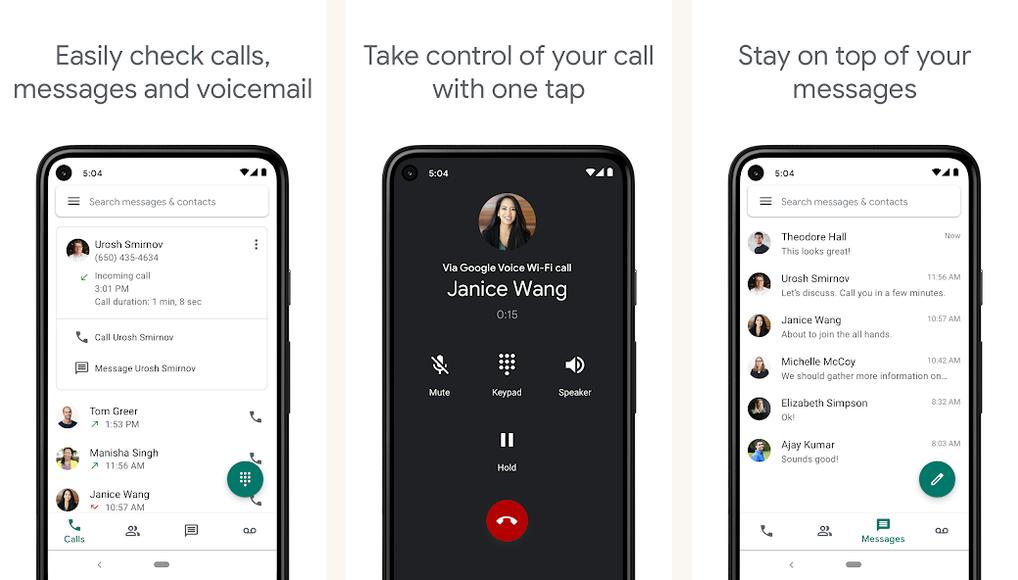
Google Voice solves the hard problem. A personal Google Voice account gives you a real US phone number for free, and calls to numbers inside the US are free from it. It is the closest thing to a genuinely free second phone line, with no ads in the way.
The number works for calls and texts, voicemail is transcribed, and the whole thing ties into your Google account, so it syncs across your phone and the web. The catch is location. A free personal Google Voice number is a US only feature, so you generally need to be in the US to set one up. International calls from it are paid, at low per minute rates. The Workspace tier is a separate paid product aimed at businesses.
Highlights
- ⭐ Best for: a free, ad free second phone number for anyone in the United States.
- ⚠️ Watch out for: a free personal number is US only, and international calls are paid.
- 💰 Pricing: free for a personal account; the Workspace tier is paid.
Key features
- A real free US number: calls and texts to US numbers at no cost.
- Voicemail transcription: messages arrive as readable text, not just audio.
- Cross device sync: the same number on your phone and on the web.
- Cheap international rates: low per minute pricing when you do call abroad.
4. TextNow

TextNow is the other route to a free phone number. It hands you a free US or Canadian number, and calls and texts within those countries are free, paid for by ads inside the app. It is the easiest free real number to get if Google Voice is not available to you.
Setup takes minutes and you do not need a separate carrier plan to use the number. The honest trade off is the ad load. A free TextNow account shows ads, and that is the price of the free minutes. International calls need purchased credit. TextNow also sells low cost paid plans that remove ads and add data, but the free tier is genuinely usable for everyday calling in the US and Canada.
Highlights
- ⭐ Best for: a free US or Canada phone number you can set up in minutes.
- ⚠️ Watch out for: the free tier is ad supported, and free calls stay inside the US and Canada.
- 💰 Pricing: free with ads; optional paid plans remove ads and add data.
Key features
- Free US or Canada number: a real number for calls and texts at no cost.
- No carrier plan needed: the number works over Wi-Fi or data on its own.
- Voicemail and texting: a full phone line experience, not just calls.
- Paid upgrades: optional plans drop the ads and bundle mobile data.
5. Google Meet

Google Meet is the pick when a call has more than two people on it. It is free, it works the same on Android, iPhone, and a laptop browser, and joining a call is as simple as tapping a link. For cross platform group calls, it is the most frictionless option here.
Anyone with a Google account can start a meeting, and guests can join from a link without installing much. Video is stable and screen sharing is built in, which makes it handy for family catch ups and informal work calls alike. The free tier has limits worth knowing: group calls are capped at 60 minutes and there is a participant ceiling. For a quick group call that is rarely a problem, but heavy users will hit it.
Highlights
- ⭐ Best for: free group voice and video calls across Android, iPhone, and the web.
- ⚠️ Watch out for: the free tier caps group calls at 60 minutes and limits participants.
- 💰 Pricing: free; paid Workspace plans lift the call limits.
Key features
- Link based joining: guests join a call by tapping a link, with little setup.
- True cross platform: the same call works on Android, iPhone, and any browser.
- Screen sharing: share your screen inside a call without an extra tool.
- Google account integration: meetings tie into Calendar and Gmail.
6. Telegram

Telegram is a free messaging app with solid voice and video calling built in. Calls between Telegram users are free over the internet, the audio is clean, and the app is fast and light. If your contacts are spread across countries, Telegram’s large international base makes it an easy app to call them on.
Voice calls are encrypted, group voice chats scale to large rooms, and the app syncs across phones, tablets, and desktops. Two honest notes. Like the other app to app picks, Telegram only calls other Telegram users, not landlines. And while one to one calls are end to end encrypted, Telegram’s regular cloud chats are not encrypted the way Signal’s are, so it is a calling and messaging app first, not a maximum privacy tool.
Highlights
- ⭐ Best for: free calls to contacts worldwide, especially where Telegram is widely used.
- ⚠️ Watch out for: it calls only other Telegram users, and cloud chats are not end to end encrypted.
- 💰 Pricing: free; an optional Premium tier adds extras unrelated to calling.
Key features
- Free voice and video: internet calls to other Telegram users at no cost.
- Encrypted voice calls: one to one calls use end to end encryption.
- Large group voice chats: voice rooms that scale to big groups and communities.
- Multi device sync: the same account on phone, tablet, and desktop.
7. Viber

Viber sits between the two kinds of calling. Viber to Viber voice and video calls are free and end to end encrypted, the same as the messaging picks above. What sets it apart is Viber Out, a paid add on that dials real landlines and mobiles at low international rates.
That makes Viber a sensible single app if you call some contacts who have the app and others who only have an ordinary phone. The free part stays free; only the calls to real numbers cost credit. Viber is especially popular in parts of Europe and Asia, so in those regions plenty of your contacts may already be reachable for free. Viber Out rates change by country, so check the current price before you rely on it for regular landline calls.
Highlights
- ⭐ Best for: free app to app calls plus the option of cheap paid calls to landlines.
- ⚠️ Watch out for: calling real phone numbers needs paid Viber Out credit, not a free tier.
- 💰 Pricing: free Viber to Viber calls; Viber Out is paid, with rates that vary by country.
Key features
- Free encrypted calls: Viber to Viber voice and video, end to end encrypted.
- Viber Out: a paid option to dial landlines and mobiles at low rates.
- Strong regional reach: widely used across parts of Europe and Asia.
- Group calls and messaging: a full communication app, not calls alone.
Wi-Fi calling on your existing line
Sometimes the best free calling app is no app at all. If your calls drop or sound rough indoors because the cellular signal is weak, Wi-Fi calling fixes it. It routes ordinary calls to and from your real number over your home or office internet instead of the cellular network. The calls still count as normal calls on your plan, with no extra app and no new number.
Every major US carrier supports it, and so do many carriers across Europe and Australia, including names like EE, O2, and Telstra. It is the simplest fix for poor reception at home, and it costs nothing beyond your existing plan. The menu path varies by Android skin, but it usually lives under Settings, then a Connections or Network section, then a Wi-Fi Calling toggle. The US communications regulator, the FCC, publishes a consumer guide explaining how Wi-Fi calling handles emergency 911 location, which is worth a read if you rely on it.
Turn on Wi-Fi calling
Open Settings, then Connections or Network and internet, depending on your phone. Find the Wi-Fi Calling entry and switch it on. If you do not see it, your carrier may not support the feature on your plan, so check with them. Once it is on, calls route over Wi-Fi automatically whenever the cellular signal is weak.
What to skip
Two categories are not worth your time. The first is the crowd of ad funded “free calls to any number” apps, names like TalkU and FreeTone. They dangle a handful of free minutes, then wrap them in heavy ads and uneven call quality. The few free minutes are a poor trade. If you genuinely need a short term number for privacy, a paid second line app like Hushed, Burner, or Phoner costs a few dollars a week and behaves far better. Confirm the current price before you commit.
The second is Skype. It was a fixture of free calling for years, but Microsoft has retired the consumer version and moved people to the free tier of Microsoft Teams. If you were planning to fall back on Skype, that option is gone. Use one of the picks above instead.
| Avoid this | Why | Do this instead |
|---|---|---|
| Ad funded “free calls to any number” apps | A few free minutes buried under heavy ads and weak call quality | Google Voice or TextNow for a free number, or a paid second line app |
| Relying on Skype | The consumer version is retired and no longer available | Pick one of the seven apps above |
| Apps demanding broad permissions for “free calls” | Calling apps do not need your full contact, SMS, and storage access to work | Stick to well known apps and review the permissions they request |
Common mistakes that cost you money
Free calling is straightforward once you avoid a few traps. These are the ones that quietly put charges back on your bill or send you to the wrong app.
| Mistake | Why it bites | Better move |
|---|---|---|
| Expecting an app to app call to reach a landline | WhatsApp, Signal, and Telegram only call other users, not phone numbers | Use Google Voice or TextNow when you need to dial a real number |
| Making long calls on mobile data with a small plan | App to app calls are free but still use data, which a tiny plan can burn through | Call on Wi-Fi, or check your data allowance first |
| Assuming free numbers work everywhere | Free real numbers from Google Voice and TextNow are mostly US and Canada only | Outside North America, plan to buy low cost calling credit |
| Chasing ad funded free minute apps | Heavy ads and poor quality make the few free minutes not worth it | Pay a little for a reputable service, or use a genuine free number app |
Key takeaways
- App to app calling is solved: WhatsApp for reach, Signal for privacy, both free.
- To dial a real phone number for free, use Google Voice or TextNow, both US and Canada focused.
- Google Meet is the easiest free pick for cross platform group calls.
- Telegram and Viber add free calls with a large international base; Viber Out handles paid landline calls.
- For weak signal at home, turn on carrier Wi-Fi calling instead of installing anything.
- Skip ad funded free minute apps, and do not count on Skype, which is retired.
The verdict
Seven solid apps, but they are not interchangeable. The right pick depends entirely on who is on the other end of the call.
The verdict
Best for friends and family: WhatsApp, because almost everyone already has it, with Signal close behind when privacy comes first.
Best for calling a real phone number free: Google Voice in the US, TextNow across the US and Canada.
Best for group calls: Google Meet, with link based joining that works on any device.
Best for international contacts: Telegram for free app to app calls, Viber when you also need paid landline calls.
Best for weak signal at home: your carrier’s built in Wi-Fi calling, no app required. Pick the right tier and a per minute carrier rate becomes a choice, not a default.
Questions people actually ask
- Does a WhatsApp call use my cellular minutes?
No. WhatsApp calls run over Wi-Fi or mobile data, so they count against your data plan, not your voice minutes. A typical voice call uses only a few megabytes, though the exact amount varies with your connection. - Can I call a real phone number for free on Android?
Yes, with limits. Google Voice gives you a free US number with free calls inside the US, and TextNow gives a free US or Canada number with free in country calls. Outside North America, free calls to ordinary numbers are rare, so expect to buy low cost credit. - Is Google Voice still free?
Yes. A personal Google Voice account remains free in the United States, including a real phone number and free calls to US numbers. The Workspace tier is a separate paid product aimed at businesses. - Can I use FaceTime on Android?
Not as an installed app. Apple does not make a FaceTime app for Android. An iPhone or iPad user can send you a FaceTime link, and you can then join that one call from your Android browser as a guest. For everyday calling, use one of the apps in this list instead. - Does the person I call need the same app?
For app to app calls, yes. WhatsApp, Signal, Telegram, and Google Meet all need the other person to use the same app or join the same call. For a phone number app like Google Voice or TextNow, the other person just answers an ordinary phone call. - Is Skype still available for free calling?
No. Microsoft has retired the consumer version of Skype and moved users to the free tier of Microsoft Teams. If you want free calling on Android, choose one of the seven apps above.
For more on getting the most out of your phone, see our guides to the best Wi-Fi signal apps for Android and the best eSIM apps for Android if you travel and want cheap data for calls abroad.
How we tested
We installed each app on Pixel and Galaxy hardware running current Android builds and placed real calls rather than skimming feature lists. We checked call quality over Wi-Fi and mobile data, how each app handled the gap between app to app and real number calling, and the limits of every free tier. We cross checked store availability and carrier features against official documentation. App pricing and free tier limits change often, so confirm the current details before you rely on them.