
In This Article
Follow BestForAndroid


The online learning market settled around a clear hierarchy a few generalist platforms (Coursera, Udemy, LinkedIn Learning), one or two AI-tutored newcomers (Khanmigo, Synthesis), and a long tail of niche specialists for languages, coding, music, and craft skills.
This is a buying guide, not an exhaustive index. We pick the platforms that earned their place on a typical learner’s roster the ones that actually move skills forward in three months rather than spinning up shelf-credentials no employer recognizes.
Every tool below was tested on Android phone and tablet, the dominant device for online learning since the post-pandemic shift to mobile-first. Where pricing changed to 2026, we note it. Where the AI features matter, we say what they actually do.
TL;DR
Best fit: Coursera and Udemy for credentialed courses, Khan Academy plus Khanmigo for K-12 and foundations, Duolingo for languages, Brilliant for STEM intuition.
Good alternative: If you only have a budget for one paid subscription, Coursera Plus at $59 per month gives the broadest catalog including degree-style specializations.
Skip if: You are looking for free college-level lectures only; in that case open-courseware from MIT, Stanford, and Harvard is still available at no cost outside any of the platforms below.
1. Coursera

Best for: credentialed courses and university-style specializations
Coursera is the broadest catalog for professional certificates and university-credentialed material. The Coursera Plus subscription at $59 per month or $399 per year unlocks roughly 7,000 courses including Google’s Career Certificates, Meta’s Front-End Developer Professional, and IBM’s Data Science Professional, plus most of the university partner offerings from Yale, Stanford, Imperial College, and the University of London.
- Job-ready professional certificates in fields like UX design, data analytics, and cybersecurity.
- Bachelor’s and Master’s degrees from accredited universities for users who want a full credential.
- Coursera Coach, the AI tutor that launched and matured through 2025, gives in-course explanations and practice problems.
Where it falls short: The free tier is auditing only; you cannot earn a certificate without paying. Some older courses have not been updated since 2022.
Pricing: Free to audit, Coursera Plus $59 per month or $399 per year, Career Certificates included in Plus.
2. Udemy

Best for: skill-based courses bought one at a time, often on sale
Udemy stays the king of project-based, instructor-published courses. The catalog is over 250,000 courses across coding, design, business, and creative fields, sold individually at $10 to $20 on near-constant sales. Udemy Business at $360 per user per year gives unlimited access to the top 12,000 courses.
- Lifetime access to any individual course you buy; revisit at any time.
- Project files and resources downloadable for offline use on the Android app.
- Coding sandbox integrated for the top 200 programming courses.
Where it falls short: The catalog is unfiltered. Quality varies from excellent to thin. Read recent reviews on any course before committing.
Pricing: Individual courses $10 to $20 on sale, full price $25 to $200, Udemy Business $360 per user per year.
3. Khan Academy + Khanmigo

Best for: K-12, foundations, and free tutoring for any age
Khan Academy is the long-running nonprofit option that still publishes free, structured courses across math, science, economics, computer science, and SAT prep. The big addition is Khanmigo, the AI tutor built on OpenAI’s GPT-4o that arrived and added free access.
- Free across the board, with the optional Khanmigo donation tier at $4 per month for premium AI tutoring.
- K-12 alignment with district curricula and SAT, AP, and MCAT prep.
- Khanmigo handles practice problems, hints without giving answers away, and Socratic dialogue.
Where it falls short: Best fit for K-12 and adult foundations; not designed for vocational or graduate-level material.
Pricing: Free; Khanmigo donation tier $4 per month or $44 per year.
4. Duolingo
Best for: languages, daily streak-driven learning
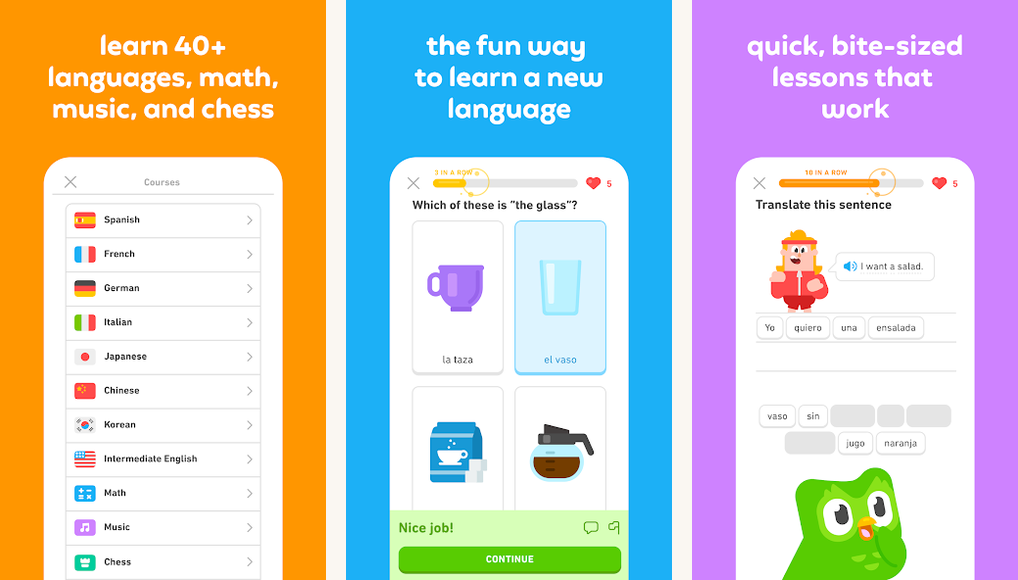
Duolingo at version 7 is still the default mobile language app. The streak system and bite-size lessons drive daily usage better than any rival. Super Duolingo at $7 per month removes ads and unlocks the harder Legendary tier.
- 40+ languages with quality varying from excellent (Spanish, French, German, Japanese) to thin (low-resource languages).
- Duolingo Max at $14 per month adds Explain My Answer and Roleplay AI conversations.
- Music and Math courses added to 2025 alongside languages.
Where it falls short: Heavy on vocabulary drills, lighter on grammar and conversation. Pair with a tutor on iTalki or Preply for serious progress.
Pricing: Free with ads, Super Duolingo $7 per month, Duolingo Max $14 per month.
5. Brilliant
Best for: math, science, and CS intuition through interactive problems
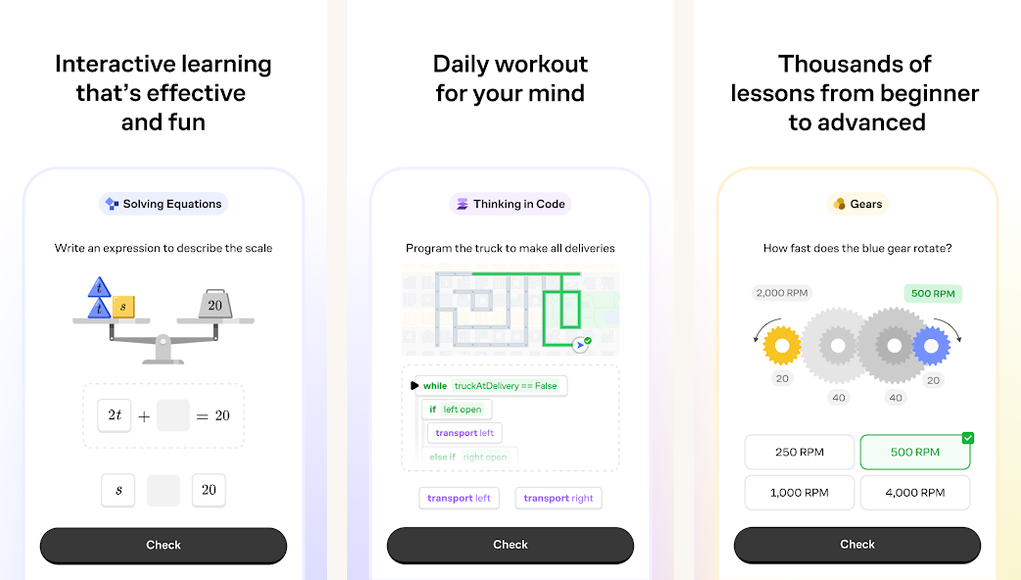
Brilliant takes the textbook-learning model and replaces it with daily interactive problems. The math and physics tracks are excellent; the AI track added and the data-science track added expanded the platform meaningfully.
- Interactive simulations that build geometric and physical intuition.
- Daily problem prompts at five to fifteen minutes a session.
- Six-track specializations in math, science, CS, data, AI, and finance fundamentals.
Where it falls short: Subscription only, no free tier beyond a seven-day trial. Some advanced tracks feel thin compared to a university course.
Pricing: $15 per month, $150 per year on annual plan.
Quick take
Pick the platform by reader intent: Coursera or edX for credentials, Udemy for project skills, Khan Academy plus Khanmigo for foundations, Duolingo for languages, Brilliant for STEM intuition.
6. LinkedIn Learning

Best for: professional skills tied to your LinkedIn profile
LinkedIn Learning’s bundle with LinkedIn Premium ($39.99 per month) makes it the natural choice if you already pay for LinkedIn Premium. The catalog is 21,000 courses across business, technology, and creative skills, all certificates auto-post to your profile.
- Auto-add certificates to your LinkedIn profile on completion.
- Path-based learning that maps to specific job titles (Data Analyst, Product Manager).
- Offline downloads on Android phone and tablet.
Where it falls short: Course depth varies; some skills better covered on Coursera or Udemy. Worth it primarily for users already on LinkedIn Premium.
Pricing: Bundled with LinkedIn Premium at $39.99 per month, or $26.99 per month standalone.
7. edX

Best for: free MIT, Harvard, and university course material with paid credentials
edX, acquired by 2U and undergoing leadership changes through 2024 to 2025, still hosts the free-to-audit MIT, Harvard, Berkeley, MIT, and University of Texas courses. Verified certificates and MicroMasters programs sit behind a paywall.
- Free-to-audit university material from top global institutions.
- MicroMasters and Professional Certificate programs that stack into full Master’s degrees.
- Career-aligned bootcamps in coding and data science.
Where it falls short: The free audit tier is auditing only. Paid certificates and degrees start at $99 and run to $25,000 for full programs.
Pricing: Free to audit; Verified Certificates $99 to $300; MicroMasters $1,000 to $1,500; full degrees $20,000 to $30,000.
8. Codecademy

Best for: interactive coding tutorials with an in-browser editor
Codecademy’s strength is the in-browser code editor that lets you write and run code without setting up a local environment. The Pro tier at $19.99 per month unlocks the project portfolio and the career paths.
- Browser-based code execution for Python, JavaScript, SQL, and twelve other languages.
- Career paths for full-stack web, data science, computer science fundamentals.
- Build-a-portfolio projects at the Pro tier.
Where it falls short: Less depth than a Coursera specialization. Best as the on-ramp before moving to a fuller program.
Pricing: Free tier with limited content; Pro $19.99 per month or $239 per year.
9. MasterClass

Best for: watch-and-learn for craft skills from named teachers
MasterClass is the entertainment-first option. You buy access to celebrity-taught video classes covering everything from writing (Margaret Atwood) to filmmaking (Werner Herzog) to cooking (Gordon Ramsay). It is inspiring more than instructive.
- Production values well above anything else on this list.
- Sessions feature from 2024 added live group cohorts.
- Twin-track approach with both class content and downloadable workbooks.
Where it falls short: Skills transfer is shallow compared to the structured platforms. Best as the inspiration layer alongside a more rigorous program.
Pricing: $120 per year for Individual, $180 per year for Duo, $240 per year for Family.
10. Pluralsight

Best for: technology skills with assessment-driven learning paths
Pluralsight stays the pick for IT and software engineers who want assessment-based progression. The Skills assessment rolled out across most tech disciplines, scoring you from novice to expert. Other coding apps for Android sit alongside it for hands-on practice.
- Skills assessments that benchmark before and after a course.
- Cloud, DevOps, and cybersecurity deep catalogs.
- Offline downloads on Android phone and tablet.
Where it falls short: Pricier than the alternatives at $29 per month. Tightly focused on IT and software, so a poor fit for non-tech fields.
Pricing: $29 per month or $299 per year for Standard, $45 per month for Premium with hands-on labs.
At a glance
| Platform | Best for | Free tier | Monthly price |
|---|---|---|---|
| Coursera | Credentialed courses | Audit only | $59 Plus |
| Udemy | Project skills | No (course-by-course) | $10-$20 on sale |
| Khan Academy | K-12 + foundations | Yes, full | Free + $4 donation |
| Duolingo | Languages | Yes | $7 to $14 |
| Brilliant | STEM intuition | 7-day trial | $15 |
| LinkedIn Learning | Professional skills | No | $39.99 with Premium |
FAQ
Are any of these certificates actually recognized by employers?
Coursera Professional Certificates from Google, Meta, IBM, and Microsoft, plus Coursera and edX MicroMasters and full degrees from named universities, carry actual hiring weight. Most other certificates are signalling, not credentials, and should be paired with a portfolio or project work.
How much should I budget for a serious year of online learning?
A reasonable budget is $400 to $700 for the year, split across one main subscription (Coursera Plus or Brilliant) and a few one-off Udemy courses on sale. Heavier programs (full MicroMasters, professional certificates) can run $1,000 to $5,000.
Which AI tutoring features are actually useful?
Khanmigo and Coursera Coach do well at hint-giving without revealing answers; Duolingo Max’s Roleplay scenarios work for low-stakes language practice; the embedded tutors in newer Codecademy and Brilliant lessons are useful debugging partners. The other AI features tend to be marketing layered over generic chatbot output.
Are the Android apps as good as the desktop versions?
On Coursera, Udemy, and LinkedIn Learning, the Android apps are very close to feature parity. On Codecademy and edX, the desktop browser remains the better experience for actual code-writing and lab work.
What about MOOC certificates from Coursera versus a traditional course?
A Coursera Professional Certificate (Google IT Support, Meta Front-End Developer) takes three to six months and is hiring-relevant. A traditional community college course is more academically rigorous and costlier. Many learners blend the two. Either is a step up from random YouTube tutorials.
Is there still a place for free YouTube channels?
Yes. Channels like 3Blue1Brown for math, freeCodeCamp for software, Veritasium for science explanations, and Crash Course for survey-level content remain extraordinary free resources. They sit alongside, not against, the structured platforms above.
The verdict
Pick the platform by the question you are trying to answer. Career change? Coursera or LinkedIn Learning. New skill on a budget? Udemy on sale. Foundations or K-12? Khan Academy plus Khanmigo. Languages? Duolingo. STEM intuition? Brilliant. The biggest mistake learners make is buying three subscriptions and using none of them.
The AI-tutoring layer added across Coursera, Khan Academy, Duolingo, and Brilliant to 2025 is the real platform shift since the last refresh of this guide. Used well, it cuts time-to-skill by twenty to thirty percent on the courses we tested. Used poorly, it becomes a crutch that lets learners skip the thinking step. Set the tutor to give hints, not answers, and the gains are real.
How we put this guide together
We tested each platform’s Android app on a Pixel 8a, Galaxy Tab S10, and Lenovo Tab P12 during April and May 2026. Each platform got at least five hours of hands-on use across a course in the platform’s strongest category. Subscription pricing and feature availability verified against each platform’s published pricing page as of May 14, 2026. AI-tutoring evaluations included three sessions per platform across math, language, and coding contexts.




