In This Article
Follow BestForAndroid


The verdict: install Proton VPN free if you only ever want to install one. The other three each beat it at exactly one thing, and none of the four costs anything to keep.
- Proton VPN freeUnlimited data on audited Swiss servers, and nothing to manage
- Windscribe free10 GB a month, more countries, a no-logs claim tested in court
- hide.me freeUnlimited and ad-free, slow enough to suit light use only
- VPN Planet freeTen devices and no account at all, but no published audit
“Free” is a business model, not a feature. Someone still pays for the servers, the bandwidth and the app store listing, and when it is not you, it is usually your traffic covering the bill. Apps with millions of installs have been caught logging connection metadata, reselling user bandwidth, injecting ads, leaking DNS to carrier resolvers, or quietly dropping the tunnel while the lock icon stays on screen.
The numbers back that up. When Top10VPN investigated the 100 most popular free Android VPN apps, 88 percent leaked data and 71 percent shared personal information with third parties. The security firm HUMAN traced a hidden SDK it called PROXYLIB through 28 Android apps, 17 of them posing as free VPNs, that enrolled phones as residential proxy nodes for other people’s traffic. Google pulled them, then later disrupted IPIDEA, a criminal proxy network fed by hundreds of trojanized Android apps, several marketed as free VPNs. Four apps are the honest exceptions. Below is what each one actually gives away, where it stops, and the seven you should delete tonight.
4 Free VPNs That Make Sense
They split cleanly by what you are willing to trade. Proton trades server choice for unlimited data. Windscribe trades a data cap for more countries and the strongest no-logs proof. hide.me trades speed for a clean, unmetered backup. VPN Planet trades the audit for ten devices and no signup at all. None of the four fixes a reused password or a fake login page, so keep the basic protection habits on public Wi-Fi whichever one you install.
| 🏁 VPN | 💾 Data | 🌎 Countries | 📲 Devices | 🪵 Audited | 🌟 Best for |
|---|---|---|---|---|---|
| 1. Proton VPN | Unlimited | 10 (auto) | 1 | Yes | Daily browsing |
| 2. Windscribe | 10 GB a month | 10 | Unlimited | Yes | Occasional use |
| 3. Hide dot me | Unlimited, slower | 7 to 8 | 1 | Yes | No-ads backup |
| 4. VPN Planet | Unlimited | 5 (6 loc) | 10 | No | Households |
How We Landed On These Four

We ran the same audit we use on paid VPNs: a 42-scenario leak test across three Android phones over two weeks. A VPN had to keep its tunnel honest through a hard kill, sleep, reboot and network handoff. Then three free-tier checks on top.
What a free VPN had to clear for us:
- ✅ An independent audit: The provider has commissioned an external infrastructure or no-logs audit, and published the result.
- 💰 An honest free tier: No bandwidth reselling, no upsell-by-throttling tricks, no surprise limits buried in the fine print.
- 🏆 The same infrastructure as paid: The free tier runs on the provider’s main server fleet, not a separate degraded fleet of donated user nodes.
Proton, Windscribe and hide.me clear all three. VPN Planet clears two and fails on the audit, which is why it ranks fourth. We include it because it covers something nothing above it does: a household running ten devices without handing over an email address.
Proton VPN
Proton AG runs this from Geneva, Switzerland, as the free tier of its paid service. It suits anyone who wants one VPN installed and never wants to watch a data counter.

- Best forAnyone who wants one free VPN that just works, with no cap to watch.
- Free dataUnlimited, no monthly cap and no time limit
- ServersAbout 10 countries, auto-selected; no manual picker on free
- Privacy proofA fourth consecutive no-logs audit by Securitum; kill switch held in every leak scenario we ran
- AppsAndroid and iOS, one device at a time
Proton VPN is the only free Android VPN we tested that ships with no data cap, no time limit and no ads. Leave it connected all month and it will not meter you. That alone makes it the default for anyone who wants cover on public Wi-Fi without doing mental arithmetic. The free fleet is smaller than the paid one, and the app auto-connects to the fastest server rather than letting you choose, though Proton has steadily widened that free country list.
The privacy posture is identical to the paid plan: a Swiss company, a strict no-logs policy, open-source apps, a published transparency report and a no-logs claim that has now passed four consecutive external audits covering every server tier, free included. During busy hours you may wait a few seconds for a free server. For reading and browsing that never shows up. For streaming or gaming, the paid tier is the real answer.
Windscribe
Windscribe Limited runs this from Ontario, Canada, as the free tier of its paid service. It suits occasional users who want to pick their own server and want the no-logs claim backed by more than a policy page.

- Best forOccasional users who want server choice, and proof the no-logs claim holds.
- Free data10 GB a month, but only 2 GB until you confirm your email
- ServersAbout 10 countries, chosen manually
- Privacy proofIndependent no-logs audit, and a Greek criminal case dismissed with no logs to hand over; kill switch on free
- AppsAndroid and iOS, unlimited devices at once
Ten gigabytes a month is enough for occasional public-Wi-Fi browsing and the odd region shift, though not for streaming. Windscribe earned its trust the hard way. When a Greek court took up criminal charges against its founder over traffic that had crossed one of its servers, the subpoenaed machine held billing data and nothing else, and the case was dismissed. Most no-logs policies have never been tested by anything harder than a marketing page. This one was tested by a prosecutor.
Windscribe also runs an unusual build-a-plan paid tier where you pay only for the locations you use. For someone who needs two or three regions and nothing else, that is a cleaner upgrade than a full subscription.
Hide Dot Me
eVenture Ltd runs hide.me from Labuan, Malaysia, outside the major surveillance alliances. It suits light browsing and messaging rather than streaming.

- Best forA clean, ad-free backup for light browsing and messaging.
- Free dataUnlimited, no monthly cap
- Servers7 to 8 countries on free
- Privacy proofIndependent no-logs audit by Securitum; kill switch behaved through every test scenario
- AppsAndroid and iOS, one device at a time
hide.me has lifted its free allowance from a tight 2 GB to no monthly cap at all, which puts it in rare company. The app is unusually clean for a free product: no ad layer, no upsell pop-ups jammed into the connection flow. The catch is speed. hide.me markets the free tier as having no speed limit, but independent testing puts it around 1 Mbps, and unlimited data at that rate is a smaller offer than it sounds.
It is fine for messaging, email and light browsing on hotel or cafe Wi-Fi. It is not built for streaming or downloads. Less polished than Proton or Windscribe in the marketing layer; the actual product is honest. Install it as a second option for the day your first pick has an outage.
VPN Planet
Free VPN Planet S.R.L runs this from Bucharest, Romania; the service was formerly RusVPN. It suits a household that wants several devices covered without creating an account.
- Best forA household that wants cover on several devices without creating an account.
- Free dataUnlimited, with no traffic, time or bandwidth cap
- Servers5 countries across 6 locations: US, UK, France, Germany, Netherlands
- Privacy proofNo audit published; no kill switch in the Android app, though Windows has one
- AppsAndroid and iOS, up to 10 devices at once
Start with the gaps, because they are the reason this one sits fourth. VPN Planet has not published an independent no-logs audit, and its Android app has no kill switch of its own. Both of those are on the list of things we said a free VPN has to clear, so we are not going to pretend otherwise.
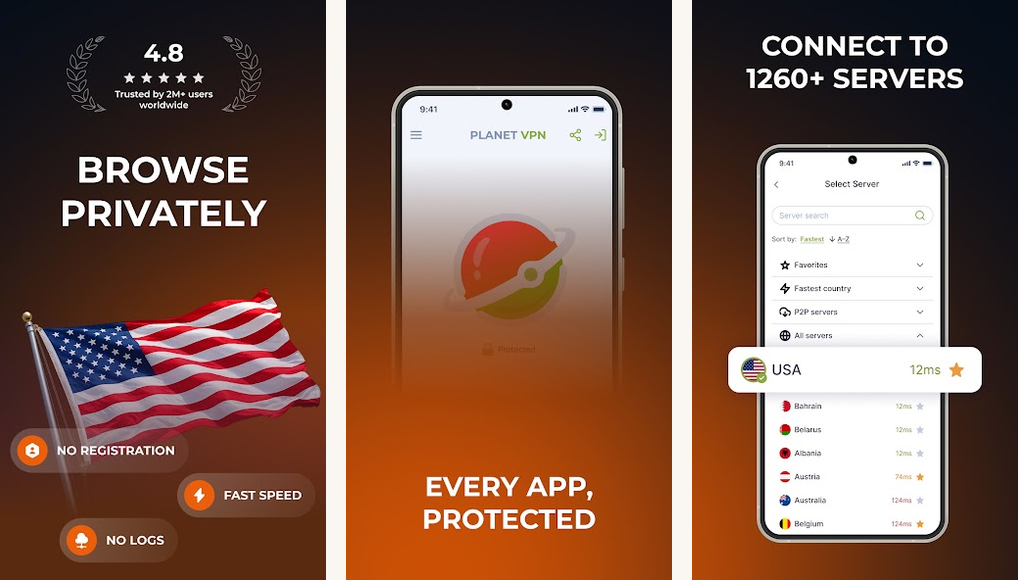
What it does offer is the most generous free tier here. No traffic cap, no time limit, and up to ten simultaneous devices, which is enough for a whole household on one free plan. It asks for no account and no payment details, so there is no identity sitting next to your sessions in a database. Connections run over OpenVPN, IKEv2 or the company’s own StarGuard protocol with AES-256, and independent leak testing has not turned up IP, DNS or WebRTC leaks. Paid plans start near two dollars a month and add the full server list. Read the store art with that split in mind: the 1,260-plus servers it advertises are the paid fleet, not the six free locations.
Close the kill-switch gap yourself
Android can enforce one at the system level regardless of what the app offers. In Android’s VPN settings, turn on Always-on VPN and Block connections without VPN for VPN Planet. Traffic then stops instead of falling back to the open network if the tunnel drops. Do this before you rely on it for anything sensitive.
The seven to avoid
Each app below has been caught at least once doing something that materially breaks the protection a VPN is supposed to provide. Several have tens of millions of installs. Reach counts for nothing here. Ownership is often hidden by design: a Tech Transparency Project check found 13 free VPNs with China-linked ownership still on the App Store and 11 on Google Play, none disclosing it on the listing.
| 📱VPN | 🏁 The documented problem |
|---|---|
| Hola Free VPN | Routes free users peer to peer, turning your phone into an exit node for someone else’s traffic. Its commercial arm, Bright Data, resells that residential bandwidth. |
| Betternet | A widely cited academic study of hundreds of Android VPN apps found it carried 14 third-party tracking libraries, the most of any app named. Now a Point Wild property, the same lineage behind Hotspot Shield. |
| VPN Proxy Master | Bundles ad and analytics SDKs and shares connection metadata with third parties despite a no-logs marketing claim. No independent audit. The Tech Transparency Project ties it to Qihoo 360, a Beijing firm under US sanctions, behind shell companies. |
| SuperVPN | Pulled from Google Play after researchers reported a critical man-in-the-middle flaw, and later tied to an exposed database of more than 360 million user records. Has resurfaced under copycat names. |
| Touch VPN | By its own privacy policy it logs connection timestamps, your advertising ID and IP-derived location, and the free tier is heavy with forced-video and pop-up ads. Another Point Wild property. |
| SpeedVPN and FlashVPN | Two opaque, unaudited free VPNs with no real ownership disclosure, no published audit, and a leaked DNS query in our network-handoff test. |
| Atlas VPN | Shut down by Nord Security. Do not install the legacy APKs still floating around. If Atlas was your pick, use NordVPN directly. |
Atlas VPN is the instructive case. It was legitimate and popular, and Nord Security still shut it down and moved users across. If it was your free pick, our guide to what replaced Atlas VPN walks through the safe alternatives. For the rest of the category, a huge install count next to a vague developer page tells you an app is popular, not that it is safe. Check who owns it before you check the star rating.
A security badge is not a privacy guarantee!
Google Play now shows a Verified badge on VPN apps that clear a Mobile Application Security Assessment and are transparent in the Data safety section, and hide.me carries it. Read it narrowly. The review checks security hygiene, things like encryption and how an app stores data, not whether the company harvests and sells your connection records. VPN Proxy Master, on the avoid list above, advertises the same badge.
Worth watching: PrivadoVPN Free → It is the one other free tier that tempts us. A generous monthly allowance, a good spread of locations, unlimited devices. It stays on the watch list because it has no published no-logs audit and it recently moved its legal home, and unlike VPN Planet it wants an account before you can connect. Our bar is a published audit or a court test; failing it costs a place unless something else pays for the gap.
When free runs out

Most people who need a VPN for something serious hit the free wall fast. It is usually a data cap, a peak-time throttle, or a missing protocol option. Streaming a region-locked service, gaming on a stable tunnel, or protecting work traffic on hotel Wi-Fi all push past what a free tier can carry. That gap is the honest reason paid VPNs exist.
You have outgrown free when:
- Streaming: Services block free-tier IP ranges first, and any free workaround stops working within weeks.
- Gaming: You need a stable tunnel and predictable ping, which our test of a VPN for online gaming covers in detail.
- Daily use: Your normal month runs past the cap, or peak-hour queues start costing you minutes.
- Work traffic: Hotel and conference Wi-Fi is where a dropped tunnel actually costs something.
If that is you, a cheap paid plan is the fix, and our test of paid Android VPNs covers what crosses the bar. Confirm current pricing before you subscribe, because VPN promos change constantly. Still weighing whether you need one at all? Why a VPN matters on Android lays out the cases that justify it.
Set it up safely

A trustworthy VPN can still leak if you leave it on the defaults. Two settings and two habits close most of that gap, and the settings take about a minute.
One minute of setup:
- Turn on Always-on VPN: In Android’s network settings, switch on Always-on VPN and Block connections without VPN for the app. That closes the seconds at boot or after a dropout when traffic would otherwise go out in the clear.
- Read the permissions before you trust it: A VPN needs the system VPN permission and little else. One asking for contacts, location or SMS is telling you how it makes money.
- Use the kill switch, then test it: Enable it in the app if it has one, then toggle airplane mode mid-session and confirm the connection stops rather than falling back to the open network.
- Remember what the provider can see: Every VPN routes all your traffic, so the no-logs policy and audit history matter more than any toggle in the app.
The golden rule: set the VPN to fail closed. One that drops you onto the open network the moment it struggles is worse than no VPN, because you think you are covered when you are not. The EFF’s guide to choosing a VPN that is right for you is the best plain-language walkthrough of what a VPN can and cannot protect you from.
Mistakes You Should Avoid
| 🙅🏼 Mistake | 💡 Why it matters | 💫 The Better move |
|---|---|---|
| Picking by install count | Some of the most-installed free VPNs have the worst documented incidents. | Pick by audit history and a known company, not by popularity. |
| Trusting the lock icon | Some free VPNs keep showing it after the tunnel has quietly dropped. | Use a VPN with a tested kill switch, or Android’s Always-on setting. |
| Using free for streaming | Streaming services block free-tier IP ranges first, and it rarely lasts. | Use a paid plan for any consistent streaming or region shift. |
| Installing a dead VPN’s APK | An unmaintained VPN gets no security fixes and can be repackaged with malware. | Only install current apps from the Play Store. |
Final Take

For most people, Proton VPN free is the one to install. It is the only free Android VPN with no data cap and no time limit, it runs on Proton’s audited fleet, and the kill switch held through every leak test we ran. Windscribe free is better if you want a wider choice of countries and can live inside a monthly budget. hide.me free is the clean backup for the day your first choice has an outage. VPN Planet free is the one to reach for when the problem is device count rather than trust, and only with Always-on VPN switched on.
Everything else on the shelf needs to earn your trust the way these did, with a published audit or an honest, verifiable free tier, before it touches a phone you actually use.
Free Android VPN common concerns, answered
- Is any free VPN actually safe to use?
Yes, but only a few. Proton VPN free, Windscribe free and hide.me free all run on the same audited infrastructure as their paid plans. The risk is the long tail of free VPNs with millions of installs and nothing published behind them. - Which free VPN is best if I only install one?
Proton VPN free. It is the only one here with no data cap and no time limit, so you can leave it on and stop thinking about it. - Is VPN Planet safe?
It is one of the more generous free tiers, with unlimited data and ten devices, and independent leak testing has come back clean. It has not published a no-logs audit and its Android app has no kill switch, so treat it as a convenience VPN and turn on Android’s Always-on VPN before you rely on it. - Why are most free VPNs considered unsafe?
Running a VPN costs money, so a free app has to make it back somewhere. The dishonest ones do it by logging and selling your data, reselling your bandwidth, or injecting ads, which defeats the point. - What does a VPN not protect me from?
Plenty. It hides your traffic from the network you are sitting on and from your ISP, but the VPN provider itself can see where you connect, which is the whole reason an audit matters. It does nothing about a reused password, a phishing page, an app you handed permissions to, or anything you are signed into. Treat it as one layer, not a shield. - Is a free VPN good enough for streaming?
Usually not. Streaming services block free-tier IP ranges quickly, and free caps and throttles get in the way. For consistent streaming, a cheap paid plan is the honest fix. - Should I install an APK of a VPN that shut down, like Atlas?
No. A dead VPN gets no security updates and its old APKs can be repackaged with malware. Move to a maintained app instead.
How we tested

We installed each free VPN and lived with it across Pixel, Samsung and OnePlus hardware. Every pick ran a 42-scenario leak test, watching for IPv4, IPv6, DNS and WebRTC leaks through hard kills, sleep, reboots and network handoffs, alongside a look at each app’s trackers, its audit history, and the jurisdiction its owner answers to. We have tested Android VPNs for years, and the avoid list is built from documented, published incidents.