
In This Article
Follow BestForAndroid


💡 Short answer
- Best overallQuo Starter: $19 a user a month, or $15 billed yearly. It sends an automatic reply to missed calls on every plan, and Business ($33) adds the Jobber and Housecall Pro links.
- Lowest crew billTalkroute Plus: $39 a month for 3 people, plus $5 for each extra person.
- Solo on a budgetGoogle Voice Starter: $10 a month on a personal Gmail account, US only.
- Job software add-onsOnly if you already pay for the software. Housecall Pro Voice starts at $65 a month on top of a $79 plan; Jobber Receptionist is $29 for 30 conversations on top of Jobber.
Say you’re under a sink or up a ladder when the phone rings. By the time you call back, the customer has already booked someone else. A business phone app can’t hold the ladder, but it can help with part of the problem: a separate number on your Android phone, texts sent from that number, and on some plans an automatic text to the caller you missed.
That leaves a second question: do you need a separate app at all? Jobber and Housecall Pro both sell a phone add-on, so I compared four standalone apps with those two add-ons, using vendor pages, Google’s help centre and store listings, all checked in November.
Start here: find your situation in the left column, then read across.
| Your situation | Pick | Why |
|---|---|---|
| Solo, lowest bill | Google Voice Starter | $10 a month, US only |
| Missed calls cost you work | Quo Starter | Auto-reply to missed calls on every plan |
| Crew of 3 to 5, lowest bill | Talkroute Plus | $39 for 3, $5 per extra person |
| Flat price and a missed-call text | Grasshopper Solo Plus | Unlimited users; Instant Response listed, plan not named |
| On Jobber or Housecall Pro, want a phone | Quo Business | Links to both |
| On Housecall Pro, want one app | Housecall Pro Voice | Calls next to customers and jobs |
| On Jobber, too busy to answer | Jobber Receptionist | An AI answers and texts back |
If two rows fit, let the missed call break the tie. A text from your business number can give a caller a reason to wait for you rather than ring the next plumber on the list, and only some plans document one. One caveat before the numbers: everything below comes from vendor pages, Google’s help centre and user reviews, not from hands-on tests.
What It Costs Each Month
| Billed monthly | 1 user | 3 users | 5 users |
|---|---|---|---|
| Quo Starter | $19 | $57 | $95 |
| Quo Business | $33 | $99 | $165 |
| Talkroute | $19 | $39 | $49 |
| Grasshopper | $18 | $41 | $47 |
| Google Voice | $10 | $60 + Workspace | $100 + Workspace |
| Housecall Pro + Voice | $144 | $254 | $254 |
| Jobber + Receptionist | $78 | $136 | $194 |
Treat these as sticker prices: regular US list prices before tax, checked in November, shown per month. For Talkroute I used Basic for one person and Plus for 3, plus $5 for each of the 2 extra people at 5. For Grasshopper it’s True Solo for one, then Solo Plus with its $9 add-on that rings everyone, plus two $3 extensions at 5. For Google Voice it’s Starter on Gmail for one, then Standard at $20 a user for ring groups, and I haven’t counted the Workspace plan that goes with it.
Here is how the job software rows are built. Housecall Pro is Basic for one person and Essentials for up to 5, with Voice from $65 on top, before minute overages. Jobber is Core at $49 for one user, then extra users at $29 a month each on the Core card, so 3 and 5 users mean 2 or 4 extras. Receptionist adds $29.
Billed Yearly Instead
| Billed yearly, per year | 1 user | 3 users | 5 users |
|---|---|---|---|
| Quo Starter | $180 | $540 | $900 |
| Quo Business | $276 | $828 | $1,380 |
| Grasshopper | $168 | $408 | $480 |
| Housecall Pro + Voice | $1,488 | $2,568 | $2,568 |
| Jobber + Receptionist | $696 | Extra-user yearly rate not shown | Extra-user yearly rate not shown |
Only vendors that print a yearly rate make this table, so Talkroute and Google Voice are missing: Talkroute offers annual billing but shows no price, and Google shows no yearly price for Voice. Housecall Pro’s Voice FAQ says Voice is billed monthly on its own cadence, and Jobber doesn’t say whether Receptionist costs less on a yearly plan. So I’ve counted Voice at $65 and Receptionist at $29 for each of the 12 months. Jobber shows no yearly rate for extra users, which is why the Jobber cells at 3 and 5 users say so.
Paying yearly takes Quo Starter down to $180 a year for one person, which is $15 a month. The catch is the refund terms, covered below: Quo, Jobber and Housecall Pro don’t refund unused time, so paying for a year is a bet that you’ll stay.
Fees to Text Customers
| Plan | One-time fee | Monthly fee |
|---|---|---|
| Quo, all plans | $19.50 | $1.50 to $3 |
| Talkroute Basic | $19 | $1.50 |
| Talkroute Plus | $15 | Included |
| Talkroute Pro | Included | Included |
| Grasshopper, Google Voice | Not printed | Not printed |
| Housecall Pro, Jobber | Not printed | Not printed |
Texting comes with paperwork. US carriers want to know who is texting from a business number, so for a regular local number you register your business and what you text about, a process called A2P 10DLC. You supply the details, the phone provider files them and passes the fee on, and until it’s registered the number can’t text US customers.
Texting registration is the fee that’s easy to forget. Quo’s fee adds $37.50 to $55.50 in the first year for one number. Jobber says texting needs 10DLC registration but prints no fee, and Grasshopper, Google and Housecall Pro print none on the pages I read, so treat their totals as a floor rather than a final bill.
Standalone App or Add-On?
The add-on question, in plain words
- No job software yet: a standalone app is the way to go. For 3 people, Quo Starter is $57 a month and Housecall Pro Essentials with Voice is $254.
- Already on Jobber: you have two routes. Quo Business links to Jobber for $33 a user, and Receptionist adds an AI that answers on a dedicated Jobber number for $29.
- Already on Housecall Pro: Voice, from $65 a month, keeps calls next to jobs.
- The real price: software plus add-on. One person on Housecall Pro Basic with Voice pays $144 a month. Quo Starter is $19.
An add-on wins only when you’d pay for the job software anyway. Then calls and texts land next to the customer record and the job, and a standalone app can’t manage that without an integration. A one-person trade that runs on paper or a calendar is best served by the cheapest route, a standalone app: Google Voice at $10, Grasshopper True Solo at $18 or Quo Starter at $19.

Quo (formerly OpenPhone)
Auto-replies to missed calls
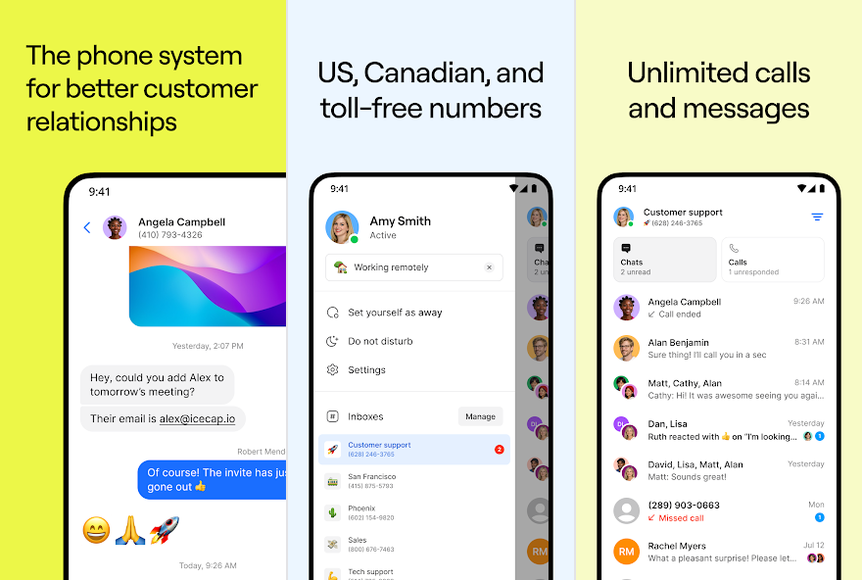
A business phone app that gives your crew one number for calls and texts, with automatic replies to missed calls on every plan.
- Best forTrades that lose work to missed calls and text customers a lot.
- Cost$19 a user
- CrewUp to 10 on Starter
- MissedAuto-reply, all plans
- CatchTexting fee
The good
- Auto-replies to missed calls on every plan
- Jobber and Housecall Pro links on Business
- Free porting and a 7-day trial
The bad
- Texting registration costs extra
- Payments are non-refundable
Quo used to be called OpenPhone, and even its cheapest plan does most of what a small trade business asks for. The pricing page lists auto-replies to missed calls, texts and voicemails on every plan, along with business hours and voicemail transcripts. So the customer who rang while you were on a roof can get a text from your business number, and you get their voicemail as text.
Pricing and limits
Here’s the price list as Quo’s pricing page showed it in November. Starter is $19 a user a month, or $15 billed yearly, for up to 10 users. Business is $33, or $23 billed yearly, and Scale is $47, or $35. On top of that, every plan pays a one-time $19.50 texting registration, then $1.50 to $3 a month. Extra numbers cost $5 a month. Porting your number in is free, and there’s a 7-day trial. Only Business and Scale have the job-software links.
Where it disappoints
Starter records a call only when you tap record. Automatic recording, forwarding unanswered calls by business hours and phone menus all need Business, and phone support for customers is on Scale only. Money is the sore spot: Quo’s help centre says payments already made are non-refundable, and being charged after cancelling is a recurring complaint in App Store reviews. So is support that’s hard to reach.
TechRadar’s Quo review says call quality depends on a stable internet connection. Worth knowing if your office is a van on patchy mobile data.
Skip it if you want one flat price for the whole crew, or you might cancel within a year. Verdict: our best all-round pick for a trade business that misses calls, and the only app here that links to both Jobber and Housecall Pro. If the monthly bill for 3 or more people is what matters most, look at Talkroute instead.

Talkroute
A flat price for a small crew
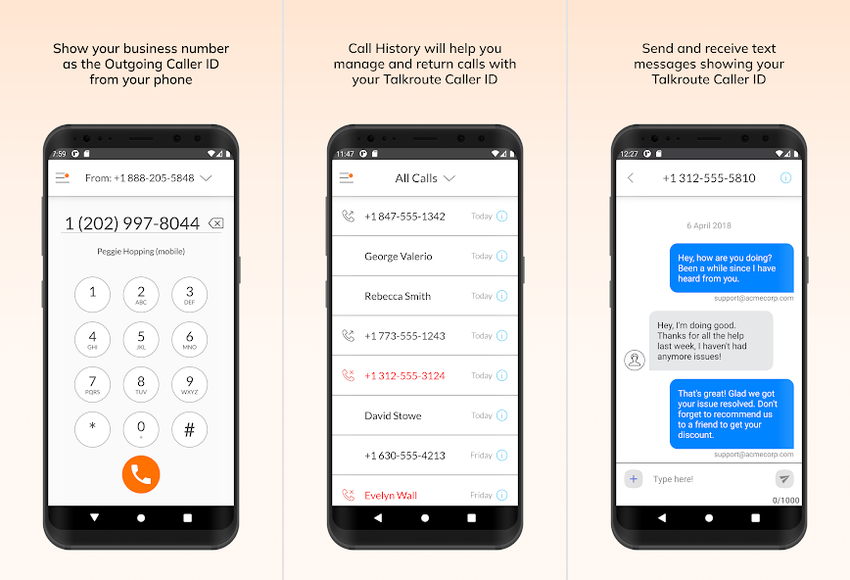
A virtual phone system priced per plan rather than per person, with calls, texts and voicemail on a business number.
- Best forCrews of 3 to 5 who want the lowest predictable monthly bill.
- Cost$39 for 3 users
- Crew$5 per extra user
- MissedNot stated
- CatchNo missed-call text stated
The good
- $39 covers 3 people on Plus
- After-hours routing from Plus
- Free porting, usually 3 to 5 days
The bad
- No missed-call text stated
- Few ratings to judge it by
Talkroute charges by plan, not by person, which is why it has the lowest monthly bill here for a crew of 3 to 5. Plus covers 3 users for $39 and each extra person is $5, so a crew of 5 pays $49. Two features start on Plus: Hours of Operation, which sends calls elsewhere when you’re closed, and Simultaneous Ring, which rings every phone at once.
Pricing and limits
On Talkroute’s pricing page in November, Basic was $19 a month for one user, Plus was $39 for 3 and Pro was $59 for 10. Texts are capped by plan at 500, 2,000 and 5,000 a month. Call recording and scheduled call forwarding wait until Pro. Registering a local number for texting costs $19 once plus $1.50 a month on Basic and $15 once on Plus, and nothing extra on Pro.
Talkroute offers annual billing but shows no annual price. The free trial runs 7 days. After that there are no refunds, and partial months aren’t prorated.
Where it disappoints
The pages I read state no missed-call text and name no Jobber or Housecall Pro integration. The Android app was last updated in May, and its 406 ratings on Google Play average 3.7. User reports are too thin to show a pattern.
Skip it if a text back to missed callers is the reason you’re buying. Verdict: the lowest predictable bill for a crew that lives on calls, and the refund terms are printed on the price page. If you want missed callers texted automatically, go with Quo, or Grasshopper if Instant Response is on your plan.

Grasshopper
One price, unlimited users
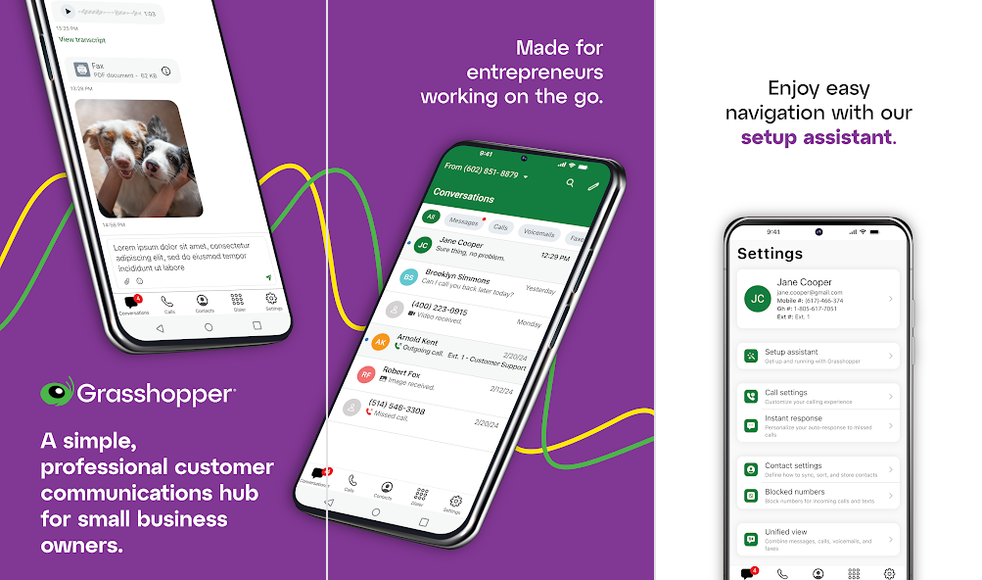
A virtual phone service with a business number on your mobile, an automatic text after a missed call, and one plan price for the team.
- Best forSolo trades and growing crews who want a missed-call text and a flat bill.
- Cost$18 solo, $32 crew
- CrewUnlimited users
- MissedInstant Response
- CatchCancel complaints
The good
- Instant Response texts missed callers
- No charge to add people on Solo Plus
- Business-hours routing listed
The bad
- No job-software integrations
- Cancelling is a recurring complaint
Two things make Grasshopper interesting to a small trade business, and both are documented. Instant Response sends an automatic text to a caller after a missed call, and Solo Plus charges one price however many people answer. Its feature pages also list business-hours routing and call recording.
Pricing and limits
These figures come from Grasshopper’s own plan summary and its Instant Response page, checked in November, because the main pricing page couldn’t be read from outside the US and Canada. True Solo is $18 a month, or $14 billed yearly, for one user. Solo Plus is $32 a month, or $25 billed yearly, and brings unlimited users, one number and 3 extensions.
Want several phones to ring at once? Grasshopper calls that call blasting, and it costs $9 a month more. Extra extensions are $3 a month each and extra numbers are $9. The 7-day trial needs no card, and porting your number in is free. A caveat: the Instant Response and porting details come from the plan summary page, not the price page, and it doesn’t name the plans that include Instant Response. Confirm it on the plan you pick.
Where it disappoints
Nothing links Grasshopper to Jobber or Housecall Pro: its own summary says it has no third-party CRM integrations and no public API. Cancelling is where it falls short. In at least 7 App Store reviews between July and October, users describe auto-renewal with a 30-day notice, no refund for unused time and charges after cancelling. The pages I read don’t list a texting registration fee or refund terms.
Skip it if you might cancel within a year, or you want calls logged in your job software. Verdict: a sensible flat bill with a missed-call text, for a crew that plans to stay put. If you need the job-software link, Quo is the better alternative.

Google Voice
Cheapest line for a solo trade
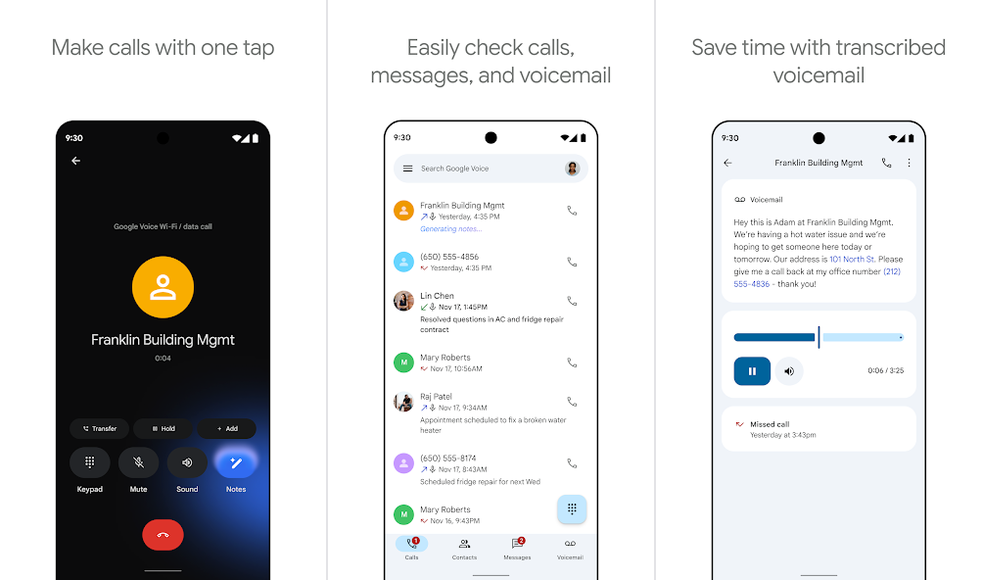
Google’s phone service, sold as a standalone plan on a personal Gmail account or as an add-on to Google Workspace.
- Best forA one-person trade in the US that wants a cheap second line.
- Cost$10 a month
- CrewWorkspace for crews
- MissedNot stated
- CatchUS texts only
The good
- $10 a month for one person
- Official Google help for each step
- Ring groups for a crew on Standard
The bad
- No missed-call text stated
- Unlimited texts in the US only
If it’s just you, Google Voice is the cheapest paid business line on this list. Per Google’s plan comparison, checked in November, a standalone Starter plan is $10 a month for one user on a personal Gmail account, in the US only. The standalone Standard plan is $20 and adds auto attendants, which is Google’s name for a phone menu.
Pricing and limits
A crew needs the Workspace route, where Voice is an add-on: Starter at $10 a user for up to 10 users, Standard at $20 and Premier at $30, each on top of a paid Workspace plan. Ring groups give the crew one number that rings several people, and they need Standard or Premier. Every paid plan records calls on demand, but automatic recording is Premier only. Unlimited texting is US only, and Google shows no yearly price.
Where it disappoints
Google’s pages state no missed-call text. Crews also hit an Android catch: Google’s ring group settings page says calls to a ring group aren’t forwarded to the mobile numbers linked to members’ Voice accounts, so each person has to answer in the Voice app. App bugs are a recurring complaint in recent App Store reviews of the consumer app: sluggish text input and one-way audio, for example.
Skip it if you need texts outside the US, or a text back to missed callers. Verdict: the sensible pick for a solo trade on a budget. If you want missed callers texted, Grasshopper True Solo at $18 a month is the better alternative, provided Instant Response is on that plan, which Grasshopper doesn’t say.
If You Already Pay for Job Software
| Add-on | Price on top | What it is |
|---|---|---|
| Housecall Pro Voice | From $65 a month plus minutes | A phone system inside Housecall Pro |
| Jobber Receptionist | $29 a month for 30 conversations | An AI that answers a dedicated number |
Both add-ons only make sense if you already pay for the software underneath. Housecall Pro Basic is $79 a month for one user, or $59 billed yearly, and Essentials is $189 for up to 5 users, or $149 billed yearly. Jobber Core is $49 a month for one user, or $29 billed yearly, and Connect is $199 for 5, or $149 billed yearly.
Now add the phone. One person pays $144 a month on Housecall Pro or $78 on Jobber, where Quo Starter is $19. If these tools already run your business, the add-on keeps calls beside the customer and the job. If they don’t, you’d be buying field-service software to get a phone, which is an expensive way to do it.

Housecall Pro Voice
Phone inside Housecall Pro
Housecall Pro’s own phone system, added to its field-service software, with calls and texts kept in the same account as customers and jobs.

- Best forCrews that already run every job through Housecall Pro.
- CostFrom $65 on top
- CrewRing groups of 10
- MissedExisting customers
- CatchKeep the app open
The good
- Calls sit next to customers and jobs
- Call hours, phone menu and ring groups
- Texts existing customers after a miss
The bad
- From $65 a month plus minutes
- App must stay open to take calls
Inside Housecall Pro, Voice is the phone system: calls and texts sit in the same account as your customers and jobs. Per its Voice FAQ and settings help, you get call flows with a Call Hours setting (24/7, your business hours or a custom schedule), a phone menu and ring groups of up to 10. Missed Call Automation texts existing customers when you miss their call, working off business hours or a custom date range.
Pricing and limits
On Housecall Pro’s pricing page, checked in November, Basic is the entry point at $79 a month, or $59 billed yearly, for 1 user. Essentials covers 5 users for $189, or $149 billed yearly. MAX is $329, or $299 billed yearly, for 8 users, plus $35 for each extra user. The 14-day trial is of MAX and needs no card.
Voice and call tracking begin at $65 a month plus overages. The packages run from 500 to 6,000 minutes, topping out at $350 a month for 6,000. Per the Voice FAQ, Voice is billed monthly on its own cadence and works in the US and Canada only.
Where it disappoints
The missed-call text has a catch: it only goes to existing customers, so a first-time caller who found you online gets no text back. Android has rules of its own. Housecall Pro’s mobile help says you have to be logged in with the app open in the background, and your device has to be in a ring group to receive a call. Porting takes 1 to 3 weeks in or out, toll-free numbers can’t move over, and a number is kept 60 days after deactivation.
User reports are mostly negative in recent reviews. Sales calls after signing up and app lag are recurring complaints in recent App Store reviews, and unexpected charges show up in two.
Skip it if you don’t already run Housecall Pro, or if most of your new work comes from first-time callers. Verdict: worth it for a Housecall Pro shop that wants calls in one place. If the missed-call text matters more, Quo Business at $33 a user also links to Housecall Pro, though Quo’s Housecall Pro guide says that needs a MAX or XL plan with API access.

Jobber Receptionist
An AI that answers for you
An AI receptionist inside Jobber that answers calls on a dedicated number, keeps a recording and transcript, and alerts you when a call needs you.

- Best forJobber users who can’t answer during jobs or after hours.
- Cost$29 for 30 calls
- CrewBuilt into Jobber
- MissedFollow-up text
- Catch$0.79 per extra
The good
- Answers after hours or around the clock
- Texts callers who hang up early
- Included on the Plus plan
The bad
- 30 conversations, then $0.79 each
- Android support not stated
Jobber Receptionist is an answering service, not a second phone line. An AI picks up on a dedicated Jobber number, records and transcribes each conversation, and sends you an escalation notice with a transcript snippet when a call needs you. Jobber’s Receptionist help page says it can play an after-hours greeting, schedule after-hours tasks for the next day, or run 24/7.
When a caller hangs up before the conversation starts, Receptionist sends a follow-up text, though never twice to the same caller within 24 hours. The help page says you can keep your existing number.
Pricing and limits
Jobber’s pricing page, checked in November, lists Receptionist as a $29 a month add-on on Core, Connect and Grow, and includes it on Plus. The help page says $29 buys 30 conversations, then $0.79 each, while Plus is unlimited. The software comes on top: Core is $49 a month or $29 billed yearly for one user, Connect is $199 or $149 for 5 users, Grow is $299 or $229 for 5, and Plus is $499 or $399 for 5. The Core card also lists extra users at $29 a month each, which puts 3 people on Core with Receptionist at $136 a month and 5 people at $194.
Two-way texting is listed on Grow and Plus, needs 10DLC registration and isn’t available in the 14-day trial. The dedicated number works in the US, Canada and the UK. Jobber’s texting FAQ says you can’t change it once you pick it.
Where it disappoints
A busy month adds up: 60 conversations is $29 plus $23.70. On Android, the help page says nothing beyond push notifications in the Jobber app during business hours. On the money side, Jobber’s terms say fees are non-refundable, and an annual plan needs 30 days’ notice before renewal. Slow loading and crashes in the Jobber app are a recurring complaint in recent App Store reviews. One review says the Receptionist has improved, but that’s an isolated report.
Skip it if you don’t run Jobber, or you want a person, not an AI, to answer. Verdict: a cheap way for a Jobber user to cover calls after hours. A crew that wants a shared line with texting is better off with Quo Business, which links to Jobber.
When You Miss a Call
| App | Missed-call text | Who gets it |
|---|---|---|
| Quo | Auto-reply, all plans | Callers; no limit stated |
| Talkroute | Not stated on the pages read | Not stated |
| Grasshopper | Instant Response; plan not named | Callers; no limit stated |
| Google Voice | Not stated on the pages read | Not stated |
| Housecall Pro Voice | Missed Call Automation | Existing customers only |
| Jobber Receptionist | Follow-up text | Callers who hang up early |
I’d treat this as the feature that pays for the app. A caller who gets a text back from your business number can see you noticed, and may wait for you. Before you buy, check which plan includes it and who receives it.
After Hours and Weekends
| App | After-hours options |
|---|---|
| Quo | Business hours and auto-replies, all plans; forwarding by hours and phone menus on Business |
| Talkroute | Hours of Operation on Plus; scheduled forwarding on Pro |
| Grasshopper | Business-hours routing; plan not named |
| Google Voice | Phone menu on Standard; a ring group falls back after 30 seconds |
| Housecall Pro Voice | Call Hours: 24/7, business hours or custom; phone menu |
| Jobber Receptionist | After-hours greeting, tasks for the next day, or 24/7 |
Customers don’t keep office hours. Evening and weekend calls arrive when you’re off the tools, so what happens to them matters. Every app here has business hours in some form, but the plan matters: Talkroute needs Plus, and Quo needs Business for forwarding by business hours and phone menus. Google’s ring group falls back after 30 seconds to voicemail, a forward or a message.
Recording rules change from plan to plan as well. Quo records on request on Starter and automatically on Business and Scale. Talkroute records on Pro, and Grasshopper lists recording without naming a plan. On Google Voice, every paid plan records on request, and only Premier records automatically. Housecall Pro has settings for inbound and outbound recording, and Jobber Receptionist keeps a recording of each conversation. US states differ on recording rules, so check yours before you switch it on.
How Each Works on Android
| App | Play rating | Updated | Android note |
|---|---|---|---|
| Quo | 4.7 (10.2K) | Sep 29 | Needs a stable connection |
| Talkroute | 3.7 (406) | May 26 | Few ratings |
| Grasshopper | 4.4 (5.02K) | Nov 12 | No limits stated |
| Google Voice | 4.1 (373K) | Nov 5 | Ring groups ring the app only |
| Housecall Pro | 4.6 (6.99K) | Nov 9 | App open in the background |
| Jobber | 4.4 (6.98K) | Nov 10 | Receptionist on Android not stated |
The ratings and update dates above come from the Google Play listings, checked in November. Only Housecall Pro and Google spell out Android limits, in their cards above. The pages I read document none for Quo, Talkroute or Grasshopper.
Links to Your Job Software
| App | Jobber | Housecall Pro |
|---|---|---|
| Quo | Business and Scale | Business and Scale, with HCP MAX or XL |
| Talkroute | Not stated | Not stated |
| Grasshopper | None | None |
| Google Voice | Not stated | Not stated |
| Housecall Pro Voice | No | Built in |
| Jobber Receptionist | Built in | No |
Quo is the one standalone app here that documents a link to both tools, and only on Business and Scale. Its Housecall Pro link imports contacts one way every hour and logs calls and texts to the customer record. Older activity doesn’t come across.
Grasshopper’s own summary says it has no third-party CRM integrations, and the pages I read for Talkroute and Google Voice name neither tool. So if calls have to land in the job record, you’re choosing between Quo Business and the add-on inside the software you already use.
Cancelling and Refunds
| App | Trial | Refunds and notice |
|---|---|---|
| Quo | 7 days | Payments non-refundable |
| Talkroute | 7 days | No refunds after the trial, no proration |
| Grasshopper | 7 days, no card | Not on the pages read |
| Google Voice | Not shown | Not on the pages read |
| Housecall Pro | 14 days of MAX | Auto-renews; no proration; refunds asked for by email |
| Jobber | 14 days of Grow | Non-refundable; 30 days’ notice on annual plans |
Cancelling is where these apps draw the most complaints, so read the terms before you pay for a year. Quo’s help centre says payments already made are non-refundable, and charges after cancelling are a recurring user complaint. Talkroute gives no refunds after its 7-day trial and doesn’t prorate partial months.
Housecall Pro’s terms say subscriptions renew automatically, with no proration or refund beyond what the agreement allows, and refund requests go by email. Jobber’s terms call fees non-refundable and ask for 30 days’ notice before an annual plan renews. Grasshopper users describe the same pattern, a 30-day renewal notice and no refunds for unused time, and it’s a recurring complaint.
Moving Your Number
| App | Porting in | When you leave |
|---|---|---|
| Quo | Free; 3 to 7 business days | Held 60 days or 30 at most; Quo’s pages disagree |
| Talkroute | Free for most US and Canadian numbers; 3 to 5 business days | Not shown |
| Grasshopper | Free (plan summary page) | Not on the pages read |
| Google Voice | Not shown | An admin requests a port-out code |
| Housecall Pro Voice | 1 to 3 weeks; no toll-free numbers | Number kept 60 days |
| Jobber Receptionist | Not covered; keeps your number | Not covered |
Porting means carrying over the number your customers already know. Quo, Talkroute and Grasshopper say porting in is free. Quo takes 3 to 7 business days and Talkroute 3 to 5, while Housecall Pro takes 1 to 3 weeks in either direction and can’t move toll-free numbers. Texting has its own wait: Quo’s porting guide says US texting stays blocked until registration is done, which usually takes 24 to 48 hours.
Leaving is where people get caught out. Google says in its port-out guide for Voice that you shouldn’t cancel the old service until the port is complete. Quo’s pricing page and help centre disagree on how long a cancelled number is held, 60 days against 30 at most, and Housecall Pro keeps one 60 days. So port first and cancel after. For a number you fully control, see our guide to a secure number you own.
What Users Report
| App | What users report | How often |
|---|---|---|
| Quo | Support hard to reach | Recurring |
| Quo | Charged after cancelling | Recurring |
| Talkroute | Too few reports to show a pattern | Too few to say |
| Grasshopper | Hard to cancel, no refunds | Recurring |
| Google Voice | App bugs (consumer app) | Recurring |
| Housecall Pro | Sales calls after signing up, app lag | Recurring |
| Housecall Pro | Unexpected charges | Several |
| Jobber | Slow loading and crashes | Recurring |
How I labeled complaints: recurring means three or more independent reports, several means two and isolated means one. The sources were the newest App Store reviews and Google Play ratings, read in November. Recent reviews skew negative, so treat this as a list of risks, not a score.
For the job-software tools, the loudest complaints are about sales calls, billing and the app itself, not the phone features. I could find no independent test of these apps for a trade business, and reviews such as TechRadar’s describe features without a test method.
Left Out, and Why
Apps considered and not ranked
- Ooma Office Pro Plus: it costs $29.95 a user plus a $29.95 activation fee, and it has a Jobber integration. On the other side, texting is capped at 1,000 a month per account, no missed-call text is stated, and dropped calls on weak Wi-Fi are a recurring complaint in App Store reviews.
- Workiz Genius Phone: no public price, a Google Play rating of 2.7 from 426 ratings, and cancelling is a recurring complaint.
- ServiceTitan Phones Pro: it has no public price, is sold through an account manager and is built for larger operations.
- Dialpad: its pricing page doesn’t say whether the price it shows is monthly or yearly.
- RingCentral: Core includes only 25 texts a user a month, which is thin for a crew that texts customers all day.
- Zoom Phone: a good shared line, but the team text thread is an add-on, and it has no published price.
If your crew mostly needs one number that several people answer, our guide to shared business phone number apps goes deeper on shared texting. Want a private second number on your own phone? See our ranking of second phone number apps, and for free calls rather than a business line, our free calling apps.
FAQs
Is the phone add-on in Jobber or Housecall Pro enough?
Only if you already pay for that software. Housecall Pro Voice starts at $65 a month on top of a plan from $79, and Jobber Receptionist is $29 for 30 conversations on top of Jobber. Without either tool, a standalone app like Quo Starter at $19 a user costs far less.
What does a business phone app cost for a crew of 3?
On regular list prices checked in November, Talkroute Plus comes out lowest at $39 a month. Grasshopper Solo Plus with its ring-everyone add-on is $41, and Quo Starter is $57, or $540 a year billed yearly. Quo also charges $19.50 once plus $1.50 to $3 a month for texting registration. If you’re already on job software, Housecall Pro Essentials with Voice is $254 a month, and Jobber Core with 2 extra users and Receptionist is $136.
Which apps text back a missed call?
Quo documents auto-replies to missed calls on every plan. Grasshopper documents Instant Response but doesn’t name a plan. Housecall Pro Voice texts existing customers only, and Jobber Receptionist texts callers who hang up early. For Talkroute and Google Voice, the pages I read state nothing of the kind.
Can I keep my current number?
Usually, yes. Quo and Talkroute say porting in is free and takes 3 to 7 and 3 to 5 business days. Housecall Pro takes 1 to 3 weeks and can’t move toll-free numbers. Whichever you pick, keep the old service until the port is complete.
Do I need to register my number to text customers?
In the US, yes, for a regular local number. Your provider files your business details and passes the fee on to you. Quo charges $19.50 once plus $1.50 to $3 a month, and Talkroute Plus charges $15 once.
How this guide was put together. It’s research-based. I read each vendor’s pricing and help pages, Google’s Voice help, the Google Play and App Store listings, the newest App Store reviews, and TechRadar’s Quo review. I opened no accounts and made no calls or texts. Prices are regular US list prices before tax, checked in November, and they change, so check the vendor’s page before you buy.