In This Article
Follow BestForAndroid


Disclosure: This is a sponsored review. The links to CZUR carry tracking tags, and BestForAndroid may earn a commission if you buy through them, at no extra cost to you. The sponsorship paid for the coverage, not the verdict. What you read here is what the hardware and its software actually do.
Short answer: The CZUR ET Max is an overhead scanner built for one job, digitizing bound books and stacks of paper fast without taking them apart. A 38MP camera shoots a full page in about 1.5 seconds, lasers flatten the curve of an open book, and bundled ABBYY OCR turns the result into searchable text. It is pricey and it eats desk space, so it suits a library, an archive, or a heavy home workload more than the occasional receipt.
Picture digitizing a 400-page hardback. On a flatbed you would press the spine flat, scan one side, flip, line it up, and scan again, page after page, while the lamp warms up between passes. A sheet-fed scanner is faster but useless here, since it cannot pull a bound book through its rollers. That is the gap the CZUR ET Max is built to fill: it shoots the whole open spread from above in about 1.5 seconds, then moves on.
CZUR positions the CZUR ET Max Book Scanner as a professional overhead scanner, the kind of tool a library, a small archive, or anyone with a wall of paper to digitize would reach for. Instead of a glass bed, a 38-megapixel camera sits on an adjustable arm and looks down at the page. The interesting part is what happens after the shutter fires, so that is where most of this review lives.
The specs that actually matter
Spec sheets blur together, so here are the numbers worth holding onto. They explain why the ET Max is quick on a thick book and why it is overkill for a single page now and then.
| Spec | Detail |
|---|---|
| Camera | 38MP CMOS sensor, 7168 by 5376 pixels |
| Default output | 410 DPI, with higher DPI available in the software |
| Capture speed | About 1.5 seconds per page, up to 40 pages per minute |
| Scan area | Up to A3, roughly 16.5 by 11.7 inches |
| Max thickness | Around 50mm, near 2 inches, so most hardbacks fit |
| Display out | HDMI 1.4 at 1080p 60Hz to an external screen |
| OCR engine | Bundled ABBYY, over 180 languages |
What the CZUR ET Max actually is
Strip away the marketing and the ET Max is a camera on a stand with clever software behind it. The 38MP CMOS sensor mounts on an adjustable arm with a wide field of view, so a single shot captures an entire document rather than a strip at a time. That single-shot approach is the whole reason overhead rigs beat a flatbed on bound material, and it is the engine that powers CZUR’s whole take on OCR technology, since you cannot read a page you have not captured cleanly first.
After the capture, AI post-processing does the heavy lifting. It cleans up the image, corrects distortion from the angle, and flattens the natural curve of an open page so the text does not warp toward the spine. Get that flattening right and a scanned book reads like a flat document instead of a photo of a book, the same goal that drives serious book scanning work in archives and libraries, and it matters a lot once you run text recognition over the result.
The good and the not so good

After weighing what the hardware does well against where it frustrates, the picture is clear enough. The strengths are the reasons to buy it:
- Strong on bound books: this is the headline. It digitizes hardbacks and thick volumes without unbinding or damaging them.
- Foot pedal efficiency: the optional pedal frees both hands to turn pages, which adds up over a long session.
- Mature OCR: the bundled ABBYY engine is one of the better names in text recognition, not a token afterthought.
- Glare control: indirect side lighting helps with glossy magazine pages that would otherwise blow out under a direct lamp.
The drawbacks are worth stating plainly so nothing surprises you after the box arrives:
- Price and footprint: it sits at the higher end and the arm needs real desk space, so a cramped setup will feel it.
- Not a true reproduction tool: it captures a clean, usable image, not gallery-grade fidelity for fine art or archival facsimile.
- De-warping can wobble: page flattening on bound books is not perfect every time, and smaller books often need a second attempt to sit right.
- OCR language gaps: the engine covers a lot, but not everything. Thai, for one, is not supported, so confirm your language is on the list before you commit.
Design and build
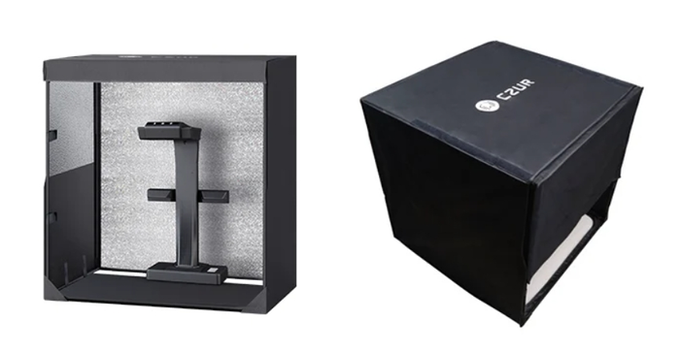
The industrial design is restrained rather than flashy, which fits a device meant to live on a library desk or in a home office. The matte housing and brushed-metal support arm feel solid, and the unit ships in double-layer packaging with custom-molded foam, so it arrives without the rattles you sometimes get from gear in this class.
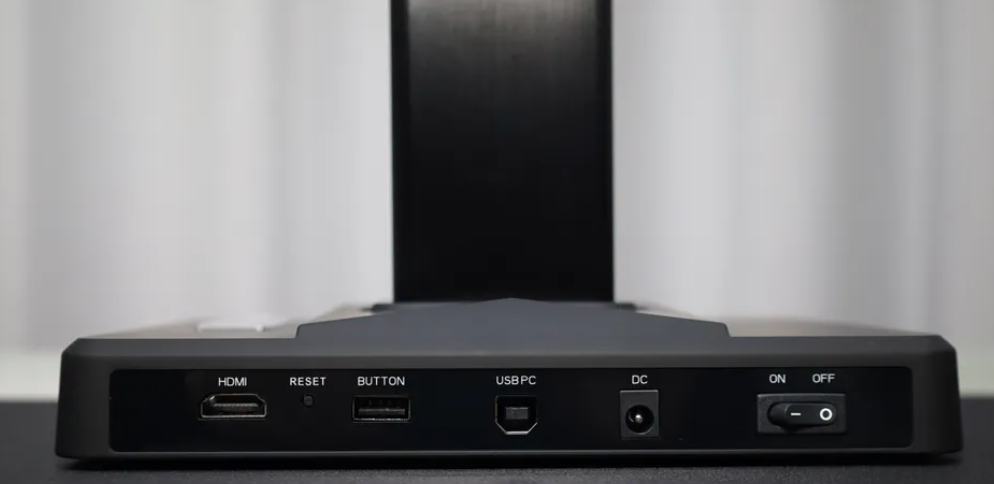
Round the back you get a USB Type-B port labeled for the PC connection and a dedicated BUTTON port for the desktop trigger or foot pedal. A horizontal toggle handles power. One detail that earns its keep is the HDMI output: it can send live video to an external monitor with no computer attached, which turns the rig into a makeshift document camera for teaching or a presentation.
LED fill lights sit along the top and the sides, with the side lights angled to soften the light across the page. Ventilation openings keep things cool with a dust-resistant design, and power draw stays low. None of this is glamorous, but it is the kind of build that holds up to a few hundred scans in a sitting.
Scanning, flattening, and reading text

The hardware and software are designed as one piece. The official scanning app runs on Windows, macOS, and Linux, with Linux support limited to listed Ubuntu-family distributions through a downloadable package. The interface is clean and the learning curve is gentle, so you are scanning within minutes rather than wading through manuals.
Imaging defaults to a sensible 24MP and climbs to the full 38MP when you need it, and DPI is adjustable from 300 upward. Two arrays of five LEDs each, plus a magnetic side light set at a 45 degree angle, light the page evenly. Three laser beams read the curvature of an open book, and the software uses that map to flatten the page in real time, which is the trick that makes a thick spread come out readable.
Once the page is flat, the bundled ABBYY engine handles the text recognition, reading over 180 languages and writing the result into a searchable layer. CZUR advertises high recognition accuracy on clean printed text, which lines up with what a mature engine delivers in practice, though faint print or handwriting will always be harder. If you want a primer on how optical character recognition turns an image into letters, that background is worth a read, and the same idea is what lets tools pull readable text off a printed page.
Beyond capture, the software does the tidying you would expect: background cleanup, auto-cropping, batch rotation, blank-page detection, handwriting removal, and watermarking. None of these are reinvented, but having them in one place means fewer trips to a separate editor before you export.
Modes, software, and who it is for
There is more than one way to trigger a scan, and the right one depends on volume. For a few pages, a mouse click or the wired desktop button is fine. For a long session, the foot pedal keeps your hands on the book. For real bulk, auto page-turn detection fires the shutter on its own as you flip, so you settle into a rhythm and let it work.
Two finger cots come in the box to hold a page down gently and keep the opposite page out of the frame, and the built-in 2.4-inch LCD gives a quick preview of framing and brightness before you shoot. Across the modes, the platform support is broad: the scanning software runs on Windows, macOS, and Linux, and it handles documents, books, magazines, receipts, and ID cards up to A3.
| If you scan | Use this mode |
|---|---|
| A handful of pages | Mouse click or the desktop button |
| A long stretch by hand | Foot pedal, both hands free for the book |
| A whole shelf | Auto page-turn detection, hands almost off |
| A class or a demo | HDMI to an external screen, no PC needed |
The verdict
The ET Max is a focused tool, and judged on that focus it is very good. If you need to turn a wall of bound books into searchable PDFs without cutting a single spine, it does that quickly and with little fuss. The image quality is plenty for reading, sharing, and searching, even if it is not the last word in archival reproduction, and the bundled OCR is mature enough to trust on clean print.
Price is the gate. It is not an impulse buy, and street pricing moves around: some Amazon listings sit closer to the $499 mark, while the official store often lands in the $650 range on sale, normally higher. Roughly speaking, budget somewhere in the $500 to $660 band depending on retailer and timing. At that level the volume of work has to justify it, which is exactly why the natural buyers are libraries, archives, researchers, and anyone digitizing a serious collection.