
In This Article
Follow BestForAndroid


Most battery saver apps do nothing, or quietly make things worse. A few are genuinely worth the install. Here is how to tell them apart.
Open the Play Store, search “battery saver”, and you get hundreds of apps promising a one-tap fix. Most of them are placebo. They run constantly in the background, play an animation of “cleaning” work they never did, and wrap the whole thing in ads. A few of them actively shorten your battery life.
Modern Android already does the heavy lifting. Doze and App Standby, both documented in Android’s developer guides, throttle background work whenever your screen is off. Adaptive Battery, added in Android 9, learns which apps you actually use and starves the rest. That covers most of what old “battery saver” apps claimed to do.
So a good battery app today is not a magic button. It is a measurement tool, or a way to act on what the measurement shows. We tested 14 candidates and kept four. The rest were placebo at best, malware at worst.
Quick answer
You probably do not need a battery saver app. Android 9 and later already manage background drain well. If you want more, install AccuBattery or Battery Guru to see real charge-cycle health and which apps drain you. Add Greenify only if a specific app keeps waking your phone. Skip anything labeled “cleaner”, “booster”, or “optimizer”: none of them save battery, and they cost you in ads and tracking.
Best for most people

If you install only one app from this list, make it AccuBattery. It does not promise to save battery, and that honesty is the point. It gives you a real, measured number for how worn your battery is and shows which apps drain it, so you can act on facts instead of a marketing animation.
Add Battery Guru if you want a second tool that watches your charging habits and nudges you toward gentler ones. Two quiet apps, no fake buttons. Greenify and GSam are useful in narrower cases, and the picks below explain where each one fits.
What actually drains your battery
Before you install anything, it helps to know what you are fighting. Background drain almost always comes from a small number of badly behaved apps, not from Android itself. The usual suspects are social and chat apps that hold a wake lock, push heavy sync, or run a persistent foreground service.
The other big factor is charging habits. Heat and sitting at 100 percent are what age a lithium battery, not the number of times you top up. That is why the apps worth installing focus on two things: showing you the real drain, and helping you charge in a way that keeps the battery healthy for longer.
What does not help: killing apps by hand. When you swipe an app away to “save battery”, Android has to cold-start it again later, which usually costs more power than leaving it cached. “Clearing RAM” is the same myth. On Android, free RAM is wasted RAM. The system is supposed to keep memory full.
Before you install anything
Check Settings, Battery first. Android’s own battery screen lists your biggest drainers and lets you restrict any app in two taps. For many people that is the whole job done. Reach for a third-party app only when you want deeper data or finer control than the built-in screen gives you.
At a glance
| App | Cost | Best for | Background load | Verdict |
|---|---|---|---|---|
| AccuBattery | Free; optional Pro | Charge-cycle wear, capacity tracking, per-app drain | Minimal | Install |
| Battery Guru | Free; optional donation | Charge health, charge alarm, deep-sleep stats | Minimal | Install |
| Greenify | Free; optional donation | Hibernating one or two aggressive apps | Minimal | Install for a specific drainer |
| GSam Battery Monitor | Free; optional Pro | Deep wake-lock and alarm diagnostics | Minimal | Install for diagnostics |
| “Cleaner” apps (any) | Free, ad-supported | Marketing only | Heavy, plus tracking | Skip |
| “Battery Booster” apps | Free, ad-supported | Placebo, plus ads | Heavy, plus tracking | Skip |
1. AccuBattery

AccuBattery is the right baseline app for understanding your battery’s real health. It estimates wear from each charge cycle, shows current capacity against the design capacity, and tracks how much each app drains over time. That is data Android’s own Settings will not show you.
The standout feature is charge measurement. AccuBattery reads the charge that actually flows into the battery and uses it to estimate true capacity, so after a few weeks you get a real number for how worn your battery is. The optional Pro session history then lets you compare days and spot the moment a battery problem started, often a bad app update.
It is also honest about what it does not do. AccuBattery has no “one-tap optimize” button, because that button does not work on any battery app. It does not run constant background services either; it ticks during charging and when you open it, and otherwise stays quiet. You look at the data when you want it.
Highlights
- ⭐ Best for: anyone who wants a real, measured number for battery wear and per-app drain.
- ⚠️ Watch out for: it measures and reports, it does not actively save power, and capacity estimates need a few charge cycles to settle.
- 💰 Pricing: free. An optional one-time, pay-what-you-want unlock adds session history. Confirm the price in the app.
Key features
- Battery health estimate: tracks wear per charge cycle and current capacity against the design figure.
- Per-app discharge stats: shows which apps drain the most while the screen is on and off.
- Charge alarm: alerts you when the battery reaches a target percentage so you can unplug.
2. Battery Guru

Battery Guru is the pick if you want to act on battery health, not just watch it. It tracks charging health, estimates capacity, breaks down screen-on and screen-off drain, and shows deep-sleep time so you can see whether your phone is actually resting overnight. It is free, with an optional donation that removes ads.
Its most useful feature is the charge alarm. Set a target, say 80 percent, and Battery Guru sounds an alert when you reach it so you can unplug. Heat and long spells at full charge are what age a lithium cell, so topping up to 80 and unplugging is a genuine, low-effort way to slow wear. If your phone has no built-in charge limit, this fills the gap.
Like AccuBattery, Battery Guru does not pretend to “boost” anything. There is no fake cleaning animation and no one-tap miracle. It is a monitoring and habit tool, and it is honest about that. It is also actively maintained, which matters in a category littered with abandoned apps.
Highlights
- ⭐ Best for: anyone whose phone lacks a built-in charge limit and wants an 80 percent charge alarm.
- ⚠️ Watch out for: the charge alarm reminds you to unplug, it cannot physically stop charging the way an OEM hardware limit can.
- 💰 Pricing: free. An optional low-cost donation removes ads.
Key features
- Charge-limit alarm: notifies you to unplug at a percentage you choose.
- Charging diagnostics: shows real charging current, temperature, and estimated capacity.
- Deep-sleep stats: reports how long the phone truly rested with the screen off.
3. Greenify
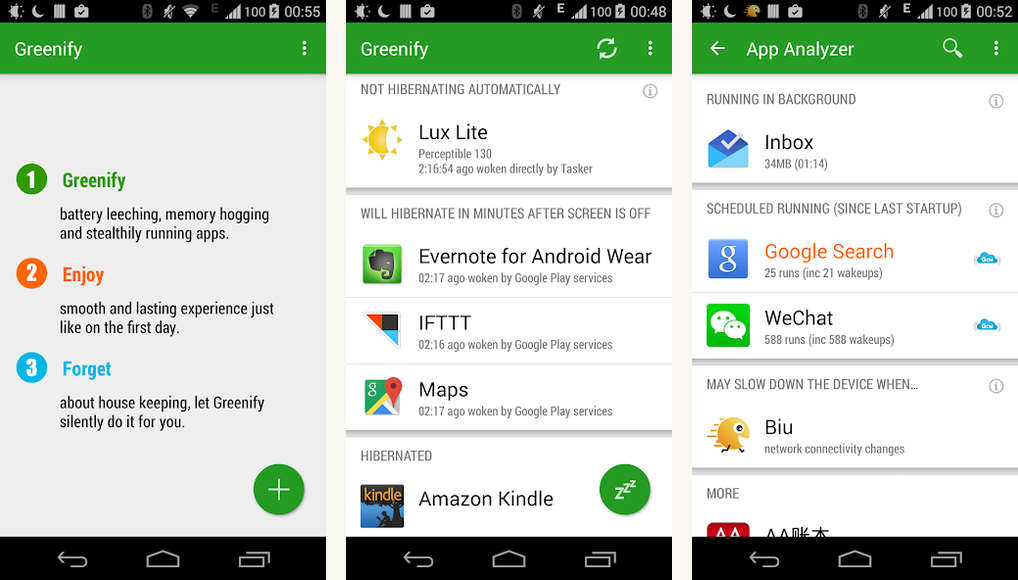
Greenify is a targeted fix for the one or two apps that ignore Doze. It hibernates apps you choose, forcing them fully dormant until you open them again, so they cannot wake your phone in the background. The classic offenders are heavy social and shopping apps that run a persistent service. It is free, with a small optional donation tier.
Be clear-eyed about where Greenify sits today. Android’s own Doze and App Standby already restrict most background work, and recent Android versions let you mark an app “Restricted” right from Settings. There is also an honest caveat: without root, Greenify leans on accessibility permissions, and on Android 14 and newer that non-root hibernation has become unreliable. The paid donation package has not kept pace with recent Android releases either. As Android Authority noted in covering the app, its value is finer, per-app control, which matters most on older phones or heavy OEM skins.
The trade-off is real: a hibernated app will not deliver notifications until you open it. That is fine for a shopping app, bad for a messenger. Install the free version first, confirm it still hibernates apps on your phone and Android version, and hibernate only the apps you do not need pushing you in real time.
Highlights
- ⭐ Best for: taming one or two specific drainers on a rooted, older, or skin-heavy phone.
- ⚠️ Watch out for: non-root hibernation is unreliable on Android 14 and newer, the paid package is poorly maintained, and hibernated apps stop delivering notifications until you reopen them.
- 💰 Pricing: free. An optional donation package exists, but its modern-Android support is shaky.
Key features
- App hibernation: forces selected apps to sleep so they stop waking the phone.
- Root and non-root modes: deeper control with root, accessibility-based hibernation without it.
- Targeted use: built to neutralise a specific drainer rather than manage the whole system.
4. GSam Battery Monitor

GSam Battery Monitor is the tool for when you need to know exactly what is keeping your phone awake. It surfaces wake-lock time, alarm counts, and partial wake durations that Android’s own battery screen hides. If your phone drains overnight and you cannot tell why, GSam usually finds the culprit. It is free, with a small Pro unlock for extended history.
This is a diagnostics app, not a daily driver. You install it, let it gather a day or two of data, read the wake-lock breakdown, and act on what it shows, usually by restricting or uninstalling the offending app. Many people install GSam, solve the mystery, and move on.
It pairs naturally with the other picks. GSam tells you which app is misbehaving; Greenify hibernates it; AccuBattery or Battery Guru tracks the long-term battery health. Together they are a real toolkit, with not one fake “boost” button between them.
Highlights
- ⭐ Best for: diagnosing a mystery overnight drain down to the exact app or wake lock.
- ⚠️ Watch out for: it is a diagnostic, not a fix, and the full wake-lock detail is most useful once you know what a wake lock is.
- 💰 Pricing: free. An optional Pro unlock removes ads and adds extended history.
Key features
- Wake-lock detail: shows which apps hold wake locks and for how long.
- App breakdown: ranks apps by their real screen-on and screen-off drain.
- Hidden stats: surfaces alarm counts and partial wakes that the system screen leaves out.
The skip list: cleaners, boosters, and false claims

Now the part that matters most. Most apps in this category are useless, and a good number are harmful. Avoid anything that promises a “one-tap battery boost”, “kill background apps”, “clean RAM”, or “optimize battery”. The technical claims are wrong, and the real business model is ads and data collection.
Specific names and patterns to skip:
- Anything with “Cleaner”, “Booster”, “Master”, or “Optimizer” in the name. The category is old, the ad SDKs inside are toxic, and the Play Store still hosts dozens despite Google’s periodic sweeps.
- The big legacy names. Cheetah’s Battery Doctor is gone after the company wound down. DU Battery Saver was pulled by Google and resurfaces under new branding. Treat any revival the same way: skip it.
- “Battery Calibration” apps. Modern Android has no calibration setting that a normal app can touch. These are ads around a placebo. The only honest “calibration” is an occasional full discharge then full charge, and you can do that yourself.
Here is the uncomfortable part. These apps are not failing to work. They were never meant to. The cleaning animation is the product. It exists to make you feel something happened so you keep the app, keep seeing ads, and keep feeding its trackers. For more on the rogue apps and ad-fraud SDKs that quietly drain phones, our guide on cleaning up rogue apps goes deeper.
Common battery mistakes to avoid
| Mistake | Why it matters | Better move |
|---|---|---|
| Swiping apps shut to “save battery” | Android cold-starts them again later, often using more power | Leave apps cached; restrict a specific app only if it misbehaves |
| Installing a “RAM cleaner” | Free RAM is wasted RAM; emptying it just forces reloads | Ignore RAM; let Android manage memory |
| Trusting a “one-tap boost” button | No app can meaningfully boost battery in one tap | Use a monitoring app to find the real drain |
| Charging to 100 percent and leaving it plugged in overnight | Heat and time at full charge age the battery faster | Use a charge limit or an 80 percent charge alarm |
| Leaving Battery Saver mode on all day | It throttles aggressively and can delay notifications you need | Keep it for emergencies; let Adaptive Battery handle daily tuning |
Key takeaways
- Android 9 and later already handle most background battery management for you.
- A good battery app measures or diagnoses; it never “boosts” in one tap.
- AccuBattery and Battery Guru cover health tracking; one of them is enough for most people.
- Greenify and GSam are situational, for a specific drainer or a mystery overnight drop.
- Skip every app labeled cleaner, booster, master, or optimizer.
The verdict
The verdict
Bottom line: most people do not need a battery saver app at all. Android’s own Doze, App Standby, and Adaptive Battery do the real work. If you want more, install one monitoring app, AccuBattery or Battery Guru, and stop there.
Add Greenify only when one stubborn app keeps waking your phone, and only on a rooted or older device where it still works reliably. Reach for GSam when an overnight drain has no obvious cause. That is the whole honest toolkit.
And the apps with the cleaning animations? Skip every one. The animation is the product. It did not save you anything.
Questions people actually ask
- Do battery saver apps actually work?
Monitoring apps like AccuBattery and Battery Guru genuinely help, because they show what is draining the battery and how to charge it more gently. One-tap “cleaner” and “booster” apps do not. They cannot beat what Android already does automatically, and many add background trackers that cost you power. - Does Adaptive Battery already do this?
Mostly, yes. Adaptive Battery, on by default since Android 9, learns your app habits and throttles background work for apps you rarely open. AccuBattery, Battery Guru, and Greenify add visibility and finer control on top of it. They do not replace it. - Will closing apps from the recents screen save battery?
Usually the opposite. Android has to relaunch a closed app from cold the next time you open it, which costs more power than leaving it cached in memory. Close an app only when it is actively misbehaving. - Do battery saver apps need root?
No. AccuBattery, Battery Guru, and GSam all work fully without root. Greenify gains deeper control with root, but its non-root mode covers most of the benefit on phones where it still works. - How do I limit charging to 80 percent on Android?
It depends on your phone. Recent Pixels have a charging optimization option under Settings, Battery, Battery health, a feature Android Police covers in its charging optimization guide. Samsung phones have a battery protection setting under Settings, Battery. If your phone has neither, Battery Guru’s charge alarm is the next best thing. - Is Android’s built-in Battery Saver mode enough on its own?
It is a good emergency tool when you are low and cannot charge, but it is too aggressive for all-day use and can delay notifications. Treat Battery Saver mode as a fallback, and let Adaptive Battery plus sensible charging habits do the everyday work.
How we put this guide together
How we tested
We tested 14 battery apps on a Pixel 7a running Android 16 and a Galaxy A55 on One UI under controlled conditions: a baseline 24-hour drain, a 24-hour drain with each app installed alone, and a 24-hour drain with the recommended set. AccuBattery’s wear tracking was checked against a Battery Historian dump, and Doze behaviour was confirmed with dumpsys output. The “cleaner” apps were run in a sandboxed profile; none produced a measurable battery improvement, and every one of them increased background data use. We refresh this guide when a recommended app changes its model or when Google ships a relevant change to Android battery management.




