In This Article
Follow BestForAndroid


Data usage tracking on Android is partly built into the OS (Settings > Network > Data Usage) and partly the domain of better third-party apps that add per-app caps, per-network breakdowns, and carrier-bill reconciliation. Picking right depends on whether you want simple visibility or active control.
This guide covers the picks that earn their place a couple of OS-built-in features, a handful of reputable third-party trackers, and the one paid pick that adds genuine carrier-billing parity for users on metered plans with strict caps.
Tested on Pixel 8a, Galaxy S26 Ultra, OnePlus 12, and Motorola Edge 50 during April and May 2026. Each app tested for accuracy against carrier dashboards on Verizon, T-Mobile, and EE.
TL;DR
Best fit: Android’s built-in Data Usage screen (Settings > Network > Data) covers most users’ visibility needs. Pair with Datally if you want per-app caps on a Pixel or stock-Android phone.
Good alternative: For Samsung users, the built-in Galaxy Data Saver plus Smart Network Switch already handles most of what third-party trackers offer.
Skip if: You are looking for an app that bills your carrier on your behalf; that does not exist. The apps below show you what you used; the carrier bill is the carrier’s.
1. Android Built-In Data Usage (Settings)

Best for: every Android user who wants visibility without extra installs
Built into every Android phone since Android 7. Open Settings > Network & internet > SIMs > Data usage. Shows total usage, per-app breakdown, cellular vs Wi-Fi split, and lets you set per-line data limits and warnings. the update added cycle-specific tracking that matches most carrier billing cycles.
- No install needed; already on your phone.
- Per-app breakdown visible.
- Data limit alerts at the OS level.
Where it falls short: Less granular than third-party apps for users on multi-line family plans or roaming arrangements.
Pricing: Free.
2. Datally by Google

Best for: Pixel and stock-Android users wanting per-app data control
Google’s Datally is a free data-tracking and data-saving app. The ‘Data Saver’ feature blocks background data per app, the daily limit feature warns at preset thresholds, and the Wi-Fi map highlights free Wi-Fi spots in your area.
- Per-app data blocking for background.
- Daily data budget with notifications.
- Wi-Fi nearby map.
Where it falls short: Datally development slowed to 2025; some features are dated. Best as a complement to the OS built-in.
Pricing: Free.
3. GlassWire

Best for: advanced users wanting firewall-style per-app data and security
GlassWire is the most-featured third-party data tracker. Per-app data graphs, real-time alerts on data spikes, firewall mode that lets you allow or block per-app network access, and security alerts for new connections. Free tier; Pro at $4.99 per year unlocks alerts and firewall.
- Real-time graphs showing per-app data live.
- Firewall mode to block apps from data access.
- Security alerts on new network connections.
Where it falls short: Firewall mode uses Android’s VPN slot, which conflicts with other VPN apps.
Pricing: Free tier; Pro $4.99/year.
4. My Data Manager

Best for: no-frills data tracker with carrier-bill parity
My Data Manager focuses on tracking data usage against your carrier’s billing cycle. Set your monthly cap, the app warns at customizable thresholds. Pro at $4.99 per year removes ads and adds shared-line tracking for family plans.
- Carrier-bill-cycle aligned tracking.
- Shared family plan tracking in Pro.
- Roaming alerts for travel.
Where it falls short: Less feature-rich than GlassWire on the firewall side.
Pricing: Free + ads; Pro $4.99/year.
5. NetGuard

Best for: open-source firewall-style data control
NetGuard is the open-source firewall app from Marcel Bokhorst. Per-app allow or block for Wi-Fi and mobile data, no root required, no servers involved (it uses Android’s local VPN service). Free with optional Pro at $4.99 to support development.
- Open source, no telemetry.
- No root required.
- Per-app and per-network control.
Where it falls short: More configuration than the average user wants. Best for power users.
Pricing: Free + Pro $4.99 for support.
Quick take
Android’s built-in Data Usage covers most users. Add Datally or GlassWire for per-app control. For absolute accuracy, your carrier’s own app is the source of truth.
6. Samsung Galaxy Data Saver (built-in)

Best for: Samsung Galaxy users with One UI
Samsung’s built-in Data Saver under Settings > Connections > Data usage > Data saver mode automatically restricts background data for apps you have not used recently. The Smart Network Switch feature falls back to mobile data when Wi-Fi signal is poor.
- Built into One UI; no install needed.
- Smart Network Switch for automatic handoff.
- Free.
Where it falls short: Samsung Galaxy only.
Pricing: Free.
7. 3G Watchdog Pro
Best for: long-running tracker for users on metered cellular plans
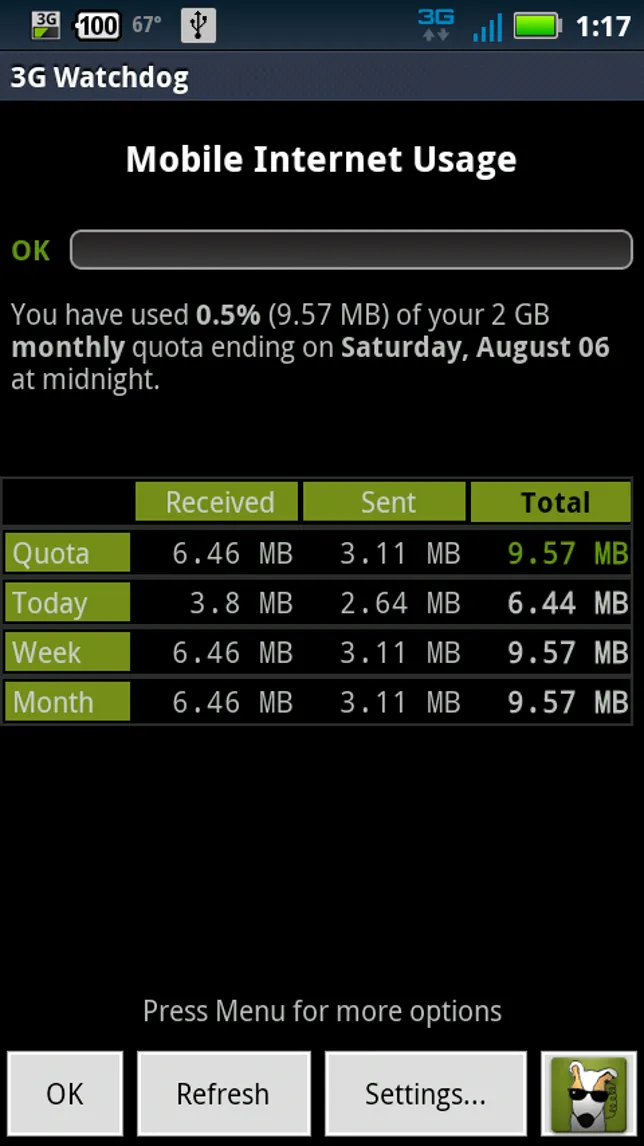
3G Watchdog has been around since Android 2.x. Despite the name, it tracks 3G, 4G, 5G, and Wi-Fi. The widget shows live data usage on the home screen. Pro at $3 one-time removes ads.
- Home-screen widget with live usage.
- Per-day or per-month limits.
- Long history of the app and data.
Where it falls short: UI is dated; design has not had a major refresh recently.
Pricing: Free + ads; Pro $3 one-time.
8. Speedtest by Ookla

Best for: data-usage tracker built into speed testing
Speedtest by Ookla has the standard internet speed test but also tracks your monthly cellular data usage through the same app. Useful as a one-install solution for users who already use Ookla for speed tests.
- Speed test plus data tracking.
- History of speeds at each location.
- Outage maps for your carrier.
Where it falls short: Data tracking is not as detailed as the dedicated trackers.
Pricing: Free.
9. Internet Speed Meter Lite

Best for: lightweight data tracker with notification-bar live counter
Internet Speed Meter Lite places a live data-rate counter in the notification bar. Useful for spotting an app that suddenly starts heavy data use. Free tier with ads.
- Notification-bar live counter.
- Per-app data history.
- Free.
Where it falls short: Notification persistence uses a small amount of battery; turn off when not needed.
Pricing: Free + ads.
10. Carrier-specific apps (Verizon, T-Mobile, EE)
Best for: users on a specific carrier wanting the authoritative usage data
Every major carrier has its own Android app (My Verizon, T-Mobile, My EE, AT&T, Vodafone). The data tracking inside these apps comes straight from the carrier’s billing system and is by definition the authoritative usage figure. VPN apps can sometimes confuse third-party trackers; the carrier app does not have that problem.
- Authoritative data from carrier billing.
- Plan management from the same app.
- Free.
Where it falls short: Carrier-specific only.
Pricing: Free.
At a glance
| App | Best for | Cost |
|---|---|---|
| Android built-in | Default visibility | Free |
| Datally | Per-app limits on stock Android | Free |
| GlassWire | Firewall-style power user | Free + $4.99/year Pro |
| My Data Manager | Cycle-aligned tracking | Free + $4.99/year |
| NetGuard | Open-source firewall | Free + Pro support |
| Carrier app | Authoritative carrier data | Free |
FAQ
Why do third-party trackers show different data than my carrier?
Three reasons. The carrier counts at the billing layer (after compression and re-routing); the phone counts at the app layer (raw). VPN traffic confuses third-party trackers. Roaming and Wi-Fi calling change which data is counted. For billing accuracy, the carrier app is the source of truth.
Does Wi-Fi data count toward my cellular plan?
No. Wi-Fi data is tracked separately and does not count toward your cellular plan. Wi-Fi calling on most carriers also does not count toward cellular minutes (it does count toward Wi-Fi data).
How do I reduce my data usage?
Default the streaming apps to lower quality (480p instead of 1080p), disable auto-play in feeds, turn off background data for apps you do not need it for, and use Wi-Fi when at home or in cafes. The Datally per-app block feature handles the per-app part automatically.
Will GlassWire affect my battery life?
Modestly. The firewall mode uses the VPN slot, which has a small but persistent battery cost (1 to 3 percent per day). The data-tracking-only mode is essentially free in battery terms.
Can I use multiple data trackers at once?
Yes for monitoring purposes. They will report slightly different totals because of how each counts. For firewall-style apps (GlassWire, NetGuard), you can only have one running because they share Android’s VPN slot.
Is data tracking different on dual-SIM phones?
Yes. Most apps now report per-SIM data, but the granularity varies. The built-in Android Data Usage handles dual-SIM properly. Most third-party apps do too. Check that the app you choose names both SIMs in its breakdown.
The verdict
Data usage tracking on Android is well-served. The built-in OS tools handle visibility for most users. Datally, GlassWire, and NetGuard add per-app control for users who need it. The carrier’s own app is the authoritative source for billing-cycle data.
Pick by what you need. Visibility only: built-in OS plus the carrier app. Per-app control: add Datally or GlassWire. Firewall-grade blocking: NetGuard. The third-party market has consolidated around a handful of reputable players after years of consolidation.
How we put this guide together
Tested ten apps on Pixel 8a, Galaxy S26 Ultra, OnePlus 12, and Motorola Edge 50 during April and May 2026. Accuracy measured against Verizon, T-Mobile, and EE carrier dashboards over a billing cycle. Battery overhead measured for the firewall-mode apps over 24-hour cycles. Pricing verified against each app’s published subscription page as of May 12, 2026.