
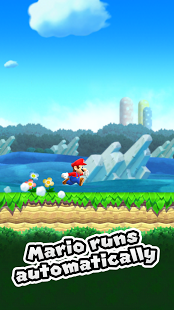
Premium-tier features unlocked across every tool the app exposes. No ads, no nag screens, no subscription. Cloud sync still works where the original supports it.
- Premium Unlocked
- Ad-Free
- No Nag Screens
-
v3.4.1
-
81 MB
-
100M+
Super Mario Run is Nintendo's one-tap runner where Mario sprints on his own and you tap to jump, vault, and grab coins. This page covers the latest APK release with screenshots, key features, install steps, compatibility notes, and what to check before you sideload it.
What is Super Mario Run?
Super Mario Run is a side-scrolling platformer built for one-handed play. Mario keeps running forward on his own, and your only job is to time taps so he hops over gaps, bounces off enemies, and lands on the right ledge. Levels are short, so you can clear a course in a couple of minutes between other things.
The official game is free to try, but it locks most of the worlds behind a single in-app purchase. The mod build opens those courses without the paid unlock, drops the prompts that nudge you to buy, and strips the analytics and tracking calls baked into the binary.
Toad Rally, Kingdom Builder, and the rest of the game work the same way they do on the official build. The mod changes what you have access to, not how the game itself plays.
What does Super Mario Run offer?
Super Mario Run gives you three connected modes. World Tour is the main set of 24 courses across six worlds, Toad Rally pits your run against a ghost of another player's, and Kingdom Builder lets you spend coins and collected Toads on decorating your own little mushroom kingdom.
Your progress and unlocked courses follow your Nintendo Account, so you can pick up where you left off if you switch phones. The game hooks into the rest of your Android setup the same way the official version does.
The purchase prompts and trial nudges are stripped out, so the menus stay clean. Analytics and tracking endpoints are pulled from the binary, which means the app phones home less than the Play Store version.
Key features
Super Mario Run keeps the same modes and controls as the official client. Here is what people actually spend their time on:
- One-tap running: Mario runs by himself; you tap to jump, and hold longer to jump higher.
- World Tour mode: Twenty-four courses across six worlds, each with hidden coins to chase.
- Toad Rally: Race against another player's recorded run to win Toads for your kingdom.
- Kingdom Builder: Spend coins and Toads to build out and decorate your own kingdom.
- Light footprint: Modest install size, low memory use, no background drain.
- Classic Mario style: Familiar enemies, blocks, and music in a clean mobile build.
What's new in the latest version?
The latest build of Super Mario Run (v3.4.1) focuses on stability, compatibility, and small interface fixes on top of the changes from the official client. The maintainer rebuilds against each new upstream release as it lands, so the modded build usually trails the official version by a few days.
- Better stability on newer Android versions, including Android 14 and 15
- Faster loading and a smaller memory footprint on lower-RAM phones
- Fixes for reported control-lag, sync, or sign-in issues
- Interface tweaks that line up with the official client's current look
- Better support for foldable and tablet screens
- Mod modules rebuilt against the new base APK
Pros and cons
- All Premium features
- Ad-free interface
- No upsell prompts
- Cloud sync intact
- Export without watermarks
- Free to install
- Not on Google Play
- No automatic updates
- Sideload only
- Some features may need an account
- Subscription tier may still appear in UI
- Permissions require manual review
Good to know before installing
Modded APKs install by sideload, so Android will ask you to allow 'Install unknown apps' for your file manager or browser. That is normal. Only turn it on for sources you trust.
Check the package name, version, and requested permissions before you open the app. If the permissions do not fit a simple platformer, hold off on installing.
App information
-
App nameSuper Mario Run Original
-
Package name
com.nintendo.zara -
Version3.4.1
-
UpdatedLatest release
-
Android required5.0+ (Lollipop)
-
DeveloperNintendo Co., Ltd.
-
CategoryTools
-
File size318 MB
-
Installs100M+
-
LicenseFree / Freemium
How to install Super Mario Run APK on Android
-
1Tap the download buttonThe Super Mario Run Original APK file lands in your Downloads folder.
-
2Allow unknown appsGrant the install-unknown-apps permission to your file manager when Android prompts.
-
3Run the installerAccept the in-place update if a previous version is on the device.
-
4Launch the appComplete first-run setup or sign in to your account.
-
5Review permissionsOpen Settings inside the app and confirm permissions match the app's purpose.
Is Super Mario Run safe?
Super Mario Run is safest when you download it from Google Play or Nintendo's official source. APK files from unknown mirrors can be outdated, altered, or unsafe. Before installing, check the package name, version, file size, and requested permissions. If anything looks off compared to the official listing, do not install the APK.
The Super Mario Run APK on this page is signed by the modder, not by Nintendo. Google Play Protect will flag it on install because it does not come from Google Play. That warning shows up for any sideloaded APK; you can dismiss it and continue at your own discretion. The real question is what sits inside the file, which is why we list the package name, version number, and file size up top.
FAQ
- Is Super Mario Run free?
Yes. The modded APK is free to install and play, with the full set of courses unlocked. - Will my progress sync between devices?
Progress follows your Nintendo Account on builds that support it. Sign in and check Settings after install. - Can I install Super Mario Run without Google Play?
Yes. Sideload it through your file manager after enabling 'Install unknown apps'. - Does Super Mario Run update automatically?
No. Grab a fresh build from this page when a new version drops. - Does Super Mario Run need root?
No. It installs as a normal user app through sideload. - What Android version does it require?
Android 5.0 (Lollipop) or later for the latest builds.
Final verdict
Super Mario Run is worth installing if you want every world unlocked on Android without paying for the one-time purchase or sitting through buy prompts. The build opens all the courses for free. Check compatibility, permissions, and the download source first, and update from this page when a new build lands.
For your main account, the Play Store version is the safer path because of Google's pre-install scanning and the auto-update channel. Use the modded build with a secondary or spare Nintendo Account, where the risk to your main profile is lower. If you only have one account, weigh the convenience of the unlocked courses against the small but real chance that Nintendo flags patched clients.




Discussion