In This Article
Follow BestForAndroid


TL;DR
The pick: Todoist for task management, Toggl Track for time logging, Forest for focus, and Google Calendar for everything else. The four-app stack that handles the actual flows; everything else is duplicate.
Runner-up: if you only use one, Todoist. The free tier covers the most common use cases and the paid tier is reasonably priced for power users.
Skip if: you don’t actually have a time-management problem. Most people don’t; they have an attention or prioritization problem that a different category of app addresses.
Android time management audit
Four apps. One stack. Skip the eight others.
The Android time management category has hundreds of apps. Most are duplicates. Four cover what most users actually need.
Cover the actual time-management workflow
That works together cleanly
Total setup across all four
Time management apps are an oversaturated category. Most are todo lists with slightly different aesthetics, plus a smaller cohort of timer apps and calendar wrappers. The four below are different enough from each other to actually compose into a working stack, and each is the best at its specific job.
1. Todoist

Best for: task and project management.
Todoist is the cleanest task manager on Android. Free tier covers most personal use; paid tier (about $5/month) adds project-level templates and reminders that depend on time-and-place context. The Android app feels native rather than a web wrapper, which a surprising number of competitors don't manage.
2. Toggl Track

Best for: users who actually need to log how their time is spent.
Toggl Track is the closest thing to RescueTime that respects your privacy. Manual time entries with project tags, weekly reports, and a Pomodoro mode. Free for individuals; paid plans for team usage. Use it when you're billing clients, when you want to honestly answer "where did my Tuesday go," or when you suspect a specific project is eating more time than you think.
3. Forest

Best for: users who pick up the phone every 90 seconds during deep work.
Forest is the Pomodoro timer that actually changes behavior. Plant a virtual tree at the start of a focus session; it dies if you leave the app. About $2 one-time. The mechanic sounds silly until you've felt yourself reach for the phone mid-session and pulled back because you didn't want to kill the tree.
4. Google Calendar
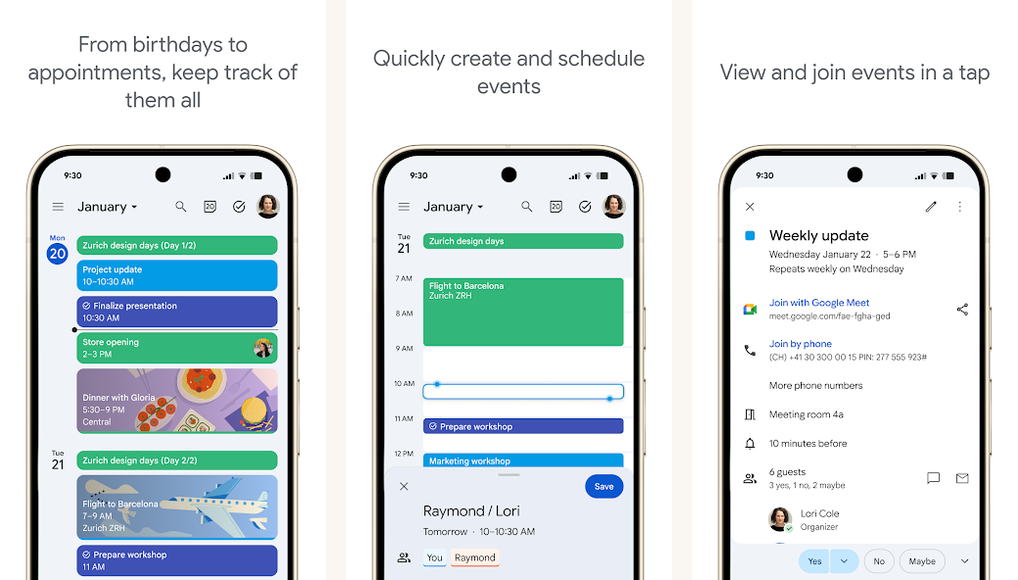
Best for: calendar everything.
The default Calendar app on most Android phones is Google Calendar; if it's not, install it. Free, sync across every device, integrates with virtually every other tool. The Android app's quick-add feature ("dinner with Sarah next Wednesday at 7") parses natural language reliably. No upsell.
How the four apps work together
Todoist captures intent (what you want to do). Google Calendar captures commitment (what you've blocked time for). Forest captures attention (the focused minutes inside those time blocks). Toggl Track captures actual (where your time really went). The four together close the loop: plan, commit, focus, audit.
Most users will do best with just Todoist plus Google Calendar. Add Forest if attention is the bottleneck. Add Toggl Track if billing or honest auditing is the goal.
Verdict
Todoist plus Google Calendar covers most users. Add Forest if your phone interrupts you during work. Add Toggl Track if you bill by the hour or want a serious time audit. Skip every other Android time-management app; the long tail is mostly duplicates.