In This Article
Follow BestForAndroid


Average US screen time crossed five and a half hours a day in late 2025. Most readers do not need a number to know the problem is real; the regret hits every time you look up from a fifteen-minute reels session that was supposed to be one minute. The Android landscape for fighting compulsive phone use has matured. Google Digital Wellbeing shipped useful Focus Mode updates over the past year, and a tier of third-party apps consistently rises above the noise. The American Psychological Association keeps an updated public brief on technology use and mental health.
Below are the ten Android apps actually worth installing if you want to spend less time with your face in your phone. Ranked by what kind of friction they introduce, not by app-store rating. Install one tonight and check back in two weeks; some of these change behavior surprisingly fast.
Quick Overview
If you’re scanning fast, here’s the ten picks by what they do best.
- One Sec: A 10-second breathing pause before any chosen app opens. Tiny friction, real abandonment data.
- Opal: Scheduled deep-work blocks plus a weekly screen-time score that actually feels meaningful.
- Digital Wellbeing: Google’s built-in app timers, Focus Mode, and Bedtime Mode. Free, underused, surprisingly effective.
- Forest: Plant a virtual tree per focus session; it dies if you leave the app. Gentle and oddly motivating.
- AppBlock: Hard-mode app and website blocker with strict profiles that survive reboots.
- Stay Focused: Granular per-app limits, schedule profiles, and a strict mode you cannot easily disable.
- Freedom: Cross-device blocker that locks apps and websites on phone, tablet, and desktop at once.
- BlockSite: The simplest way to kill specific websites and apps without learning a new system.
- Flipd: A hard-lock timer that disables the phone entirely for a chosen window. The willpower fallback.
- ActionDash: The replacement Digital Wellbeing dashboard for readers who want richer analytics on where the time goes.
1. One Sec
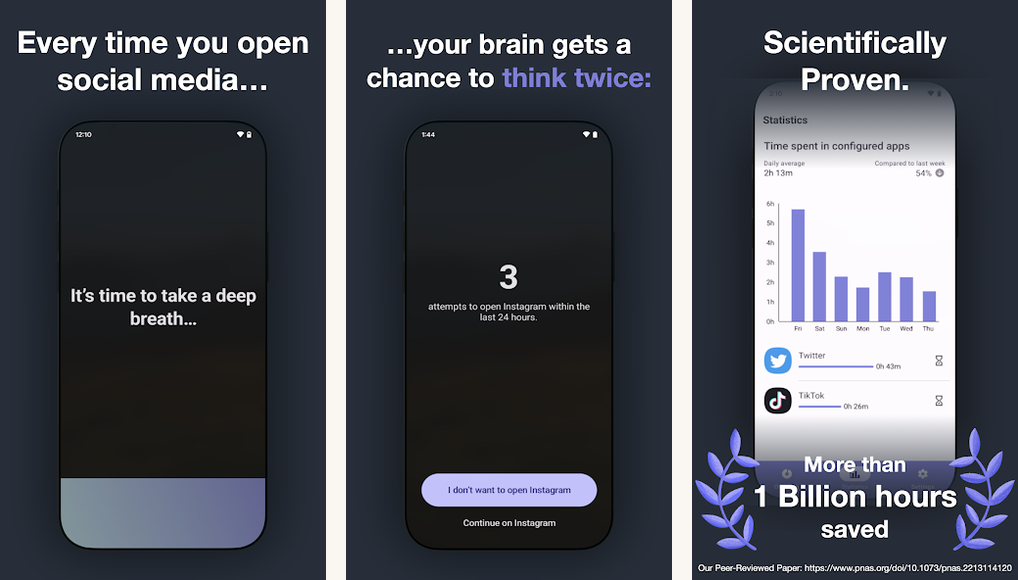
One Sec inserts a roughly 10-second breathing pause before a chosen app opens. The free tier covers one app, which is usually all you need; point it at the app you regret most (typically Instagram or TikTok) and let it run for two weeks. The app shows your abandonment rate, meaning the percentage of times you opened the app, breathed, and closed it before scrolling. That metric is the genuinely valuable data point because it measures the habit, not the time.
The paid tier (around six dollars a month) unlocks unlimited app blocks plus a weekly digest. Most readers should stay on the free tier; the goal is to break one habit, not optimize an entire phone. A Cologne University study published at CHI 2024 tracked One Sec users for six months and found sustained reductions in social-app sessions of 36 percent.
Highlights
⭐️ Best for: The compulsive Instagram or TikTok opener who wants the lightest possible friction that still works.
👎🏼 The catch: Free tier limits you to one blocked app. Setup uses Android Accessibility permission, which some readers find invasive.
💰 Pricing: Free for one app. Pro ~$5.99/month or ~$24.99/year.
Key Features
- Breathing pause: 3-10 second deep-breath animation before the chosen app loads, with optional motivational text.
- Abandonment rate: per-app statistic showing how often you closed out during the pause instead of scrolling.
- Daily limits: cap an app at N opens per day; further opens require typing why you’re opening it.
- Privacy-first design: all data stays on-device. No account required to use the free tier.
2. Opal

Opal is the more polished sibling. You set scheduled focus blocks (8 AM to noon every weekday, evenings after 9 PM, etc.) and the chosen apps will not open during those windows. Streaks, weekly scores, and an account-level recap make it easy to compare this week with last. The polish carries through to onboarding: Opal asks what you want to spend less time on and builds the first profile for you.
The Snooze mode lets you make any focus block one-tap pausable, which sounds like cheating but actually makes the system more sustainable. The brain rebels less when there is an escape valve. The deeper feature, called Deep Focus, requires a passcode (or a friend’s passcode) to disable and is the one to enable once you trust the system.
Highlights
⭐️ Best for: Knowledge workers who want defined deep-focus blocks with a weekly score that gamifies improvement.
👎🏼 The catch: The free tier is genuinely limited (one session a day, capped duration). Most of the value lives behind the subscription.
💰 Pricing: Free with restrictions. Opal Pro ~$7.99/month or ~$59.99/year.
Key Features
- Scheduled blocks: recurring focus windows on a weekday/weekend schedule with chosen app and website lists.
- Deep Focus: passcode-locked sessions that cannot be disabled without entering a code from a friend or partner.
- Weekly score: aggregated screen-time-saved metric with week-over-week comparison and friends leaderboard.
- Custom apps and sites: block individual websites in mobile Chrome and Safari in addition to apps.
3. Digital Wellbeing

Built into every recent Android device. Three settings are worth turning on tonight. App Timers caps an app at fifteen minutes a day, then locks it until midnight. Focus Mode pauses chosen apps for a duration you set, and a triple-press shortcut on most recent Pixel models toggles it on. Bedtime Mode grayscales and silences everything from a chosen time each night.
These are free, built in, and underused. Set them up once, configure to your schedule, and you have a baseline of automatic friction that the third-party apps build on. Digital Wellbeing also surfaces a daily dashboard (unlocks, notifications received, time per app) which is itself a behavior-change tool. Most users underestimate how much they pick up the phone until they see the number.
Highlights
⭐️ Best for: Anyone who wants a zero-cost baseline of phone friction built into the OS without installing anything.
👎🏼 The catch: App timers are easy to dismiss with a single tap. The intent is gentle, not strict; willpower is still required.
💰 Pricing: Free. Ships with every Android 9+ device that hasn’t disabled Google services.
Key Features
- App Timers: per-app daily caps that lock the icon and grayscale it once exceeded.
- Focus Mode: a togglable mode that pauses chosen apps until you exit; great for work blocks.
- Bedtime Mode: turns the screen grayscale, silences notifications, and dims at a chosen hour.
- Daily dashboard: unlock count, time-per-app, and notification volume in one place.
4. Forest

Forest plants a virtual tree when you start a focus session, and the tree dies if you leave the app to scroll something else. The two-dollar price tag and the friendly visual nudges are why it works on people who shrug at stricter tools. Forest’s social feature lets you plant trees with friends, which is more motivating than expected; an entire row of dead trees from a Zoom call gets visceral.
The long-running gimmick: Forest partners with the Trees for the Future non-profit. Spend enough coins inside the app and a real tree gets planted in Africa. The partnership has been running for years and has reportedly planted over a million real trees. Whether you find that motivating or marketing is your call, but the underlying focus tool is genuinely effective.
Highlights
⭐️ Best for: Students and remote workers who respond to gentle visual nudges instead of hard blocks.
👎🏼 The catch: Easy to defeat (just leave the session running and use a different device). The motivation is internal.
💰 Pricing: Pro version ~$3.99 one-time on Android. Free on iOS with paid coins.
Key Features
- Focus timer: set a 25-120 minute session; a tree grows and dies if you exit the app to scroll.
- Plant with friends: shared focus sessions where everyone’s tree dies if any one person bails.
- Forest of accomplishments: visual history of every completed session shown as a forest grid.
- Real-tree partnership: coins earned in-app can plant real trees via Trees for the Future.
5. AppBlock

AppBlock is the harder-edged blocker for readers who have already failed at gentle. Build a profile (Work, Sleep, Study), pick the apps and websites it covers, and schedule it to activate by time or by location. The strict mode is what sets it apart; once enabled, the profile cannot be disabled without typing a pre-set passphrase or waiting out a cool-down timer.
The site blocker works across mobile Chrome, Firefox, Brave, and most Chromium-based Android browsers via a local VPN that intercepts DNS requests. There is no cloud component, which keeps the privacy posture clean. AppBlock also offers a usage tracker if you want to inspect the data Digital Wellbeing surfaces from a different angle.
Highlights
⭐️ Best for: Readers who have tried gentle apps and need a profile that cannot be one-tap disabled.
👎🏼 The catch: The local-VPN approach blocks all your VPN slots; you cannot run AppBlock and a privacy VPN at the same time.
💰 Pricing: Free with ads. Premium ~$3.99/month or ~$22.99/year removes ads and unlocks unlimited profiles.
Key Features
- Strict mode: profile cannot be disabled without entering a long passphrase or waiting a cool-down period.
- Location and Wi-Fi triggers: activate a profile when you arrive at the office or join your home network.
- Site blocker: DNS-based site blocking across most Android browsers via a local on-device VPN.
- Usage stats: built-in screen-time tracker for users who want richer analytics than Digital Wellbeing.
6. Stay Focused
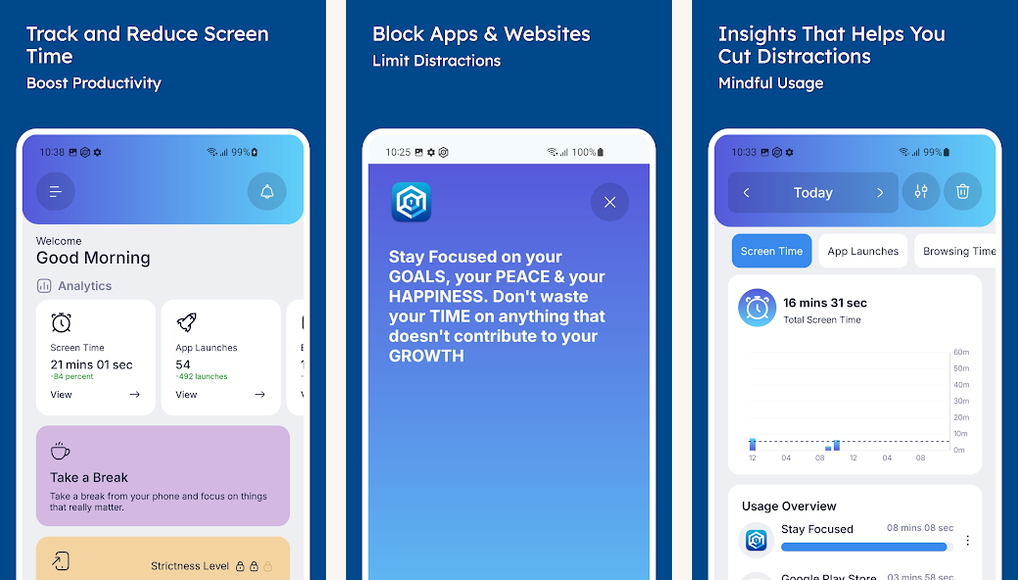
Stay Focused goes harder than the others, with a strict mode that survives reboots and disables uninstalls during an active session. The granularity is the selling point: per-app daily limits, per-launch limits, time-of-day windows, and Wi-Fi-aware profiles. Pick one timer per app or stack multiple constraints, and the app stays blocked until every constraint is satisfied.
The interface is dense compared with One Sec or Forest, but power users will find more knobs here than anywhere else on this list. The free tier covers most of the core features; the paid tier removes ads and adds password-protected uninstall, which matters if your kids are trying to disable it.
Highlights
⭐️ Best for: Power users who want fine-grained per-app constraints and the strictest possible Android blocker.
👎🏼 The catch: The setup UI is dense and unpolished. The first hour is spent learning what every option does.
💰 Pricing: Free with ads. Premium ~$3.99 one-time removes ads and unlocks all profiles.
Key Features
- Strict mode: blocks survive device reboots and disable the system app-uninstall flow for the chosen app.
- Granular limits: daily time caps, per-launch caps, max-launches-per-day, and weekly limits combined per app.
- Self-control profiles: bedtime, work, exam-prep profiles that auto-toggle on a schedule.
- Password lock: requires a PIN to alter settings; pairs with Android’s uninstall-protection.
7. Freedom

Freedom is the cross-device blocker. One Freedom account locks apps and websites simultaneously on your phone, your tablet, your work laptop, and your home computer. Schedule a session and every device enters the same block state at the same moment. For writers and remote workers whose distractions live on multiple screens, no other app on this list covers the full attack surface.
Freedom’s strength is also its trade-off: the subscription is per account, not per device, and the free tier is generous enough to test but firm-limited beyond it. The cross-platform sync is reliable. The Locked Mode (cannot be disabled mid-session even by uninstalling) makes Freedom one of the few apps on this list with no obvious workaround.
Highlights
⭐️ Best for: Writers, remote workers, and students who need the same block across phone, tablet, and desktop simultaneously.
👎🏼 The catch: Subscription pricing adds up. The premium plan is meaningfully more expensive than Opal or One Sec for solo phone use.
💰 Pricing: Limited free tier. Premium ~$8.99/month or ~$39.99/year covers all devices.
Key Features
- Cross-device sessions: one schedule covers Android, iOS, Windows, macOS, and Chrome simultaneously.
- Locked mode: sessions cannot be ended early; reinstalling does not unblock until session ends.
- Recurring schedules: set weekly focus blocks that auto-activate, like every weekday 9-noon.
- Block lists: pre-built website categories (social, news, video) plus custom URL and app lists.
8. BlockSite

BlockSite is the simplest of the hard blockers. You add an app or a website, optionally tag it as adult or social, and BlockSite intercepts every attempt to open it with a polite redirect. There is no profile system to learn; if it’s in the block list, it’s blocked. For readers who tried Stay Focused and bounced off the configuration depth, BlockSite is the calmer choice.
The Focus mode adds Pomodoro-style work blocks (25 minutes on, 5 off) with chosen apps blocked during the work phase. Password protection prevents anyone (including a future you in a weak moment) from disabling a block without typing the password. The site blocker covers Chrome and other Chromium-based Android browsers via the accessibility-service approach.
Highlights
⭐️ Best for: Readers who want the simplest possible add-app-to-block-list experience without learning a profile system.
👎🏼 The catch: Free tier caps block lists at six items. Some accessibility-permission warnings make first-run setup feel intrusive.
💰 Pricing: Free for up to six blocks. Premium ~$5.99/month or ~$29.99/year for unlimited.
Key Features
- One-tap blocks: add an app or URL to the block list; BlockSite intercepts every open attempt.
- Work mode: Pomodoro-style 25/5 work-and-rest blocks with apps blocked during the work phase.
- Password protect: require a PIN to edit the block list or disable the app.
- Adult-content filter: pre-built category blocker for parental-control use cases.
9. Flipd

Flipd is the willpower fallback. You set a duration (30 minutes, 2 hours, a full workday) and Flipd hard-locks the phone for that window. Unlike Forest or Opal, there is no cheat code, no Snooze, no settings trip. The timer runs until it runs out. Calls and emergency contacts still come through; everything else is hidden behind a lock screen showing the timer.
Hardcore mode is the differentiator: once activated, even uninstalling Flipd does not end the session early. The app preserves the lock state across reboots and restores it on reinstall. The community feature lets you join group focus sessions (study halls, work sprints) with strangers who are also locked in for the same window.
Highlights
⭐️ Best for: Students cramming for exams or professionals on deep-work sprints who need an unbreakable lock.
👎🏼 The catch: Hardcore mode is genuinely unbreakable; activating it accidentally for 8 hours is a real risk.
💰 Pricing: Free with limits. Premium ~$3.99/month unlocks unlimited Hardcore time.
Key Features
- Hardcore mode: a session that cannot be ended early, even by uninstalling. Persists across reboots.
- Community sessions: shared focus rooms with strangers locked in for the same window.
- Stats: total time spent focused with daily, weekly, and monthly tallies.
- Calm mode: a gentler version that allows urgent overrides but logs them as session breaks.
10. ActionDash

ActionDash is a richer replacement for Google’s built-in Digital Wellbeing dashboard. The free tier already exceeds Digital Wellbeing’s analytics depth: per-hour usage charts, app-launch counts, screen-on history, and notification volume by app. For readers whose first step in beating phone addiction is understanding where the time actually goes, ActionDash is the diagnostic tool of choice.
The Plus tier adds Focus Mode, app usage limits, and history beyond seven days. Pricing is one-time, not subscription. ActionDash is built by Action Launcher’s developer, who has been shipping reliable Android tooling for over a decade; the longevity of the project matters when you’re committing to a dashboard you’ll check daily.
Highlights
⭐️ Best for: Data-minded readers who want richer analytics than Digital Wellbeing offers, with no subscription tax.
👎🏼 The catch: Visual design is utilitarian. ActionDash is a dashboard, not a daily-driver focus tool.
💰 Pricing: Free with full analytics. Plus tier ~$6.99 one-time unlocks longer history and Focus Mode.
Key Features
- Per-hour charts: screen time, launches, and notifications broken down by hour of day.
- Notification analytics: volume per app, with charts to identify which apps interrupt you most.
- Focus Mode (Plus): built-in app blocker that pairs with the analytics dashboard.
- One-time pricing: Plus tier is a single ~$6.99 payment, no subscription.
At a glance: pick by your willpower
Side-by-side on the dimensions that matter: friction style, free tier, and the reader profile each app actually fits.
| App | Friction style | Free tier | Best for |
|---|---|---|---|
| One Sec | Breathing pause | One app | Compulsive opens |
| Opal | Scheduled blocks | Limited | Deep work hours |
| Digital Wellbeing | Built-in timers | Fully free | Always-on baseline |
| Forest | Gamified sessions | iOS free / Android paid | Study sessions |
| AppBlock | Strict profiles | Free with ads | Privacy-focused blocker |
| Stay Focused | Per-app limits | Most features | Power-user constraints |
| Freedom | Cross-device lock | Limited | Multi-screen workers |
| BlockSite | Simple block list | Six items | Lightest learning curve |
| Flipd | Hard lock timer | Limited | Cannot-cheat sessions |
| ActionDash | Analytics first | Most features | Diagnose where time goes |
Common questions about phone-addiction apps
- Do these apps actually work long-term?
Friction-based apps tend to outlast hard-block apps. One Sec users in a Cologne University CHI 2024 study maintained 36% reductions in social-app sessions for over six months. Hard blockers tend to be disabled within a few weeks because the friction crosses a frustration threshold. The right tool is the one with the lightest friction that still produces behavior change. - Are these apps tracking my activity?
Most of them log app-open events to enforce the block. One Sec processes everything on-device. Opal sends anonymized app counts to its servers. Digital Wellbeing’s data stays on the device or in your Google account if you’ve opted in. AppBlock and Stay Focused are local-only. Read the privacy policy at install time; disable cloud sync if that matters. - What about iPhone?
Apple’s built-in Screen Time covers most of what Digital Wellbeing does. One Sec, Opal, Forest, Freedom, BlockSite, and Flipd all ship iOS versions. AppBlock and Stay Focused are Android-only. ActionDash is Android-only by design (Apple’s privacy model blocks the level of analytics it surfaces). - Should I just delete the apps I waste time on?
If you genuinely will not miss them, yes. For apps you need occasionally (work Slack, Messenger to coordinate with family), friction works better than deletion. Pick the right tool for the right app. Delete games you’ve already finished; friction the apps you have a complicated relationship with. - Will grayscale mode help?
Yes, and it’s free. Triple-press the power button on most recent Pixel devices, or hold three fingers on Samsung Quick Tile to toggle grayscale. Apps suddenly look boring. Combined with a stripped home screen (no social apps on the first page), grayscale removes two of the strongest pulls toward compulsive opening. The Common Sense Media writeup covers the behavioral evidence. - How do I pick just one app to install tonight?
Start with One Sec on the app you regret most (probably Instagram or TikTok). If after two weeks your screen time has not dropped meaningfully, layer on Digital Wellbeing’s App Timers as a backstop. If you need defined work hours, add Opal third. Most readers stop there. Stacking five apps is a different addiction.
Picking your starter
Phone addiction is a design problem, not a willpower failure. The apps above add small friction at the exact moments your finger reaches for an attention slot machine. Install One Sec tonight, point it at the app you regret most, and revisit in two weeks. If the regret number drops by ten percent, you have already changed your daily life. Iterate from there.
For readers who already know the gentle apps will not stick, jump to AppBlock or Stay Focused. For multi-device workers, Freedom is the only app on this list that locks every screen at once. For students cramming, Flipd’s Hardcore mode is unbreakable. Whatever you pick, pair it with Digital Wellbeing’s App Timers in the background as a free baseline.
One last principle: the goal is not zero screen time. The goal is intentional screen time. Most readers find the regret drops sharply once they replace one habitual scroll with a deliberate one. The apps above are the leverage points; the choice of where to point them is yours.
How we put this guide together
We tested each app as a daily driver on Pixel 8a and Galaxy S24 hardware running Android 15 and Android 16, kept the install for at least two weeks, and tracked the abandonment-rate signal where the app surfaced one. Pricing was cross-checked against the in-app subscription screen at install. Research backing the friction-versus-block thesis comes from the CHI 2024 One Sec study and the APA’s technology-use brief. Apps that hadn’t shipped an update in twelve months were dropped from the candidate pool.