

Wondershare's mobile video editor with the Pro tier opened up, so the watermark is gone and the premium effects, transitions, and export options are unlocked.
What is FilmoraGo
FilmoraGo is the mobile video editor from Wondershare, the company behind the Filmora desktop suite. It brings a timeline-based editing workflow to Android, with trimming, multi-track layers, transitions, text and titles, music, and a large library of effects and templates. The interface aims at creators who want desktop-style control without learning a steep tool, which makes it a common pick for social video, vlogs, and short-form content.
The editor handles the everyday jobs well: split and reorder clips, add background music with beat markers, layer text and stickers, apply colour filters, and export in resolutions up to 4K on capable phones. A built-in library of templates and royalty-free assets speeds up edits when you want a finished look without building everything from scratch.
The free version on Google Play adds a watermark to exports and gates the premium effect packs, fonts, and templates behind a subscription. The modified build on this page removes the watermark and opens the Pro asset library, which suits creators testing the full feature set or working in regions where the subscription price runs high.
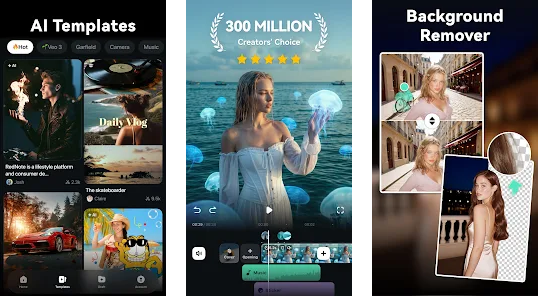
Screens from the editor
Timeline editing, the effects library, and the export panel.
What this mod offers
- No watermark on exports
Finished videos render clean, with no FilmoraGo logo stamped over the footage.
- Premium effects unlocked
The Pro transitions, filters, and overlay packs are available in the effect picker.
- Full template library
Subscriber-only templates and title styles are open as starting points for an edit.
- No upsell prompts
The subscription nag screens that interrupt the free workflow on export are removed.
How to install
- Download the APK
Tap the download button on this page. The file saves to your Downloads folder.
- Allow this source
Open Settings, find
Install unknown apps, and enable it for your browser or file manager. - Open the file
Tap the downloaded APK. Android's installer shows the permissions the editor requests.
- Tap Install
Confirm and wait for the bar to finish, then tap Open to launch.
- First launch
Skip the subscription screen if it appears. The Pro assets should be active in the effect picker.
Mod APK vs Google Play
| Detail | Mod APK | Play Store |
|---|---|---|
| Export watermark | Removed | On free tier |
| Premium effects | Unlocked | Subscription |
| Templates | Full library | Partly gated |
| Updates | Manual reinstall | Automatic |
Related Android apps
- CapCut mod APKFree editor with the Pro toolset and assets unlocked.
- KineMaster Pro modLayer-based mobile editor with no export watermark.
- Canva mod APKDesign and short-video maker with Pro elements open.
- audio and ringtone toolsPair your edits with custom sound from our app picks.
- creative and reading appsMore of our coverage on content apps for Android.


Discussion