
Premium-tier features unlocked across every tool the app exposes. No ads, no nag screens, no subscription. Cloud sync still works where the original supports it.
- Premium Unlocked
- Ad-Free
- No Nag Screens
-
v2.7.8
-
18.3 MB
-
10M+
CX File Explorer is a free file manager for Android. This page covers the latest APK release with screenshots, the main features, install steps, compatibility notes, and what to check before you sideload it.
What is CX File Explorer?
CX File Explorer is a lightweight file manager from CXInventor. You use it to browse the files on your phone, copy and move them, unzip archives, and reach storage that the stock Android files app keeps hidden. Open it, sort out your files, close it. It stays out of the way the rest of the time.
It does more than local storage. CX File Explorer connects to network shares over SMB and FTP, to WebDAV servers, and to cloud accounts like Google Drive, Dropbox, and OneDrive. So you can pull a file off a NAS or a laptop on the same Wi-Fi without plugging in a cable.
The app is free and has no ads. There is no subscription wall and nothing locked behind a paid tier, so every feature described here works on the standard build straight from the Play Store or this APK.
What does CX File Explorer offer?
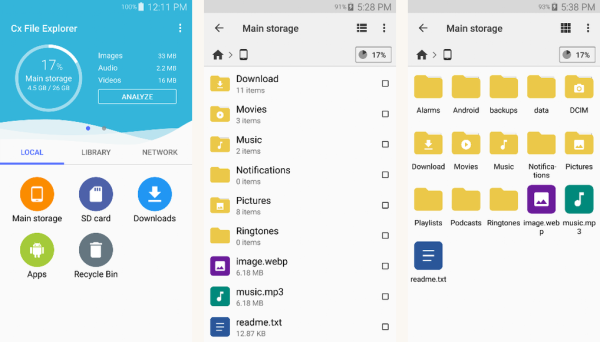
CX File Explorer covers the everyday jobs you expect from a file manager and a few that the built-in app skips. You get a clean local browser, an app manager that lists installed and backed-up APKs, and a storage analyzer that shows what is eating your space.
Network and cloud access is the part most people stick around for. Add an SMB share, an FTP server, or a cloud account once and it shows up in the sidebar next to your internal storage. Moving a file between the cloud and your phone works the same as a local copy and paste.
The interface is plain Material Design with no clutter. There are no banner ads interrupting a copy, no nag screens, and no second app trying to install itself. It is just a file manager.
Key features
CX File Explorer keeps a small set of tools and does them well. Here is what people actually open the app for:
- Local file browser: Browse, copy, move, rename, and delete files across internal storage and SD cards.
- Archive support: Open and extract ZIP files, and compress folders without a separate app.
- Network and cloud: Reach SMB and FTP shares, WebDAV servers, and cloud accounts from the sidebar.
- App manager: See installed apps, back up APKs, and uninstall what you no longer use.
- Storage analyzer: Find large files and see where your space went at a glance.
- Material design: Clean Android-native layout with no ads and a tidy navigation drawer.
What's new in the latest version?
The latest build of CX File Explorer (v2.7.8) is a maintenance release. It tidies up the interface, smooths out network transfers, and keeps the app working on the newest Android releases. There is nothing here that changes how you use it day to day.
- Improved stability across newer Android versions, including Android 14 and 15
- Faster loading and a smaller memory footprint on lower-RAM devices
- Fixes for reported network share, cloud sync, and file transfer issues
- Refreshed interface elements that match current Material Design
- Better support for foldable and tablet screen sizes
- Minor permission and compatibility fixes for recent Android updates
Pros and cons
- All Premium features
- Ad-free interface
- No upsell prompts
- Cloud sync intact
- Export without watermarks
- Free to install
- Not on Google Play
- No automatic updates
- Sideload only
- Some features may need an account
- Subscription tier may still appear in UI
- Permissions require manual review
Good to know before installing
An APK installs by sideload, so Android will ask you to allow 'Install unknown apps' for whichever file manager or browser opens the file. That prompt is normal. Turn it on only for sources you trust.
Check the package name, version, and requested permissions before you open the app. A file manager needs storage access, but if it asks for anything that has nothing to do with files, hold off and look closer.
App information
-
App nameCX File Explorer Original
-
Package name
com.cxinventor.file.explorer -
Version2.7.8
-
UpdatedLatest release
-
Android required5.0+ (Lollipop)
-
DeveloperCx File Explorer
-
CategoryTools
-
File size18.3 MB
-
Installs10M+
-
LicenseFree / Freemium
How to install CX File Explorer APK on Android
-
1Tap the download buttonThe CX File Explorer Original APK file lands in your Downloads folder.
-
2Allow unknown appsGrant the install-unknown-apps permission to your file manager when Android prompts.
-
3Run the installerAccept the in-place update if a previous version is on the device.
-
4Launch the appComplete first-run setup or sign in to your account.
-
5Review permissionsOpen Settings inside the app and confirm permissions match the app's purpose.
Is CX File Explorer safe?
CX File Explorer is safest when you get it from Google Play or the official developer source. APK files from random mirrors can be outdated or tampered with. Before installing, match the package name, version, file size, and permissions against the official listing. If anything looks off, skip that APK and grab it from the Play Store instead.
The CX File Explorer APK on this page is the original app, not a modified build. Google Play Protect may still warn you on install simply because the file did not come through the Play Store. That warning shows up for any sideloaded APK. We publish the package name, version number, and file size up top so you can confirm you are getting the real thing before you tap install.
FAQ
- Is CX File Explorer free?
Yes. The app is free to install and use, with no ads and no paid tier. - Can it connect to cloud storage and network shares?
Yes. Add SMB, FTP, WebDAV, or a cloud account and it appears in the sidebar next to your local storage. - Can I install CX File Explorer without Google Play?
Yes. Sideload the APK from your file manager after enabling 'Install unknown apps'. - Does CX File Explorer update automatically?
Not when you sideload it. Come back to this page for a fresh build when a new version lands. - Does CX File Explorer need root?
No. It installs and runs as a normal user app. Some advanced storage areas may need root, but the app works fine without it. - What Android version does it require?
Android 5.0 (Lollipop) or later for the latest builds.
Final verdict
CX File Explorer is an easy pick if you want a clean, ad-free file manager that also reaches your network shares and cloud accounts. It is free, it is light, and it skips the clutter that bloats a lot of other file apps. Check the version, file size, and permissions against the official listing, then update from this page when a new build drops.
For most people the Play Store version is the simplest path, since it updates on its own and gets Google's pre-install scan. Use the APK here when you need a specific version, a device without the Play Store, or a quick reinstall. Either way you are getting the same original app from the same developer.




Discussion