
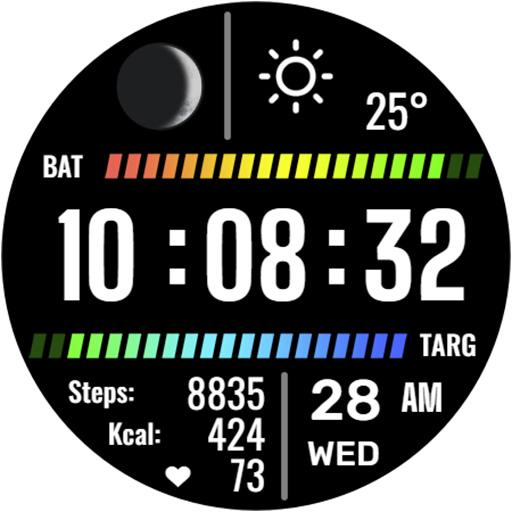
A Wear OS watch face that turns the screen into a control panel. Five tap zones launch your apps, an always-on mode keeps the time visible, and several color themes let you match the look you want.
2.0.0
Version
5.5 MB
Size
Wear OS
Platform
5
Tap zones
What is Smart Panel
Smart Panel is a watch face for Wear OS that does more than show the time. It treats the round watch screen as a small control surface, splitting it into five tap zones you can map to the apps you reach for most. A tap on one part of the face opens your messaging app, another opens the weather, and so on, so you spend less time scrolling through the watch launcher.
The face keeps a clean digital clock at the center with a choice of color themes, and it supports an always-on display mode that you turn on from the watch settings. That mode dims the screen while keeping the time readable, which suits anyone who glances at their wrist often through the day. The layout stays legible on a small panel rather than crowding it with widgets.
The developer, Eugeniy Radzivill, notes that the tap zones are guaranteed on Samsung Galaxy Watch models. The face installs on other Wear OS watches too, but tap-zone behavior can vary on non-Samsung hardware, so Samsung owners get the most reliable experience.

Key features
- Five tap zones
Map each zone to an app or shortcut from the dial menu, so a single tap on the face opens what you set.
- Always-on display
Enable the dedicated AOD mode from your watch menu to keep the time visible without waking the full screen.
- 12 and 24 hour modes
The clock follows your phone's time format and syncs the display mode automatically.
- Color themes
Pick from several color treatments for the time and panel to match your watch band or mood.
- Lightweight build
At roughly 5.5 MB the face installs fast and leaves plenty of room on the watch.
How to install
- Download the APK file
Tap the download button on this page to save the file to your phone's Downloads folder.
- Allow installs from this source
Open Settings, search
Install unknown apps, and turn the permission on for your browser or file manager. - Install on the phone
Open the APK and tap Install. Wear OS faces install through the companion app on your paired phone.
- Sync to the watch
Open your Wear OS companion app so the face syncs across to the watch.
- Set the face and tap zones
Long-press the watch face, choose Smart Panel, then open the dial menu to assign apps to each tap zone.
Smart Panel versus the stock face
| Point | Stock face | Smart Panel |
|---|---|---|
| App shortcuts | Complications only | Five tap zones |
| Always-on mode | Standard | Custom AOD |
| Color themes | Limited | Several |
| Best hardware | All Wear OS | Samsung Galaxy Watch |
Related Android apps
- Samsung Health tracker
- Peel Smart Remote control
- Pixel Launcher home screen
- custom ringtone maker apps
FAQ
- What is Smart Panel?
Smart Panel is a watch face and information panel for Wear OS smartwatches. It shows the time alongside customizable tap zones that launch apps, plus an always-on display mode and several color themes.
- Which watches does Smart Panel support?
The developer guarantees the tap zones on Samsung Galaxy Watch models running Wear OS. The face still installs on other Wear OS watches, but the five tap zones may not trigger correctly on non-Samsung hardware.
- Does Smart Panel have an always-on display?
Yes. It includes an original always-on display mode that you enable from your watch menu, so the time stays visible without waking the full screen.
- How do the tap zones work?
Smart Panel splits the face into five tap zones. You map each zone to an app or shortcut through the dial menu, so a single tap on part of the watch face opens the app you assigned.
- How large is the download?
The Smart Panel APK is about 5.5 MB. It is a lightweight watch face, so it installs quickly and uses little storage on the watch.





Discussion