

A free, open-source music client that streams the full YouTube Music catalogue with no ads, no account, and offline caching built in.
Version
Size
Licence
Cost
What is ViMusic
ViMusic is an open-source Android app from a developer who goes by vfsfitvnm. It pulls music straight from YouTube Music with no official app, no account, and no subscription. The whole thing is written in Kotlin and released under the GPL-3.0 licence, so the code is public and anyone can check exactly what it does with their data.
The idea is straightforward. You get the same huge YouTube Music library, but the ads are gone, background playback works out of the box, and the interface never nags you to upgrade. No sign-in wall. No listening history handed off to advertisers. No in-app purchases. If you just want to play songs without setting up a streaming account first, this handles it.
Since this is community software and not a Play Store listing, ViMusic comes as an APK you install yourself. The download on this page is the universal build of version 0.5.4, the last tagged release the original project put out before the repository was archived.
A look at the interface
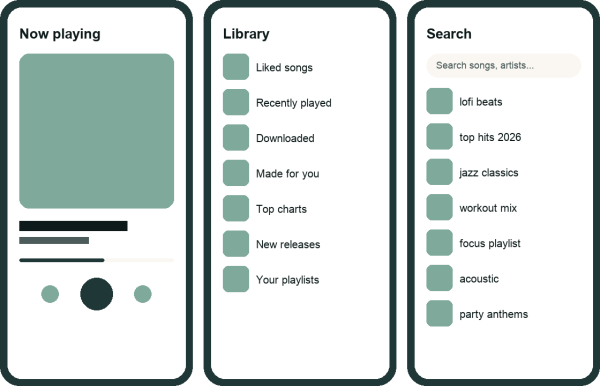
What this build offers
- Ad-free streaming, no account.
Play almost any song or video from YouTube Music with no interruptions and no sign-in required.
- Background and offline playback.
Audio keeps playing with the screen off, and you can cache songs so they still work with no connection.
- Synced lyrics you can edit.
Pull in standard or time-synced lyrics, then fix or swap them yourself when a track is mislabelled.
- Local playlists and YouTube import.
Build playlists on the device or import ones you already have on YouTube, and bookmark the artists and albums you keep going back to.
- Audio normalisation and sleep timer.
Level out volume across tracks, skip silent gaps, and set a timer so playback shuts off on its own at night.
- Material You themes and Android Auto.
Light, dark, and dynamic colour themes that follow your wallpaper, plus playback in the car through Android Auto.
How to install
ViMusic installs through the normal Android sideload flow. The file is tiny, so on most phones the whole thing wraps up in under a minute.
- Download the APK file
Tap the download button on this page. The 2.6 MB file lands in your Downloads folder almost right away.
- Allow installs from this source
Open Settings, search
Install unknown apps, pick your browser or file manager, and turn the permission on. - Open the downloaded file
Tap the APK in Downloads. Android’s package installer opens and lists the permissions ViMusic asks for.
- Tap Install
Confirm, wait for the short progress bar, then tap Open to launch the app.
- Search and play
Use the search tab to find a song or artist and hit play. No account, no setup screen, nothing in the way.
ViMusic vs the official app
| ViMusic | YouTube Music | |
|---|---|---|
| Ads | None | Between tracks on free tier |
| Account | Not required | Google sign-in needed |
| Background play | Built in, free | Premium subscription only |
| Cost | Free, open-source | Free with ads or paid Premium |




Discussion