

The full donate build of the file archive manager that handles 7z, RAR, ZIP, TAR and more. The paid tier is unlocked, the ads are gone, and every theme and format is switched on.
What ZArchiver Pro does
ZArchiver is the file archive manager from ZDevs, a small Russian studio that has shipped this tool since 2012. The free build sits past 100 million installs and holds a steady 4.4 rating, and the reason is simple. It does one job well. It opens, creates, and edits compressed files on Android without making you move them to a computer first. ZArchiver Pro is the paid donate version of that same app, package ru.zdevs.zarchiver.pro.
Most phone file managers choke on a RAR or a split 7z. ZArchiver reads them natively. You can browse inside an archive, pull out a single file, repack a folder, or set a password without reaching for a second app. It also handles the formats people actually run into: deb and rpm packages, ISO and IMG disk images, CAB, ARJ, LZH, and the newer zstd and lz4 types.
The Pro build drops the ads from the free version and turns on the extras the developer normally keeps behind the paid tier. The whole feature set is open from the first launch. That is the version mirrored on this page.
A look inside
What this mod offers
The modified ZArchiver Pro 1.0.10 build unlocks the donate feature set and strips the ads. Nothing in the app is held back behind a purchase prompt.
- Ad-free interface.
No banner or interstitial ads while you browse folders or wait on a large extraction.
- Full archive format support.
Create 7z, ZIP, BZIP2, GZIP, XZ, LZ4, TAR and ZSTD. Open RAR, RAR5, ISO, DEB, RPM, CAB, ARJ and dozens more.
- Password-protected archives.
Set and store passwords on encrypted archives, including AES-256 ZIP and 7z, without a separate vault app.
- Multi-thread compression.
Use every CPU core on your device, so large packs finish faster than they would on the single-thread free path.
- Bright and dark themes.
Switch the interface between light and dark, plus the alternate skins the donate tier adds.
- In-place file preview and editing.
View images and text inside an archive, and add or remove files without a full extract first.
How to install
- Download the APK file
Tap the download button on this page. The file lands in your Downloads folder in a few seconds. It is only about 4.6 MB.
- Allow installs from this source
Open Settings, search
Install unknown apps, find your browser or file manager, and toggle the permission on. - Open the downloaded APK
Tap the file in Downloads. The Android package installer opens and lists the permissions ZArchiver requests.
- Tap Install
Confirm the install and wait for the bar to finish. Then tap Open to launch the archive manager.
- Grant storage access
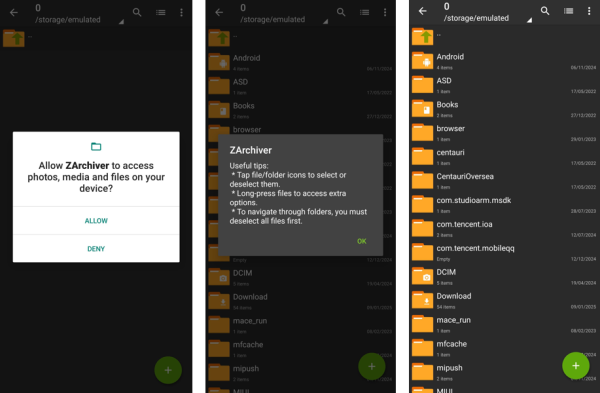
Allow file access on the first run so ZArchiver can read and write to your internal storage and SD card. The Pro features are already active.
Mod APK vs Google Play
| Feature | Mod APK (this page) | Google Play |
|---|---|---|
| Price | Free | Paid donate version |
| Ads | Removed | Present on the free app |
| Pro features | All unlocked | Unlocked after purchase |
| Updates | Manual, from this page | Automatic via Play Store |



Discussion